Workforce Identity
 Endpoint Management
 Endpoint Detection & Response
 Vulnerability Management
 Compliance Automation
 Trust Center



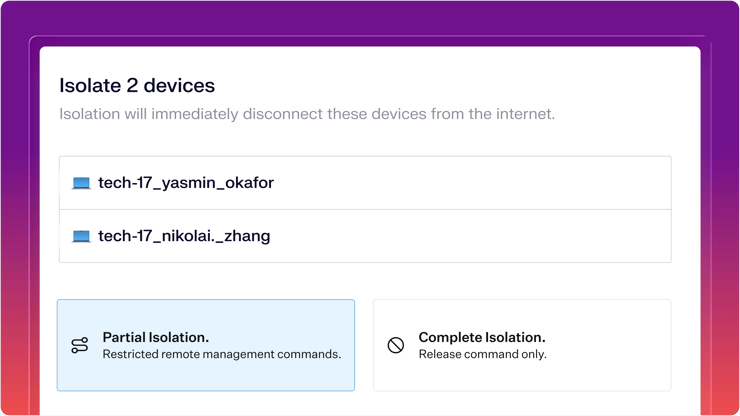
Respond to serious threats by isolating compromised devices from the network. Iru retains a secure, remote connection with the device.
In security, time is everything. When a threat appears on one of your managed devices, whether it’s malware beaconing out or an intruder moving laterally through your network, every second counts. The traditional workflow of identifying a device, switching to a separate network tool, and manually blocking access creates a delay. And attackers can take advantage of that.
Today, we are removing that delay.
We are excited to introduce device isolation for macOS, a critical response capability built directly into the Iru EDR platform. Administrators can now sever a device’s network connection the moment a threat is detected.
Why response speed matters
Picture this: your EDR flags a Mac with critical malware. You’ve got a compromised device.
Before device isolation, your next move meant switching tools. You’d pull the device record, find the IP, hop over to your network management layer, locate the right switch or VLAN, and block access. By the time you’ve done all that, the malware has had several minutes to exfiltrate data or move laterally.
With device isolation, that entire workflow collapses into a single action. You see the threat in the Iru console. You isolate the device. Done.
Two modes, one decision
Not every threat requires the same reaction, which is why we offer two distinct isolation levels.
Partial Isolation (Remediation Mode)
The device is disconnected from the network to stop the threat from spreading, but the Iru Agent keeps its connection open. That means you can still take action remotely: push a remediation script, wipe the device, or collect forensic data. The user is locked out. You’re still in control.
This mode is a good fit when you need to contain the threat while keeping the ability to remediate without physically touching the machine. For example, if a user’s device is flagged for credential-stealing malware, you can isolate it, run a remediation script to remove the payload, and bring the device back online, all from the Iru console.
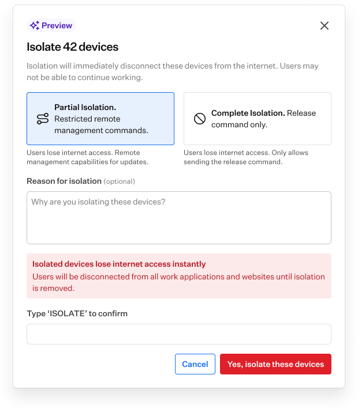
Complete Isolation (Lockdown Mode)
The device is completely cut off from all network communication. This is your emergency brake for high-severity threats where total containment is the only option.
You never lose sight of your fleet
Because Device Isolation is native to Iru, you never lose sight of your fleet. Isolated devices are instantly marked with a red locked symbol in the sidepanel, and you can filter your Detections list to see exactly which machines are currently in quarantine. Isolation state is also visible on the Devices page.
When the threat is neutralized, restoring access is just as fast. A single click releases the device and gets your user back online.
How device isolation fits into your response workflow
Device isolation works alongside the rest of Iru EDR, not as a standalone action. Here’s how it fits into a realistic incident response workflow:
Detection: Iru EDR flags anomalous behavior on a device, such as a process making unusual network connections or a file exhibiting ransomware-like behavior.
Isolation: You review the detection and apply partial or complete Isolation from the Iru console. The device is cut off before the attacker can go further.
Investigation: With the threat contained, you can investigate at your own pace. Review the detection timeline, pull forensic data, or use the Iru Agent (if in Remediation Mode) to run scripts.
Remediation and recovery: Once the device is clean, release it from isolation with a single click. The user is back online, and the incident is logged.
The whole process stays inside Iru. No tool switching, no manual network changes, no delays.
Quarantine compromised devices instantly with Iru EDR
The gap between detection and response just got smaller. Device isolation is now available to all Iru EDR customers, giving you the power to quarantine compromised devices in seconds. Start using it today, or book a demo to see Iru EDR in action.