Workforce Identity
 Endpoint Management
 Endpoint Detection & Response
 Vulnerability Management
 Compliance Automation
 Trust Center



I recently came across a persistence feature in macOS that's tied to Dock tile plugins.
Dock tiles are the small icons that appear on your Dock when an application runs. Plugins for these Dock tiles have been available since macOS Snow Leopard (10.6). In its developer documentation, Apple says about them:
A set of methods implemented by plug-ins...allow an app’s Dock tile to be customized while the app is not running.
For example, thanks to such plugins, Facetime’s dock tile can display recent calls:
 The documentation also says:
The plugin is loaded in a system process at login time or when the application tile is added to the Dock.
"Loaded in a system process at login time” means persistence, no matter how it’s framed. If these plugins have a vulnerability, such persistence means it could be exploited.
The Vulnerability
If an application with a Dock tile plugin is placed in a location—such as /Users/Shared—where every user can "see" it, the plugin will be recognized and loaded into each user's process. If a standard user places the app in such a directory, and an admin user logs in, the plugin will be executed in the admin user's context, thus achieving standard-to-admin user privilege escalation.
Here are some logs from a proof-of-concept that I developed. We can see that the plugin is loaded into different processes (1605 and 1606).
lizard@vm ~ % log stream | grep BEYOND
2023-10-02 10:58:46.049386-0700 0x5ad0 Default 0x0    1606   0 com.apple.dock.external.extra.arm64: (DuckDockTilePlugin) BEYOND setDockTile was called
2023-10-02 10:58:57.619373-0700 0x5aba Default 0x0    1605   0 com.apple.dock.external.extra.arm64: (DuckDockTilePlugin) BEYOND doSomething was called
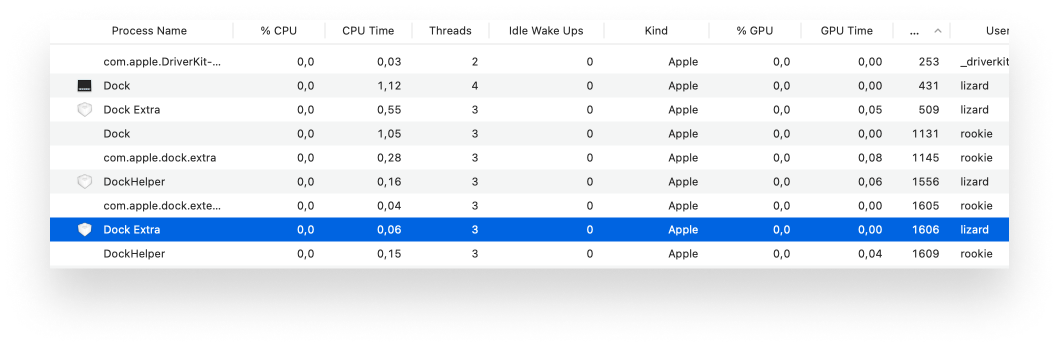
If we check the processes in Activity Monitor, we find that they belong to two separate users: rookie (standard) and lizard (admin):
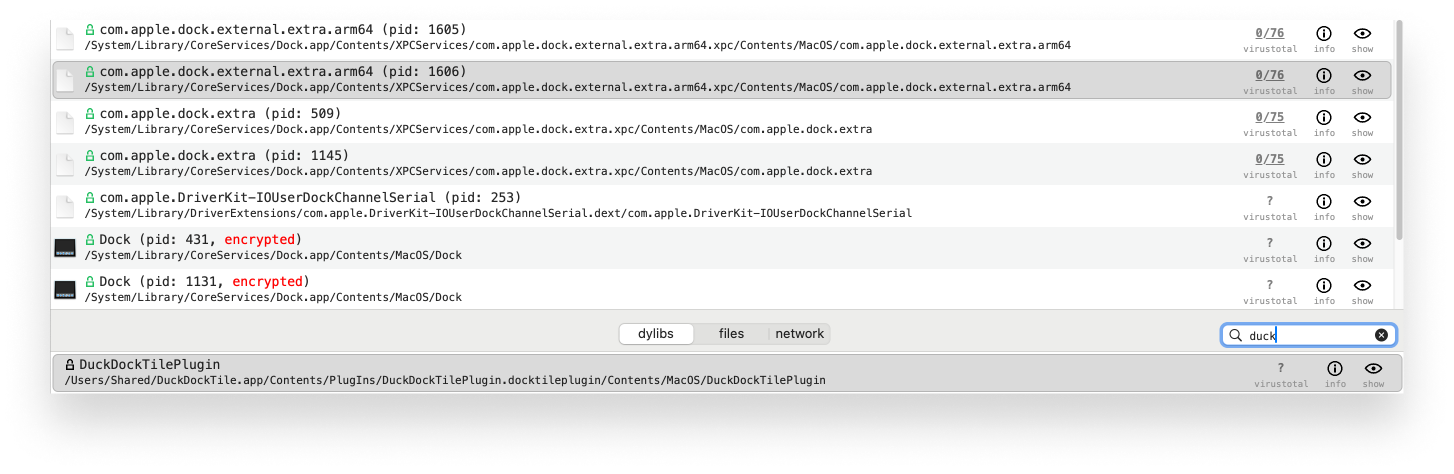
 Using Task Explorer, we can confirm that the plugin was indeed loaded from /Users/Shared:
 VM Escape and its Limitations
Since these plugins are automatically found and executed by the system process, if a malicious actor were to drop such an application to a system, they could get code execution. (Autorun only works if the quarantine attribute is not present, so we can't use it for Gatekeeper bypass). If shared folders are enabled on a virtual machine, someone could drop an app with a plugin to the host system, and it would be executed; this is essentially a universal VM escape.
It does matter where you place the application. That’s because Dock tile plugins are searched and loaded by the Dock, which checks only certain locations. In the app's LPAppSource commonInit method, we can find the directories that are scanned:
void __cdecl -[LPAppSource commonInit](LPAppSource *self, SEL a2)
{
    NSString *path; // r14
    __CFString *v4; // rax
    NSString *v5; // rax
    NSString *v6; // rax
    NSString *v7; // rax
    NSString *v8; // rdi
    NSOperationQueue *v9; // rax
    NSOperationQueue *processQueue; // rdi
    id v11; // rdi
    _QWORD block[7]; // [rsp+8h] [rbp-38h] BYREF

    switch ( self->_location )
    {
        case 0LL:
        path = self->_path;
        self->_path = 0LL;
        goto LABEL_10;
        case 1LL:
        path = self->_path;
        v4 = CFSTR("/System/Applications");
        goto LABEL_9;
        case 2LL:
        path = self->_path;
        v4 = CFSTR("/Applications");
        goto LABEL_9;
        case 3LL:
        v5 = NSHomeDirectory();
        path = objc_retainAutoreleasedReturnValue(v5);
        a2 = "stringByAppendingPathComponent:";
        v6 = -[NSString stringByAppendingPathComponent:](path, "stringByAppendingPathComponent:", CFSTR("Applications"));
        v7 = objc_retainAutoreleasedReturnValue(v6);
        v8 = self->_path;
        self->_path = v7;
        objc_release(v8);
        goto LABEL_10;
        case 4LL:
        path = self->_path;
        v4 = CFSTR("/Users/Shared");
        goto LABEL_9;
        case 5LL:
        path = self->_path;
        v4 = CFSTR("/AppleInternal/Applications");
        goto LABEL_9;
        case 6LL:
        path = self->_path;
        v4 = CFSTR("/System/Volumes/Preboot/Cryptexes/App/System/Applications");
LABEL_9:
    self->_path = &v4->isa;
LABEL_10:
    objc_release(path);
    break;
    default:
    break;
    }
It scans all standard /Application folders and /Users/Shared. If you use the latter directory for virtual machine shared folders, it could be used for a virtual machine escape. While privilege escalation will always work on a multiuser system, a VM escape is more limited.
The Fix
Apple fixed this vulnerability in macOS Sonoma 14.4. A new AppDataContainer class was created, whereby the plugin is checked in the initWithAppBundleURL: method.
AppDataContainer *__cdecl -[AppDataContainer initWithAppBundleURL:](AppDataContainer *self, SEL a2, id a3)
...
    container_query_set_class(v13, 2LL);
    container_query_operation_set_flags(v14, 0x900000002LL);
    container_query_set_persona_unique_string(v14, CONTAINER_PERSONA_PRIMARY);
    container_query_set_identifiers(v14, v12);
    single_result = container_query_get_single_result(v14);
    if ( !single_result )
    {
        NSLog((NSString *)CFSTR("No data container for app bundle %@"), v3);
        container_query_free(v14);
        goto LABEL_31;
    }
    v16 = single_result;
    v32 = v12;
    path = (const char *)container_get_path();
    if ( !path )
    {
        NSLog(&CFSTR("No data container path for app bundle %@").isa, v3);
        goto LABEL_30;
    }
    v18 = path;
    v29 = strlen(path);
    if ( !v29 )
    {
        NSLog((NSString *)CFSTR("Zero length data container path for app bundle %@"), v3);
        goto LABEL_30;
    }
...
Using the container_query* function, a call is made to containermanagerd to see if a container exists for the application or not. This check will be passed only if the main application itself has been executed by the user at least once. If another user has executed the app, a container will only exist for that user and not others. Thus, we can't use it for privilege escalation. Since the plugin is not auto-executed, we can't use it for VM escape, either.
Kandji is now Iru. This article was originally published under the Kandji brand.