
 Workforce Identity
 Endpoint Management
 Endpoint Detection & Response
 Vulnerability Management
 Compliance Automation
 Trust Center




Kandji now integrates with Foqal Agent, the service-desk and automation tool that lets IT admins use Slack to create support tickets—either in Foqal’s ticketing system or another. Foqal uses its Kandji integration to display device details in support tickets; it also enables IT admins to take action on managed Apple devices and to act on tickets without leaving Slack or the ticketing system.
With the integration configured, admins can see the following details about their Kandji-managed Apple devices in Slack or the Foqal ticketing system:
- Device name;
- Model;
- OS version;
- Serial number;
- Blueprint name; and
- Last enrollment.
In Slack or the Foqal ticketing system, users and admins can take the following actions on Kandji-managed devices:
- Lock the device;
- Shut it down;
- Reinstall the Kandji Agent;
- Reset the device;
- Set its name
- Unlock the local user account; and
- Send a blank push.
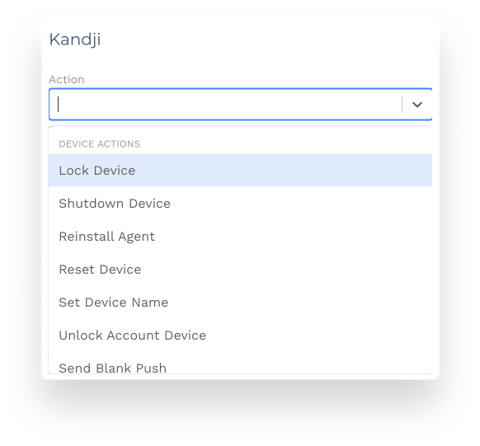
Foqal-enabled automations can take actions on behalf of your users without an admin's intervention. Imagine an employee leaves their laptop in an Uber on the way to dinner: They could open Slack on their phone, create a Foqal request, and automatically lock their device remotely.
To take advantage of this integration, Kandji customers must have:
- A Foqal account;
- A Kandji account with access to API tokens; and
- A Kandji API token with permissions to fetch data for all device endpoints and to send device actions.
Foqal uses API tokens created in Kandji to make requests to Kandji’s /devices and /actions endpoints. To set up the integration in Kandji, you'll create and copy the token and configure its permissions. You'll then go to Foqal’s automation services page for the Kandji integration, where you'll enter the API token, select the region, and specify your Kandji tenant subdomain. Foqal will validate the information and establish the connection.
For more details, see Foqal's how-to guide.


