Workforce Identity
 Endpoint Management
 Endpoint Detection & Response
 Vulnerability Management
 Compliance Automation
 Trust Center


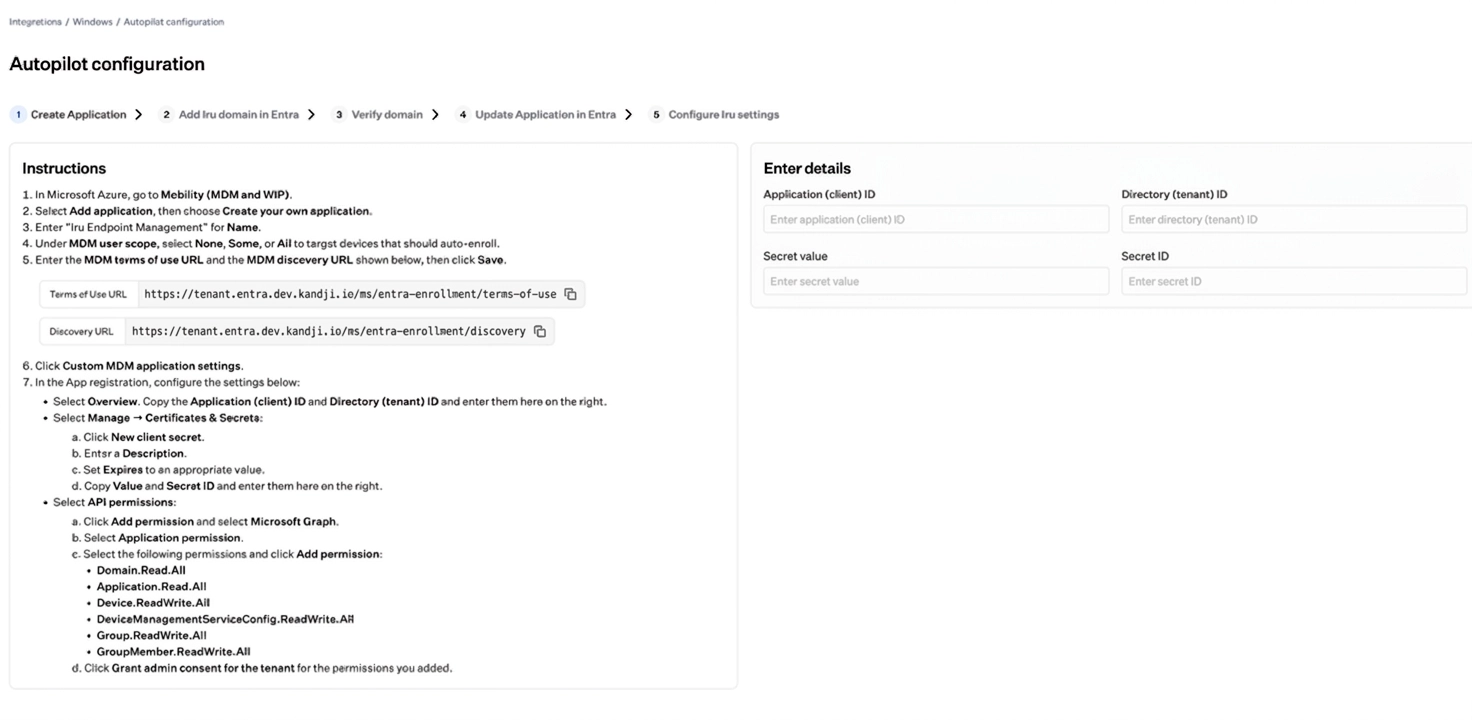
Settings to configure Windows Autopilot for MDM auto-enrollment to Iru during out-of-box experience (OOBE) on new Windows devices are now available under Integrations in Iru. The one-time setup covers app registration in Microsoft Entra ID and a custom domain for your tenant.
The setup provides a guided flow with step-by-step instructions and lists the Terms of Use URL, discovery URLs, and the other enrollment values to configure in the app registration in Microsoft Entra ID. In Iru, enter the Microsoft Entra tenant identifier, application ID, secret ID, and secret value. In Microsoft Entra ID, add and validate the custom Iru domain so auto-enrollment can complete.
A default Blueprint or Blueprint Routing must be configured so Autopilot-enrolled devices are assigned to the correct Blueprint after enrollment and receive apps, Library Items, and other configurations.