Workforce Identity
 Endpoint Management
 Endpoint Detection & Response
 Vulnerability Management
 Compliance Automation
 Trust Center




Every fall, Apple’s newest operating systems arrive everywhere at once. That’s great for users, but it puts IT teams on the clock: they need to validate the release, find blockers, prepare their support teams, and decide when the business is ready to move.
AppleSeed for IT gives organizations a direct path to do that work before public release. IT teams can test prerelease software in their own environments, use Apple’s provided test plans and surveys, and submit feedback through a dedicated AppleSeed for IT review queue. A common misconception by many IT teams is that Apple beta testing needs to be a manual, device-by-device exercise. But with modern device management services, beta enrollment can be planned, assigned, enforced, observed, and rolled out in phases.
That modern control changes the outcome from “a few IT-owned test devices running beta software” to “a repeatable readiness program.”
Why device management matters for beta testing
A good beta program is not about installing the latest build as soon as it appears. It is about proving that the next Apple release works with the systems your organization depends on:
- Wi-Fi and VPN
- Identity and authentication
- Email, calendar, contacts, and collaboration tools
- Security controls
- Business-critical apps
- Device management workflows
- Automated Device Enrollment
- OS update policies
- Support and remediation processes
And it’s important to test beta software as close to production as possible, while avoiding business-critical devices. Device management services make that balance possible. They let IT define which devices participate, which beta program they join, how updates are offered or enforced, and when devices move through each stage of testing.
The result is more useful signal, lower operational risk, and fewer surprises when Apple releases new operating systems publicly.
The key device management capabilities to look for
Vendor implementation details will vary, but the most useful Apple beta management capabilities fall into a few categories. The legacy seedutil command-line tool is no longer supported, but Apple provides all of that functionality and more in these current device management capabilities.
1. Beta enrollment during Automated Device Enrollment
Some of the most important Apple release testing happens before a user ever reaches the desktop or Home Screen. Automated Device Enrollment is where organizations validate Setup Assistant, enrollment flows, required apps, restrictions, identity configuration, and day-zero OS requirements.
Device management services can enforce a minimum OS version during Automated Device Enrollment. Apple also supports enforcing a beta version during enrollment for supported operating systems. This lets IT test new enrollment-time behavior before the public release.
This is especially useful when the question is not just “Does the OS work?” but “Can a new or wiped device enroll successfully, update to the required version, receive configuration, and become productive?”
Iru supports Apple beta enrollment and version enforcement at enrollment using the ADE Library Item. This can be used to require beta enrollment and an OS upgrade or beta update before the device completes enrollment.
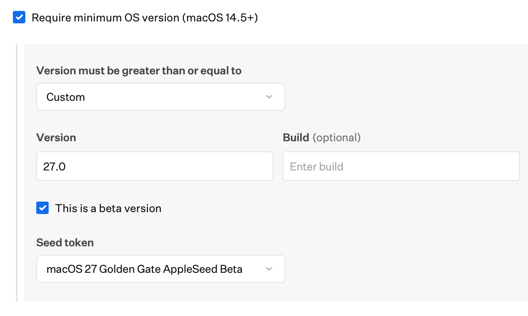
2. Enforced beta releases for managed devices
Some testing needs to be mandatory. If a team owns compatibility validation for macOS, iOS, or iPadOS, IT may need to make sure those devices are actually running the required beta release (and not just simply eligible for it).
Device management can help by combining beta program enrollment with OS version enforcement. That gives organizations a clearer way to validate specific builds, reproduce issues, and confirm fixes across a known test population.
Iru Managed OS Library Items support enforcing Apple beta releases using AppleSeed for IT beta tokens from Apple Business or Apple School Manager. Iru automatically synchronizes beta tokens through configured ADE integrations. Iru also separates automated upgrade timing from update timing, making it easier to use the same Managed OS policy model for different rollout schedules.
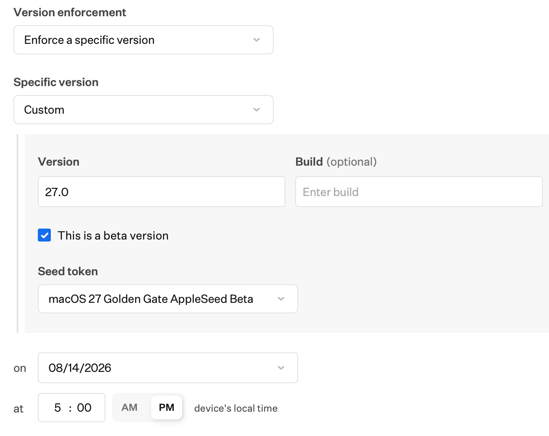
3. Optional beta participation for pilot users
Not every beta workflow should be enforced. Some organizations want a self-service pilot group: users who are technically comfortable, understand the risks, and can opt in without IT touching every device.
In that model, device management can make beta enrollment available without requiring a specific beta version, and importantly, without requiring Managed Apple Accounts. IT still controls eligibility, but the user chooses when to participate.
Iru supports offering Apple beta program enrollment through the Software Update Library Item. IT can let end users opt in, or enforce a specific beta program without also enforcing a specific OS version. This is useful for self-driven beta workflows where participation is controlled but timing remains flexible.
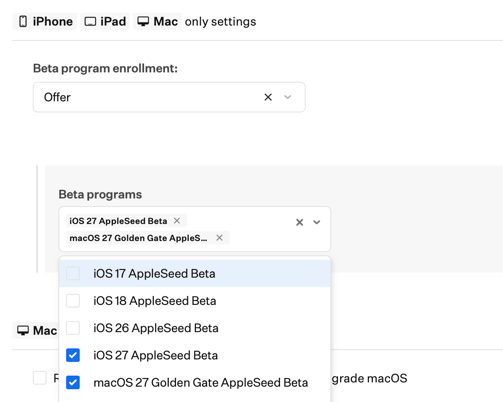
4. Restricting beta enrollment where it does not belong
A mature beta program also needs boundaries. Most users should not be able to enroll production devices into beta software casually, and some devices should never participate.
Apple’s management model supports preventing supervised devices from enrolling in beta programs at all through the same Software Update settings, available in the Software Update Library Item in Iru.
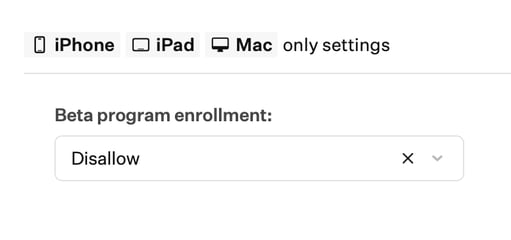
5. Visibility into beta participation
An important part of successful beta testing is ensuring IT can keep track of who is running what. Teams need to know which devices are enrolled in a beta program, which OS version they are running, and whether the device is ready for the next testing phase.
Apple provides declarative status reporting for beta enrollment on supported managed devices. Device management services can turn that signal into inventory, reporting, and assignment logic.
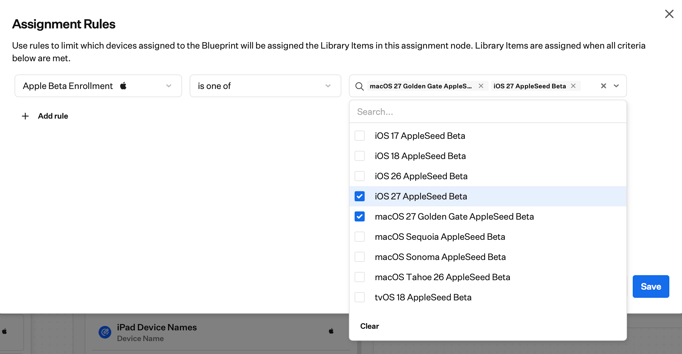
Iru shows Apple beta program enrollment on the device record details tab, in an optional Prism column, and in the enterprise API device details endpoint. Iru also supports assignment logic based on Apple beta program enrollment, making it possible to target Library Items to devices based on their beta participation.
A practical beta testing model
With so many capabilities available through device management to drive successful beta programs, for many organizations, the best approach is a three-ring model:
Ring 0: IT validation
Use dedicated test devices and enforce beta enrollment. Validate enrollment, management, security, identity, networking, and core apps. File Apple feedback with precise reproduction steps, diagnostics, and record your Feedback IDs.
Ring 1: Structured pilot
Expand to power users and business representatives. Offer or enforce beta enrollment depending on risk. Test real workflows across departments, locations, and hardware models.
Ring 2: Release readiness
Use results from Rings 0 and 1 to decide whether to defer, stage, or enforce the public release. Update internal documentation, support scripts, and known issue guidance.
Device management is what keeps those rings from blurring together. It gives each phase clear membership, clear policy, and clear reporting.
What better beta testing unlocks
A well-run Apple beta program gives IT teams:
- Earlier visibility into deployment blockers
- More confident public-release decisions
- Fewer urgent surprises after launch
- Cleaner support guidance
- A safer path to adopting new Apple capabilities
That last point is important. Apple is continuously adding management capabilities that help organizations control new OS functionality. Teams that actively test betas are better positioned to adopt those capabilities quickly and safely.
The bottom line
Apple beta testing works best when it is treated as an operational discipline, not a side project. AppleSeed for IT provides the program with prerelease software, test plans, and feedback channels, while device management services provide the tools to execute on the testing. Together, they let IT move from reactive compatibility testing to proactive release readiness.
For Iru customers, that toolset is extensive: enforce beta releases with Managed OS, require beta enrollment during Automated Device Enrollment, offer beta participation through the Software Update Library Item, track beta enrollment on device records and in Prism, and use a device’s beta enrollment status in assignment logic.
The outcome is a tighter, safer Apple release process: test earlier, learn faster, reduce risk, and adopt public release with confidence.
Mike Boylan, Director, Product Management
At Iru, Mike oversees the team responsible for Apple and Android device management and core platform tenets such as Assignment Maps and Library Items. A former engineer turned product leader, he has over 20 years of experience in deploying and managing devices of all types, including many years at Apple as a Senior Consulting Engineer. At Apple, he led field and customer platform readiness for macOS, including speaking at numerous industry conferences and events, such as Apple’s Worldwide Developers Conference (WWDC).