
 Workforce Identity
 Endpoint Management
 Endpoint Detection & Response
 Vulnerability Management
 Compliance Automation
 Trust Center



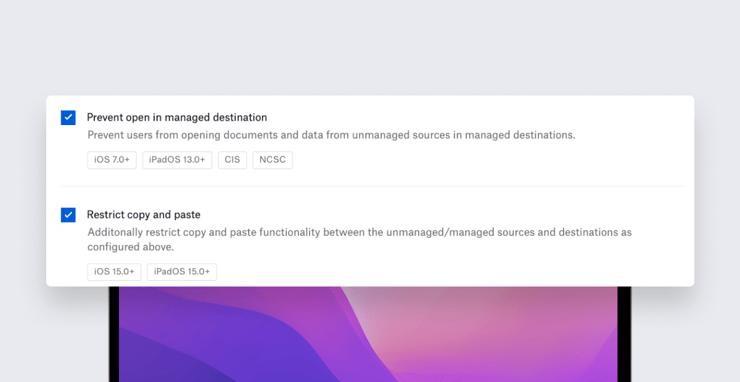
Kandji is excited to announce the release of a new Library Item that will give Apple admins finer control over data flows on iOS and iPadOS devices, as well as updates to Restrictions profiles. Both take advantage of features introduced in macOS Monterey and iOS/iPadOS 15.
Restricting Copy and Paste
With iOS 15, Apple made an improvement to Managed Open In. That functionality, originally introduced in iOS 7, lets admins prevent users from opening attachments or documents associated with managed apps in unmanaged ones, and vice versa. In iOS 15, Apple extended Managed Open In to govern data in the iOS or iPadOS pasteboard. That means admins can control whether or not data copied in a managed app can be pasted into an unmanaged one (and vice versa).
In Kandji, you can now manage the pasteboard on user devices using the Managed Data Flow Library Item; a new Restrict copy and paste option in that item becomes available when you enable either Prevent open in unmanaged destination or Prevent open in managed destination.
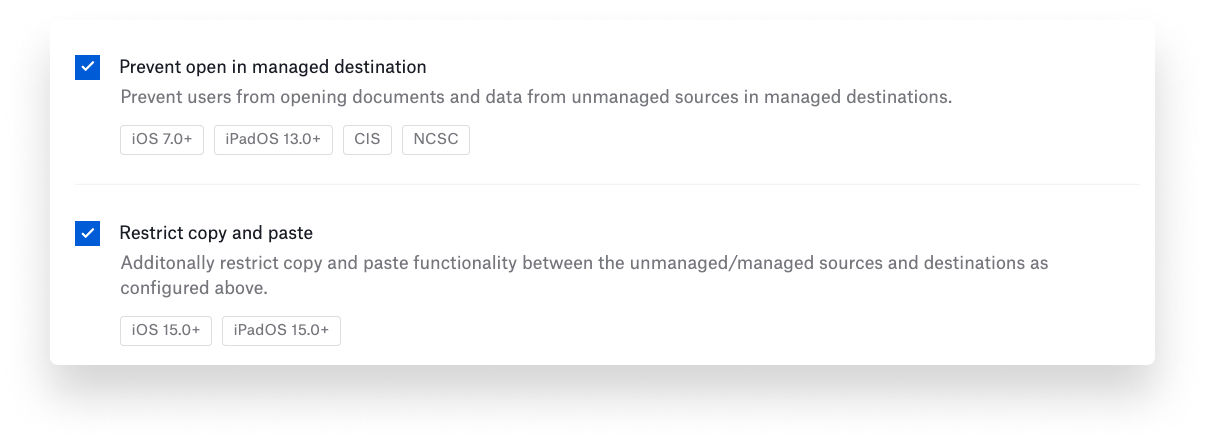
When the pasteboard restriction is enabled, the user will continue to see the Paste button when appropriate. But if that user tries to copy data from a managed app to an unmanaged one (or vice versa), they will be notified that pasting is not allowed.
While you're in the Managed Data Flow Library Item, you can also configure settings to prevent managed applications from syncing data to iCloud, to bar the Files app from accessing network drives, and to compile a list of managed domains (for email, password autofill, and web).
New Restrictions Profiles
There’s also a batch of new controls in Kandji’s Restrictions profiles, including:
- Disallow Erase All Content and Settings: Disables Erase All Content and Settings on supervised devices. Erase All Content and Settings has been available on iOS and iPadOS for some time but has just come to Mac computers that are running macOS Monterey and have the T2 chip or Apple silicon.
- Disallow iCloud Private Relay: Prevents the use of iCloud Private Relay, a new Apple service that’s designed to make it harder for third-parties to track users on local and remote networks.
- Force on-device translation: Prevents the device from connecting to the Siri servers for translation.
- Force on-device dictation: Prevents the device from connecting to the Siri servers for dictation.
- Disallow NFC: Disables Near Field Communication (NFC) on the device.
- Allow untrusted recovery boot: Prevents an untrusted host from booting iOS and iPadOS devices into Recovery Mode.
Together, these updates make it easier than ever for administrators to maintain control of endpoint security while still giving their users a great experience. The Kandji team is constantly building new functionality into our enterprise management solution. With powerful features like zero-touch deployment, one-click compliance, and offline remediation, Kandji has everything you need to enroll, configure, and secure your devices.


