
 Workforce Identity
 Endpoint Management
 Endpoint Detection & Response
 Vulnerability Management
 Compliance Automation
 Trust Center



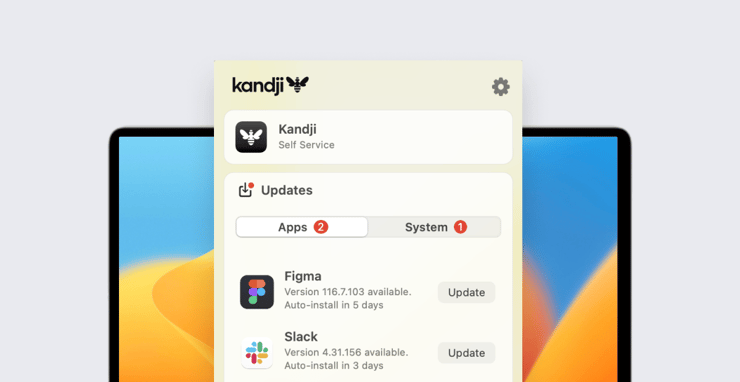
We’ve updated the Kandji menu bar app to make it more useful for users and admins alike. The new interface gives end-users easier access to the Kandji Self Service app and provides a clearer view and better control of software updates. It also gives admins greater confidence that those updates will happen in a timely fashion.
When users click the Kandji icon in their macOS menu bar, they’ll immediately see a new button to open Self Service at the top of the app window; they no longer need to click the gear icon to do so. This improved visibility—coupled with the recently introduced ability to add links to Self Service—means admins can configure the menu bar app as a hub giving users easy access to all the organization resources they need.
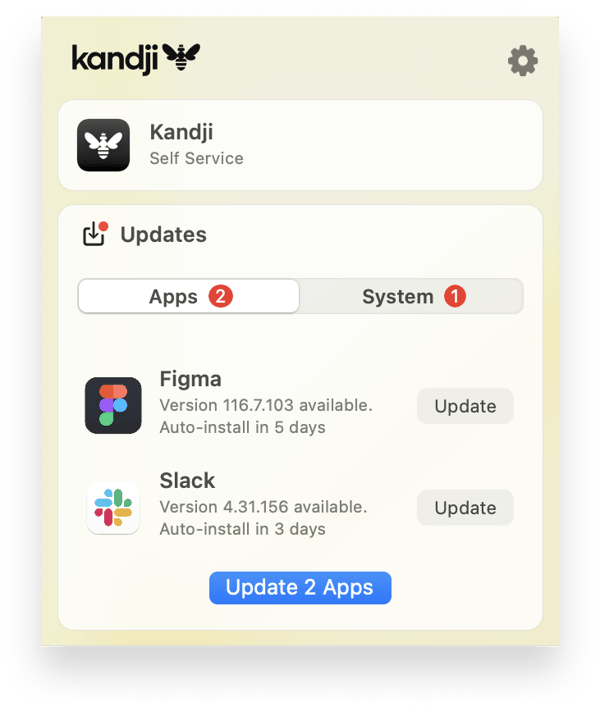
The updated interface also makes app and system updates easier. For one thing, there are now separate tabs for apps and for the operating system. This makes it more straightforward for users to see which updates are available and plan accordingly. (App updates are typically much faster, less disruptive, and more frequent than those for macOS.)
 Finally, we’ve added a mechanism for letting users know—via the menu bar app—when they need to use System Settings (in macOS Ventura) or System Preferences (macOS Monterey or earlier) to implement a macOS update or upgrade. Occasional errors can mean that OS updates initiated via MDM do not complete successfully. If an update process fails for whatever reason, the Kandji menu bar app will display a prompt that urges users to initiate that process themselves. Clicking that prompt will send them directly to the Software Update pane in System Settings or Preferences.
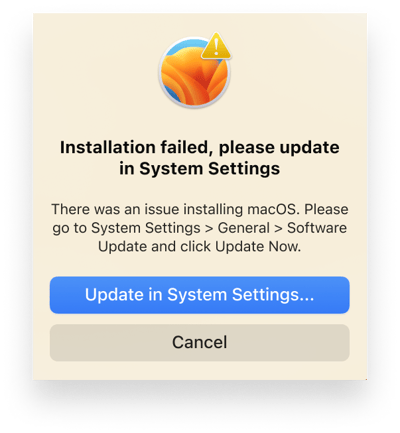 If the enforcement deadline you’ve set in a Managed OS Library Item has passed and the update is not able to successfully run via MDM, the menu bar app will notify users repeatedly, with increasing frequency, until they complete it via System Settings or System Preferences. This helps ensure that all users update to the appropriate macOS version as soon as possible.
Admins won’t need to do anything to update the Kandji menu bar app on the devices they manage; it will happen automatically and invisibly to users. For more details on our menu bar update, check out our support article.
And note: This is just the first in a series of improvements to Kandji’s Managed OS systems. Stay tuned for future improvements that will drive faster and more consistent updates.


