
 Workforce Identity
 Endpoint Management
 Endpoint Detection & Response
 Vulnerability Management
 Compliance Automation
 Trust Center




Back at WWDC 2021 in June, Apple announced a slew of exciting changes that are coming to device management, from declarative MDM to erase all content and settings for Mac. With the arrival of iOS and iPadOS 15, many of those announcements became reality, including an enhancement to Managed Open In. Here’s a quick recap of what Managed Open In is, what the latest update does, and how you can use Kandji to exert greater control over what users can do with your company’s data.
Managed Open In
Keeping data secure is, of course, a top priority for IT admins. One way to do that is to make sure that employees can open business-related files only in trusted apps. Apple addressed this problem with the Managed Open In restriction.
Introduced back in iOS 7, Managed Open In lets admins prevent users from opening attachments or documents that are associated with apps managed by MDM in unmanaged ones, and vice versa.
 image: apple.com
Managed Open In can also regulate managed and unmanaged accounts, books, extensions, and domains. So if a user downloads a PDF from a managed domain, they can open it in a managed PDF reader app. But Managed Open In could prevent them from opening a PDF from an unfamiliar website in that same app.
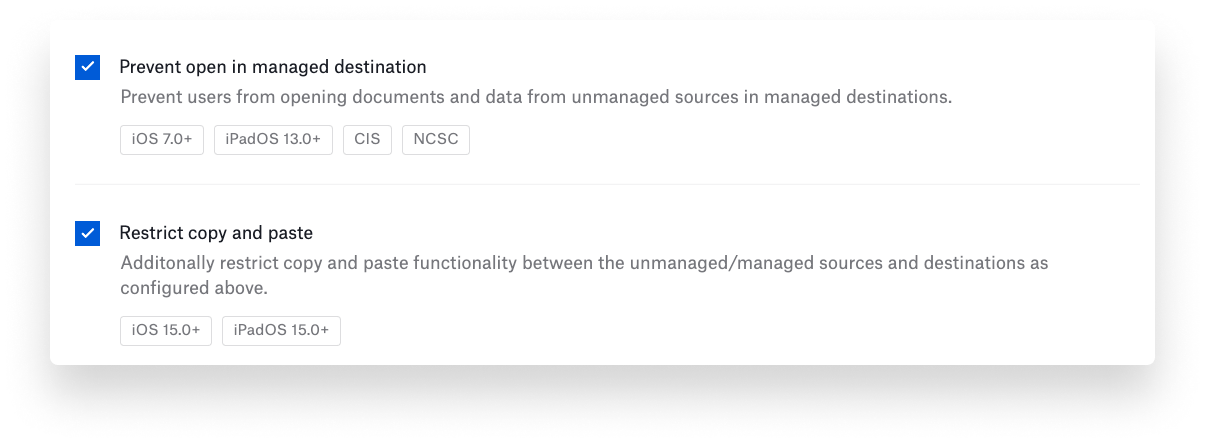
In Kandji, you’ve been able to implement these controls using the Managed Data Flow library item—specifically, by selecting the Prevent open in unmanaged destination or Prevent open in managed destination options in that item.
Managed Pasteboard
At WWDC 2021, Apple announced an improvement to Managed Open In—which then arrived in iOS and iPadOS 15—that extends its capabilities to cover copying and pasting. This means you can prevent users from copying and pasting data between managed and unmanaged environments.
In Kandji, you can take advantage of this update using that same Managed Data Flow library item. It has a new Restrict copy and paste option that becomes available when you enable either Prevent open in unmanaged destination or Prevent open in managed destination.
When the managed pasteboard is enabled, the user will continue to see the Paste button when appropriate. But if that user tries to copy data from a managed app to an unmanaged one (or vice versa), they will be notified that pasting is not allowed.
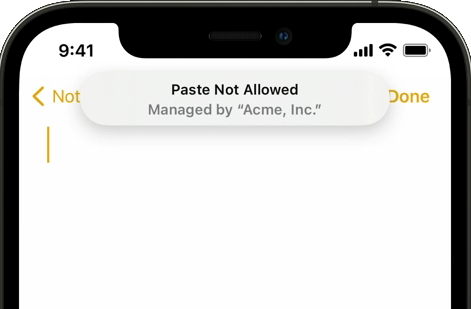
image: apple.com
It’s one more tool—and a potentially valuable one—in the IT admin’s quest to keep corporate data safe.
About Kandji
The Kandji team is staying up to date on the latest changes to Apple device management, and we're constantly building new functionality into our MDM solution. With powerful features like zero-touch deployment, one-click compliance, and offline remediation, Kandji has everything you need to enroll, configure, and secure your devices.
Editor's note: This article was updated 12/10/21.


