Workforce Identity
 Endpoint Management
 Endpoint Detection & Response
 Vulnerability Management
 Compliance Automation
 Trust Center




Iru AI can now recommend and implement Windows Update settings based on CIS benchmarks or Microsoft defaults, and you can ask follow-up questions to refine those settings or understand their behavior.
It’s 4 p.m. on a Thursday in the middle of summer. The sun is out, your clubs are packed, and you're headed to the golf course. When you arrive, a friendly, knowledgeable caddie meets you at the cart.
Whether you're picking up the game or have played for years, a good caddie makes a big difference. They know the course inside and out: which hazards to avoid, which club to pull for each shot, and how to play each hole.
Managing an entire fleet of devices can feel like playing a complex course. There are countless settings to work through, and each has to balance good employee experience with strong security.
Iru AI brings that caddie experience to Windows Update configuration. Built to guide you through every choice, it alerts you to hidden hazards by explaining exactly what complex settings do, recommends the perfect "club" by suggesting smart defaults, and provides a clear starting point so you can manage your devices in the absolute best way.
Go in with a plan
Every hole starts with a plan. Before you swing, you know where you want the ball to land. Windows Update settings work the same way. What's your intended outcome?
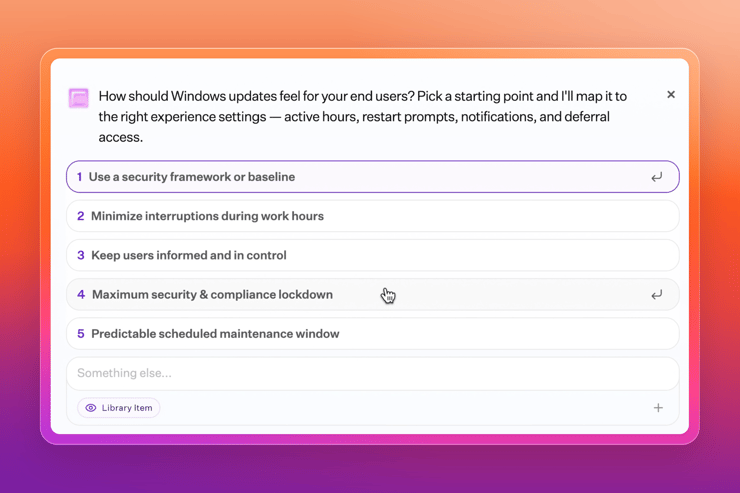
When creating your Windows Update Library Items settings, Iru AI starts by asking about your goal. You might want to follow Microsoft defaults or CIS benchmarks, lock things down for maximum security, or take a lighter approach that's easier on your employees.
Pick a starting point, and Iru AI maps it to the right experience settings: active hours, restart prompts, notifications, and deferral access.
Once decided, Iru AI will guide your decisions.
Navigating the course
Like a caddie handing you the right club, Iru AI will propose recommended settings and the impact of those settings, so you know what to expect.
For example, if you set a CIS benchmark, Iru AI prioritizes regular updates and restarts and gives users less room to postpone them.
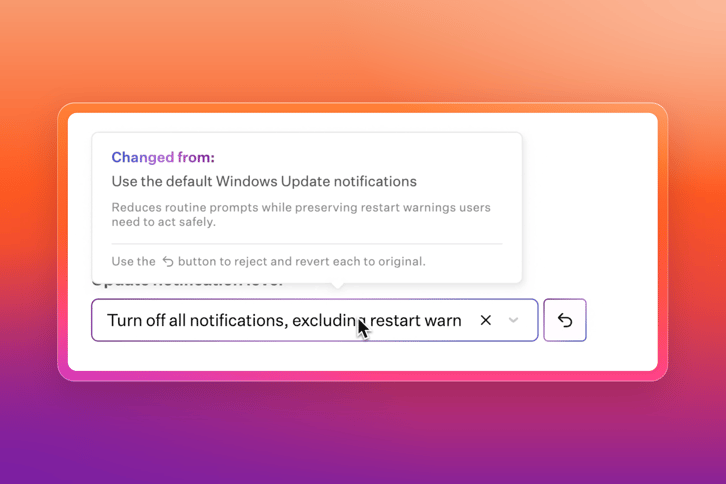
You can preview each recommendation to see what changed and why. If a setting feels too strict or too loose, you can quickly adjust it to get the level of control you need.
Stay in control with an expert guide
The best caddies know the course, your game, and what you're trying to do. But they never take the swing for you.
Iru AI works the same way. Nothing applies until you approve it. You can keep asking questions at any point in the round, such as "What changes if I move from CIS to Microsoft defaults?" Iru AI answers in plain language and updates the configuration on the spot.
Setup goes faster because you're not guessing. A guide who knows the course gets you around it quicker.
Tee off with Iru AI
Windows Update settings with Iru AI are available now. Open a new Windows Update Library Item and let Iru AI walk you through your first configuration, from picking a starting point to approving the final settings.
Not an Iru customer yet? See how Iru AI takes the guesswork out of device management.
More Iru AI assistants are on the way in the coming months. Your caddie is ready for every course.