Workforce Identity
 Endpoint Management
 Endpoint Detection & Response
 Vulnerability Management
 Compliance Automation
 Trust Center




You can automate macOS patching with Iru by:
- Enrolling your Macs: Connect your Apple fleet through Apple Business Manager and configure mobile device management (MDM)
- Setting up your managed OS and apps: Stage macOS rollouts and set enforcement deadlines
- Customizing your automation: Define internal security policies and app-specific permissions and schedules
Request a demo to see Iru in action.
Apple updates don’t drop on a predictable schedule, sometimes arriving weeks apart, sometimes months, and rarely when it’s convenient. Third-party apps follow their own cadence, creating constant churn and drift across device fleets that need to stay secure and compatible with modern tools.
Manual patching is possible, but it quickly becomes unmanageable and disruptive as Mac fleets grow. Iru uses Apple's Declarative Device Management (DDM) to automate OS updates at scale. In this article, we'll show how IT teams can simplify OS patching, strengthen Mac security, and save time through automation with Iru.
Book an Iru demo today to see how patch automation can benefit your team.
1. Enroll Your Macs
Start in the Iru Endpoint dashboard by setting up Apple Push Notification service (APNs), which every Apple device needs in order to communicate with your MDM server. For zero-touch enrollment and supervised management, which give IT greater control over corporate devices, connect your fleet through Apple Business and configure the relevant tokens. Once enrolled, Iru gives IT centralized visibility into every Mac, scans for missing patches, and continuously reports device state without requiring custom agents or manual check-ins.
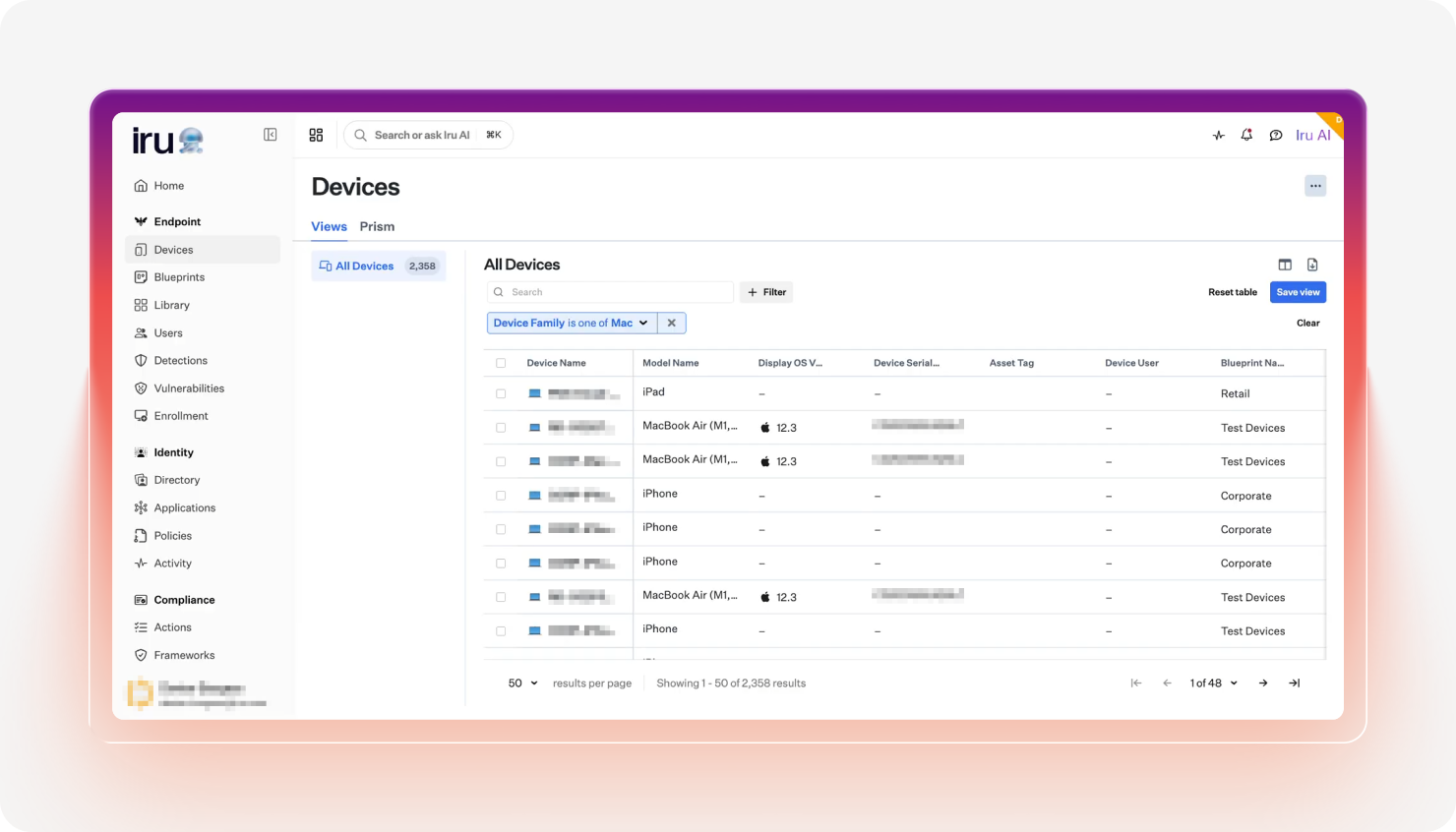
Iru in action
For true zero-touch deployment, connect Apple Business to Iru’s Automated Device Enrollment (ADE). New Macs ship directly to employees, auto-enroll on first boot, and some may even use Blueprint Routing to automatically land in the right configuration. Deputy uses workflows like this at scale to streamline onboarding, reducing initial login time to 10 minutes.
2. Set up your managed OS and apps
With Managed OS, Iru lets IT stage macOS rollouts and set enforcement deadlines while Apple controls end-user prompts. That makes it easier to test updates in waves and catch compatibility issues early, then schedule installs outside of business hours to minimize disruption.
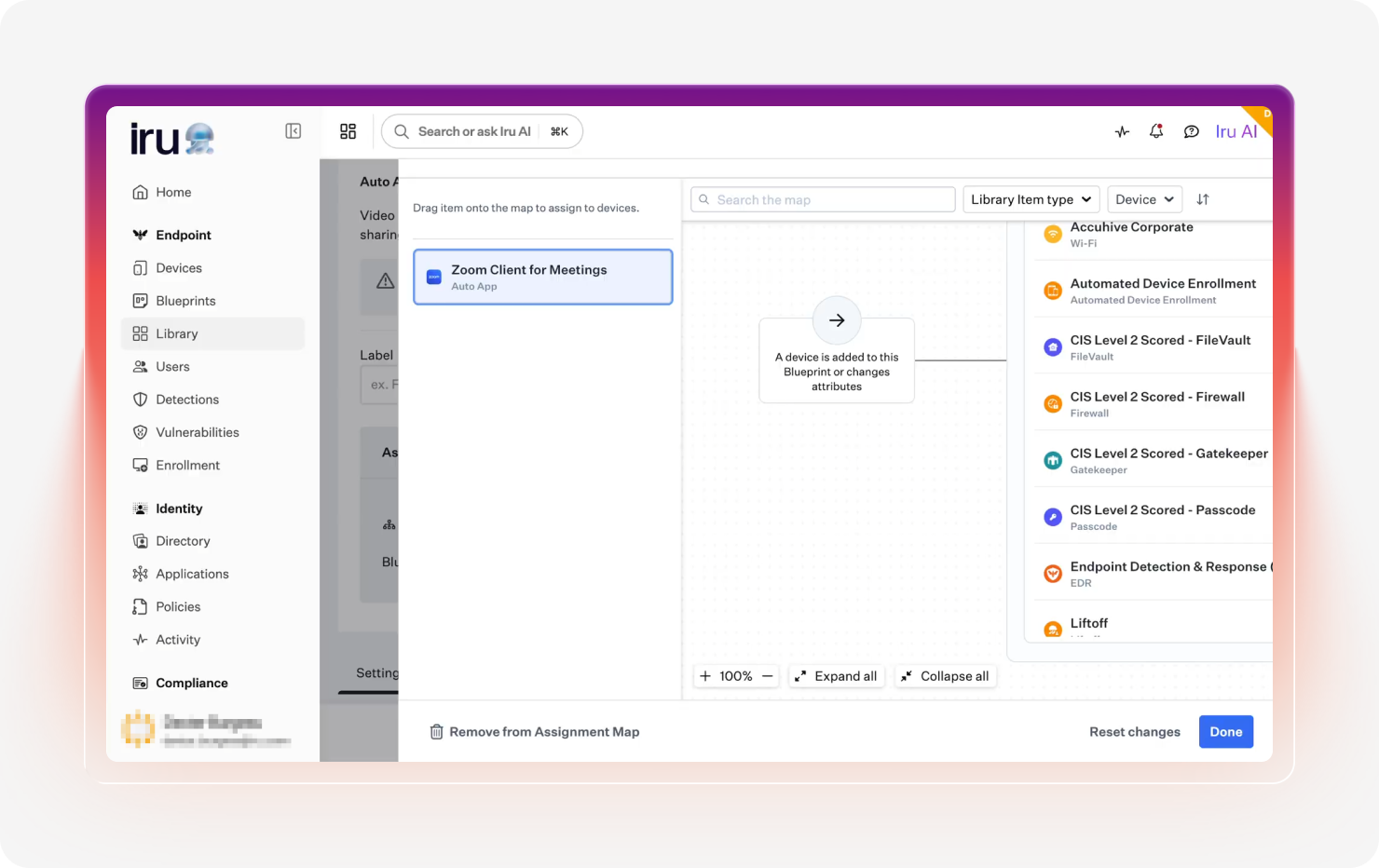
For third-party software, Auto Apps offers a library of 200+ titles that install silently and update automatically. The Iru Agent caches installers locally for efficient deployment, and its update-only mode keeps user-installed apps current — so even shadow IT software stays patched without manual packaging.
Iru connects patching directly to security operations by matching applications against threat intelligence in the National Institute of Standards and Technology (NIST) National Vulnerability Database (NVD). Vulnerability Response then automatically triggers remediation, including patch deployment, from the same device agent used across the fleet.
3. Make it uniquely yours
Iru lets teams drive patching through internal security policies that define major and minor update timelines, send user warnings ahead of enforcement, and lock noncompliant Macs when needed. Built-in device reporting also gives IT instant visibility into what’s installed and running across the fleet.
-1.png?width=1280&height=720&name=How%20to%20deploy%20printers%20in%20Iru%20(1)-1.png)
Admins can tighten control with App Blocking, preventing vulnerable or distracting software from running, while Compliance Templates help fleets align with benchmarks such as CIS Level 1 and CIS Level 2. The Level 2 blueprint, in particular, maps well to frameworks like SOC 2, providing teams with a strong starting point for audit readiness. Custom scripts and change controls extend that governance to proprietary in-house apps.
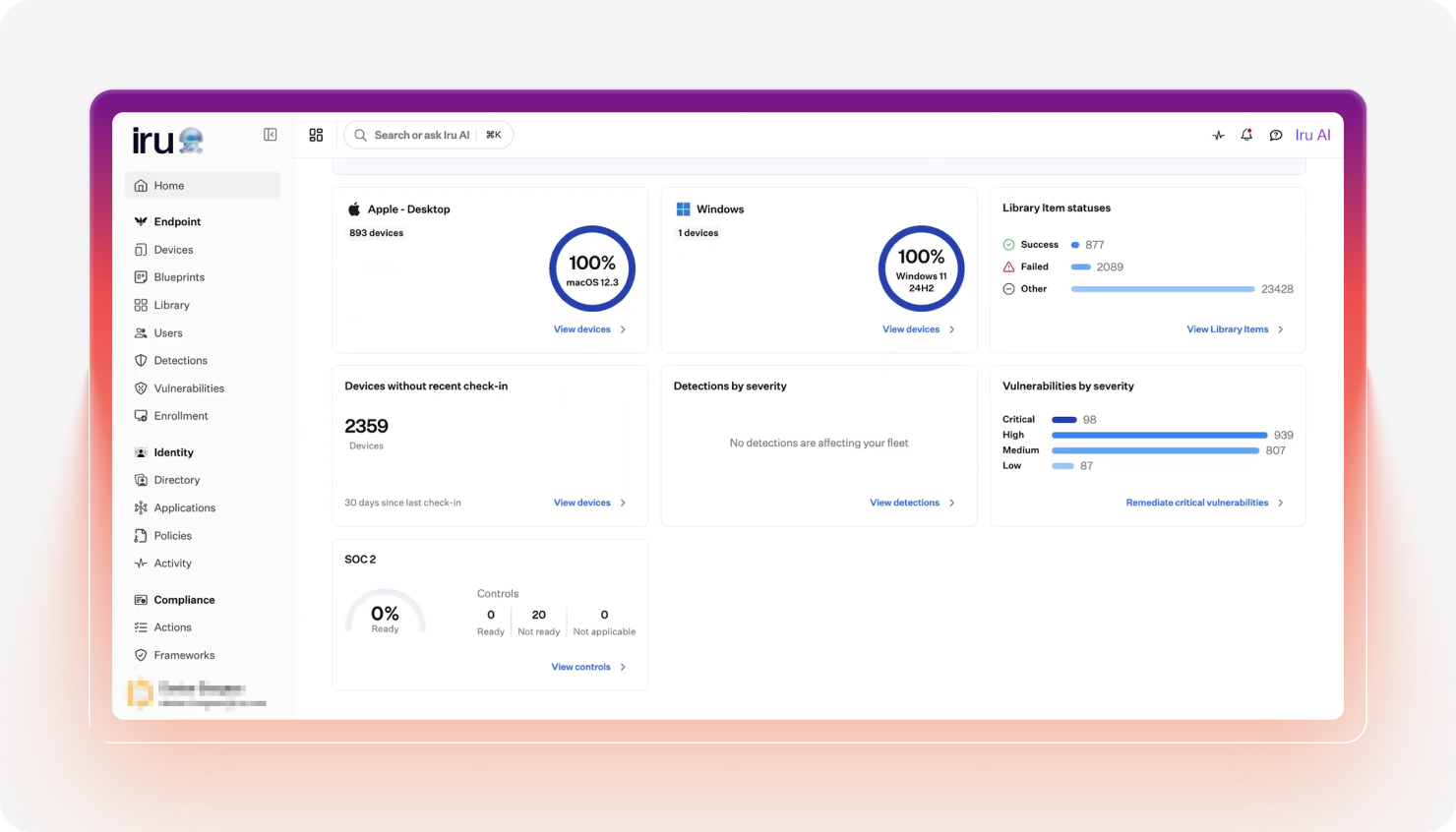
At the same time, Self Service gives users an approved app catalog for on-demand installs and updates without IT tickets. For mixed environments, Iru also supports Windows, Android, Internet of Things (IoT) devices, and printers.
Book an Iru demo today to see Mac patch automation in action.
How to manually patch your Mac
If you only manage one or two Macs, manual patching is often the simplest approach. Apple includes built-in update tools that make it easy to install macOS security updates and application patches without additional management software.
The tradeoff is visibility and consistency. Making manual updates with the native Mac patch management software works well for a small number of devices, but the steps involved become cumbersome as your device count grows.
How to manually patch your Mac
- Click the Apple menu → System Settings.
- Select General → Software Update.
- Wait while your Mac checks for available updates.
- Click Update Now (or Upgrade Now for a major macOS release).
- Enter your password if prompted.
- Allow your Mac to restart and finish the installation.
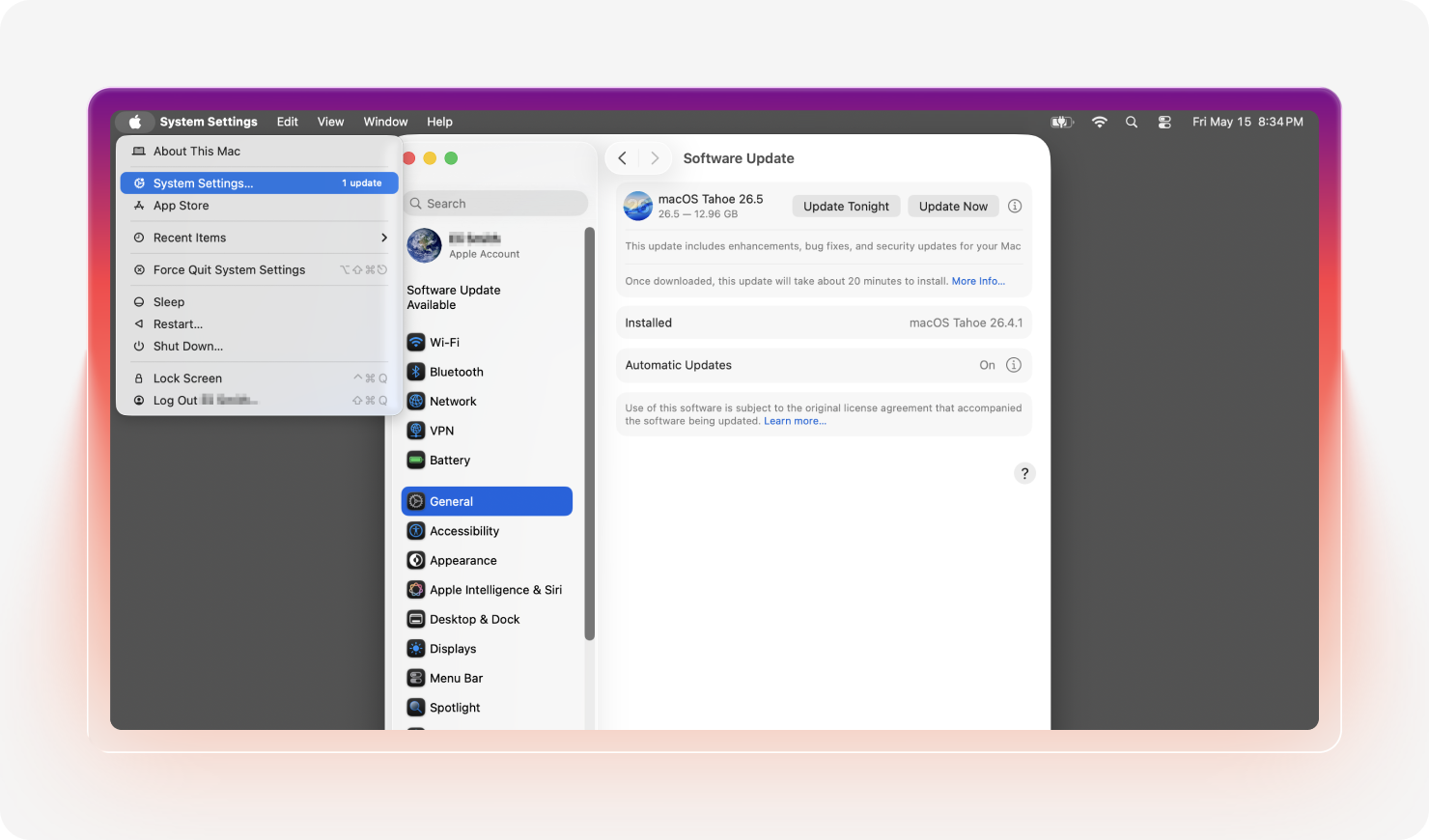
You can also turn on Automatic Updates for future security patches.
Besides core system updates, you also need to check for patches to installed apps. Do that by opening the App Store and clicking into the Updates screen, then installing any available updates. Check third-party apps (browsers, VPN, productivity tools, etc.) for built-in updaters if they aren’t App Store installs.
Manual patching can work well for a few Macs, but as fleets grow, tracking updates, coordinating reboots, and relying on employees to patch apps at the right time quickly becomes an operational headache. MDM platforms like Iru automate scheduling, enforcement, and off-hours updates at scale.
Benefits of Iru for Mac patch management
The benefits of using Iru for Mac patch management go well beyond faster updates. They show up in reduced IT workload, stronger security, and a better overall employee experience. Across its customer stories, organizations consistently report fewer support tickets and more time for strategic work instead of routine device upkeep.
At Demandbase, for example, automating OS updates and application patch management with Iru cut Mac-related support tickets by 75% and saved 40–50 hours each month in routine maintenance. Those results highlight several key business benefits of modern automated patch management:
- Time savings: Automating OS and app patching eliminates repetitive manual work. IT teams spend less time on routine maintenance and more time on strategic projects.
- Self-healing remediation of errors: The Iru Agent can automatically detect failed installs, configuration changes, and missing patches, then trigger remediation workflows without manual intervention. That reduces downtime and keeps devices in compliance with the configured policy, depending on the desired end state.
- Less human error: Automation removes common patching mistakes, like missed devices or third-party app updates and inconsistent rollout timing. Standardized workflows produce more reliable, predictable outcomes across the fleet.
- Compliance automation: Built-in compliance templates and policy enforcement help organizations align devices with frameworks like NIST guidance and SOC2 controls, replacing or augmenting manual audits with ongoing compliance monitoring.
- Enhanced vulnerability management and remediation: Iru automatically identifies exposed software and pushes patches or controls in response. That shortens the window between vulnerability discovery and remediation.
- Unified, cross-platform dashboard: Macs, iPhones, iPads, Windows PCs, Android devices, IoT endpoints, and more can be managed from one console. IT works from a single source of truth instead of juggling separate management tools.
- Better employee experience: Silent installs, self-service apps, and scheduled off-hours updates reduce interruptions for end users. Employees stay secure in their work, with no core-hours patching disruptions.
Best practices of macOS patching automation
Successful macOS patch automation requires more than simply turning on automatic updates. IT teams need a clear strategy for testing releases, scheduling deployments, enforcing policy, and maintaining visibility across devices to keep fleets secure without disrupting work, all while communicating clearly with end users.
The strongest programs follow a set of proven operational best practices that improve consistency and make Mac patch management easier to scale as Apple environments grow, while systematically reducing organizational risk.
- Test in rings: Roll out updates in stages, starting with a pilot group before moving on to a broader deployment. Ring-based testing catches app conflicts and workflow issues early, reducing the risk that a bad patch will affect the entire fleet at once.
- Enforce hard deadlines: Set firm update deadlines and apply restrictions, such as limiting access to corporate resources, to Macs that remain out of compliance past the cutoff. Clear enforcement policies transform patching from an optional task into a predictable security control.
- Prioritize vulnerabilities: Not every patch carries the same urgency. Prioritize updates tied to actively exploited vulnerabilities and critical business applications to reduce real-world risk faster.
- Account for bootstrap token: On Macs with Apple silicon, bootstrap token support is essential for seamless automated updates and secure administrative actions through MDM. Proper token escrow helps avoid failed updates and unnecessary user prompts.
- Automate third-party app patching: macOS patch management is only part of the security picture, as browsers, productivity tools, and other third-party apps can introduce vulnerabilities. Third-party software patch management needs to keep pace with OS updates.
- Monitor patch compliance rates: Track the percentage of devices that are current, pending, or deferred through dashboard reporting. Identifying chronic noncompliant devices helps focus efforts on them and mitigate security risks.
- Coordinate with end users on enforcement windows: Give employees advance notice before enforcement deadlines trigger restarts or access restrictions. Manage user prompting and clearly define maintenance windows to minimize disruption and improve compliance while reducing support tickets.
Manage, control, and secure your Macs from one platform with Iru
Strong patch management for Mac fleets helps IT teams reduce risk, save time, and cut down the operational overhead of system updates. For organizations ready to move beyond manual patching, Iru’s Apple device management guide shows how automation can simplify the entire lifecycle, from enrollment to remediation.
Iru’s vulnerability management and automated device management tools help your teams reduce manual work while keeping every endpoint secure, current, and compliant.
If you're ready to learn more about how a modern MDM solution can help your organization stay safe at scale, book a demo of Iru today.