Skip to content
Enable Faster Mac Software Updates with Auto Apps
Iru Team

2 min read

Enable Faster Mac Software Updates with Auto Apps

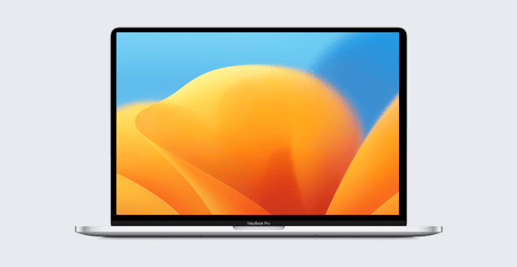
Kandji admins can now set shorter enforcement timeframes for automatically updating apps from the Kandji Auto App catalog. Prior to this latest release, Kandji admins could choose patching deadlines from one week to three months after an app update was released. Now they also have the option of one or two days.

Product Update
macOS Ventura: Bringing Transparency to Login and Background Items
Mike Boylan

5 min read

macOS Ventura: Bringing Transparency to Login and Background Items

For years now, many Mac apps have been installing components that launch automatically at login and/or that run in the background. It’s always been hard for users to keep track of these surreptitious bits of software that were running on their computers. With macOS Ventura, Apple has made it easier for users to see and control their login and background items. But Apple is giving Mac admins some say in the matter, as well.

Recent News
Kandji Announces Support for Declarative Device Management
Iru Team

2 min read

Kandji Announces Support for Declarative Device Management

Today Kandji is announcing first-in-the-market support for active Declarative Device Management (DDM) for supervised devices. Not only has Kandji enabled DDM, but we also support actively managing configuration declarations—one of the core technologies that powers DDM.

Product Update
Announcing Kandji’s Integration with Microsoft Teams
Matt Wilson

1 min read

Announcing Kandji’s Integration with Microsoft Teams

Today, Kandji is excited to announce our integration with Teams, Microsoft's video conferencing, messaging, and all-around collaboration platform.

Product Update
macOS Ventura: How to Defer the OS Upgrade
Iru Team

2 min read

macOS Ventura: How to Defer the OS Upgrade

With the release of macOS Ventura, many Apple admins may be wondering about how to defer upgrades to the new OS. As a Mac IT person, you may not want everyone in your organization to upgrade right away. And there are some special considerations to take into account when you’re thinking about upgrading the Mac computers you manage to the latest version of macOS.

Recent News
Announcing Same-Day Support for macOS Ventura and iPadOS 16
Iru Team

4 min read

Announcing Same-Day Support for macOS Ventura and iPadOS 16

Today, Kandji is pleased to announce same-day support for Apple’s latest operating system releases: macOS Ventura and iPadOS 16. (iOS 16 and tvOS 16 were released on September 12; Kandji supported all applicable functionality in those releases on the same day, as well.)

Product Update
Kandji Announces New Device Harmony Platform, Tears Down the Wall Between IT and InfoSec to Keep Enterprise Apple Users Secure and Productive
Iru Team

3 min read

Kandji Announces New Device Harmony Platform, Tears Down the Wall Between IT and InfoSec to Keep Enterprise Apple Users Secure and Productive

Kandji, today announced its revolutionary new Device Harmony platform, which tears down the wall between enterprise IT and InfoSec teams, so they can truly work together to keep every Apple user secure and productive.

Product Update
Introducing Assignment Rules
Iru Team

2 min read

Introducing Assignment Rules

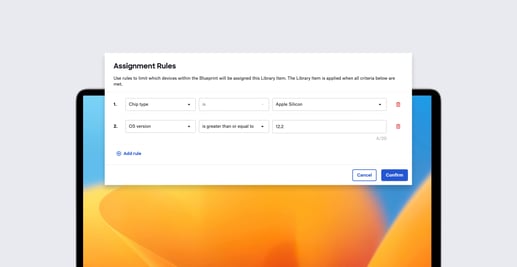
Blueprints are the cornerstone of Kandji’s device management platform. They streamline how you organize configurations and software and continually enforce parameters for managed devices. And now, we’ve made Blueprints smarter with assignment rules. These rules determine whether or not a custom app or script library item runs on the devices assigned to a given Blueprint.

Product Update
Announcing Support for iOS 16 and tvOS 16
Alexandre Morin

1 min read

Announcing Support for iOS 16 and tvOS 16

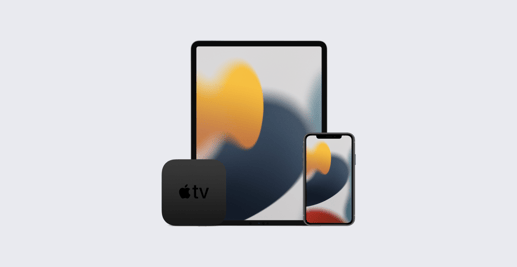
Today, Apple released iOS 16 and tvOS 16 to the public. We’ve thoroughly tested all Kandji services with iOS 16 and tvOS 16 including enrollment, payload and restrictions deployment, Self Service and more. We are happy to report that Kandji is ready to support your iPhone fleet running iOS 16 and your Apple TV devices running tvOS 16. These new operating systems bring features and enhancements your users will love. You can find the full list on Apple’s website. It’s also important to know which devices in your fleet support the new operating systems. iOS 16 is supported on devices all the way back to the 2nd generation iPhone SE (no iPod touch). tvOS is supported on Apple TV HD and later. It’s easy to update your fleet of devices. If you are using Managed OS for iOS or tvOS, you can be confident that once devices reach the enforcement deadline you set, Kandji will prompt users to update their devices so they can benefit from the latest features and security updates. Your supervised and passcode-less iPhone and Apple TV devices will update automatically without user intervention.


Recent News
Mac Virtualization: Why Recent Changes Are Good for Apple IT
Iru Team

6 min read

Mac Virtualization: Why Recent Changes Are Good for Apple IT

At a high level, virtualization allows you to run multiple operating systems on a single computer; those multiple instances are called virtual machines, or “VMs” for short. Apple silicon and macOS make virtualization possible on Mac using a combination of hardware and software technologies:

Recent News
Introducing Managed OS for iOS, iPadOS, and tvOS
Alexandre Morin

3 min read

Introducing Managed OS for iOS, iPadOS, and tvOS

Kandji has new Managed OS Library Items for iOS, iPadOS, and tvOS. This expanded operating system support is now available to all customers.

Product Update
How to Set Up and Manage an iPad Kiosk
Steven Vogt

12 min read

How to Set Up and Manage an iPad Kiosk

The primary function of Apple devices in an organization is, of course, to provide computing and communications for individual users. But that’s not the only purpose they can serve. One of the most common alternatives: Configuring an iPad as a kiosk—a single-purpose device, usually set in a fixed location. Instead of running multiple apps at the user’s discretion, iPad kiosks run just one.

Educational
Passport Adds Multifactor Authentication for Tighter Login Security
Iru Team

2 min read

Passport Adds Multifactor Authentication for Tighter Login Security

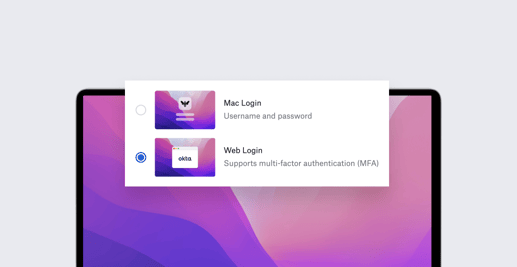
Last year, Kandji introduced Passport, which makes the login process easier for end users by letting them sign in to their local device accounts with the same single sign-on credentials they use with their organizations' identity providers (IdPs). In addition to making life easier for users, Passport also improves security for the organization as a whole: By syncing local and IdP credentials, IT teams can be sure they all meet the same safety standards. We’ve now made Passport even more secure, by adding support for multifactor authentication (MFA). This enables admins to enforce login flows that leverage the same MFA factors already configured for their users' IdP accounts.

Product Update
Choosing the Right Way to Change Device Management on iOS and iPadOS
Alexandre Morin

8 min read

Choosing the Right Way to Change Device Management on iOS and iPadOS

Switching your organization from one mobile device management solution to another is not a trivial undertaking. It can be a substantial project requiring careful planning and detailed execution. But if your current MDM solution isn’t cutting it anymore—if you’ve outgrown its capabilities, or if its provider isn’t deploying new features quickly enough for you—it’s also an imperative and eminently doable one.

Recent News
Why In-App Purchases Don't Work for the Enterprise
Caleb Basinger

3 min read

Why In-App Purchases Don't Work for the Enterprise

Dear Apple software developer, I’m writing today as just one of the thousands of Apple device administrators worldwide who work in institutions large and small, in education and enterprise. I wanted to talk to you about your app.

Recent News

Stay up to date

Iru's weekly collection of articles, videos, and research to keep IT & Security teams ahead of the curve.