Workforce Identity
 Endpoint Management
 Endpoint Detection & Response
 Vulnerability Management
 Compliance Automation
 Trust Center



It's Thursday afternoon. The audit is in 45 days.
Sarah is a compliance manager at a SaaS company. She's opened the Google Drive folder where the policies live, a maze of subfolders organized by year and revision, with names like "InfoSec Policy v3 FINAL (1)" sitting next to "InfoSec Policy v3 FINAL — USE THIS ONE." She doesn't know with certainty which is current.
She also needs to draft a new access control policy before the audit. She starts with a template but an hour later she's rewritten most of it. A generic template isn't a shortcut for her if it doesn't reflect how her business actually works.
Finally, she has to get every policy in front of every employee. She'll fire up DocuSign and manually send it to all 200 employees. She’ll work with HR to track replies, chasing down those who haven't signed.
She didn't get into compliance to manage folders and screenshot email chains. But that's the job.

A different way to work
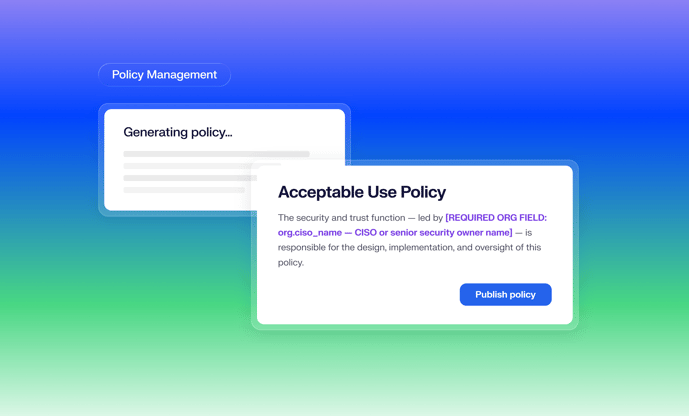
Today, we're introducing Policy Management in Iru Compliance Automation — a purpose-built module for creating, distributing, and tracking compliance policies, with acknowledgements that are captured automatically as audit evidence. No Google Drive. No DocuSign. No screenshots of email threads.
Here's how it helps GRC professionals like Sarah.
The tools were never built to work together
The reason policy management tends to be a manual process for GRC teams isn't that they aren't organized, it's that the process was never designed to be connected. Creation happens in Google Docs or Word. Approvals happen in email. Acknowledgements go out through DocuSign, tracked in a spreadsheet. And when audit time comes, someone manually uploads a policy document and a separate acknowledgement log as two different artifacts into a compliance tool.
Every handoff is a place something can slip. A policy doesn't get updated when the company switches identity providers. A new hire gets onboarded before HR remembers to send the DocuSign. A spreadsheet row gets left blank. And by the time an auditor asks for proof that employees have read and acknowledged your Acceptable Use Policy, the answer is a patchwork of files across three different tools, none of which talk to each other.
This results in both policy drift (policies that describe how the organization used to operate, not how it operates today) and audit friction (a compliance team spending the weeks before an audit doing manual reconciliation instead of actual compliance work).
Step one: Generate a policy that actually reflects how you work
Sarah opens Iru and navigates to the Policies module. She clicks Add a policy and the library opens, a catalog of templates covering the topics required by SOC 2, ISO 27001, HIPAA, GDPR, and more. She finds the access control policy template and clicks Use this template.
What happens next is where it's different. Iru already knows a lot about her organization, her connected tools, her device fleet, her tech stack because they use Iru to also manage their devices and identity. Iru combines that information with a guided set of upfront questions specific to the policy, such as her access review cadence, her exception process, and the frameworks she’s working towards, to generate a policy tailored to her organization from the start. Not a template she edits into shape, but a draft built around how her company actually operates.
And if she'd rather upload an existing document or build something custom, she can.
In minutes, she has a complete, structured draft. Every section is tagged to the input that produced it. If a clause references quarterly access reviews, Iru shows exactly which input influenced that language. When an auditor asks why the policy says what it says, she has a documented answer, not a guess.
Step two: Edit it, own it, publish it to employees
The draft lands in Iru's policy editor. Sarah reads through it. Most of it is right. She swaps the session recording tool to match what her company actually uses, tightens the language around privileged access, and rewrites one paragraph in her own words. Anything generated by AI shows up in special colored text, calling her attention to those parts to ensure she reviews them.
When she's done, she clicks Publish policy.
The policy flips from Draft to Published, and every user in her tenant (all 200 of them) automatically gets an assignment in their My Policies portal. In the meantime, Sarah attaches the policy to her framework controls.
Step three: Acknowledgements happen inside the platform
Each employee opens their portal, reads the full policy and clicks Acknowledge. Iru won't let them acknowledge until they've scrolled to the end.
From her dashboard, Sarah watches the counter tick up. 40 of 200 acknowledged. Then 120. Then 198. For the two stragglers, she can see exactly who hasn't completed it and follow up directly. No spreadsheet. No cross-referencing a DocuSign report against an employee roster.
When the last acknowledgement comes in, Sarah has a timestamped, auditor-ready record of who read the policy, and when.
Step four: Audit evidence, automatically
Here's what changes about audit preparation.
Those acknowledgements don't just live as a counter in a dashboard. Iru retains a timestamped record of every acknowledgement as audit evidence,so when an auditor samples employees during a review, the proof is already there. No folder to open. No DocuSign report to export and upload. No scrambling to reconstruct who signed what and when.
When the auditor asks for proof, Sarah points to Iru.
What's next
Policy Management ships today with generation, editing, publishing, and acknowledgement features. For teams that need a formal internal review before a policy goes live, a department lead or legal sign-off before it reaches employees, approval workflows are on the way.
See it in action. Book a demo of Iru today.