Workforce Identity
 Endpoint Management
 Endpoint Detection & Response
 Vulnerability Management
 Compliance Automation
 Trust Center


-1.png?width=24&height=24&name=Untitled%20design%20(18)-1.png)



- SStar Agent is a Go-based cross-platform RAT with infrastructure naming overlap with the OtterCookie malware family
- We recovered four samples: three macOS binaries (arm64 and x86_64) and a Windows PE, all sharing a single campaign deployment hash
- The macOS builds stub out keylogging, clipboard monitoring, and screen capture — the Windows build implements all three
- Every beacon includes the complete Chrome extension inventory of the infected host, a full filesystem tree, and system metadata
- The C2 domain api.otter-stack.com was registered April 22, 2026, fronts an operator web console, and serves payloads at /d/{hash}/agent?os=
&arch= — same deployment hash baked into every agent binary
Iru researchers recently came across a cluster of Go binaries with a shared deployment identifier and a C2 domain whose naming overlaps with a malware family researchers have been tracking. The samples call themselves "SStar agent", that string is embedded in error messages the binary writes to disk if it can't start, and they phone home to api.otter-stack.com.
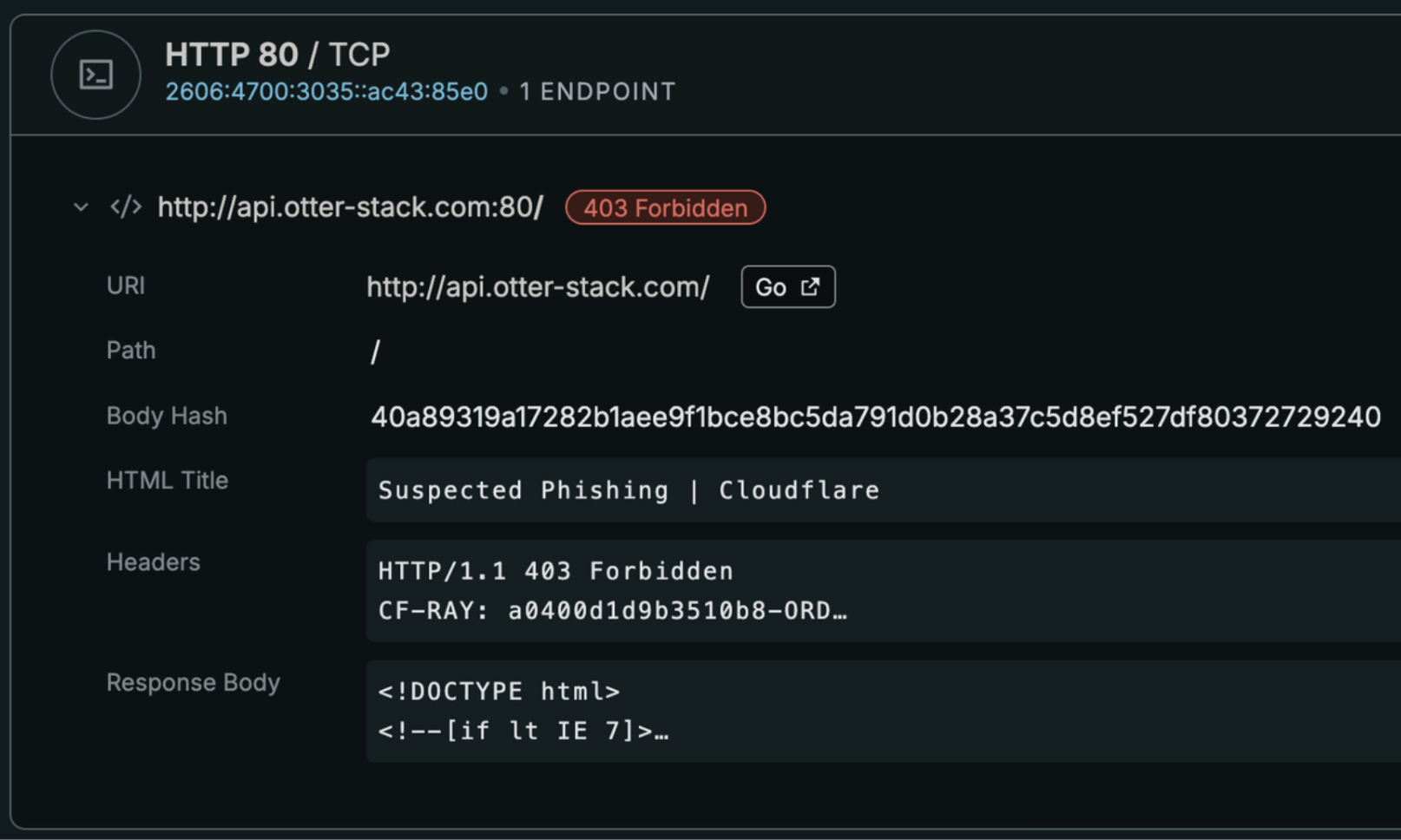 Captured domain information using censys.
The initial triage started as a side effect of an ML experiment we've been running internally. These samples scored 100 out of 100 on our model's suspicion heuristics to pull for manual review, and once we started pulling threads it became clear we were looking at something worth documenting fully.
This writeup covers the analysis of both the macOS and Windows builds. The short version: the macOS builds are heavily instrumented surveillance tools focused on recon and exfiltration, while the Windows build layers on a keyboard hook, clipboard monitor, and remote mouse/keyboard control. Notably, the malware includes a large POST request via endpoint /api/telemetry/report that constantly monitors and exfiltrates the entire directory tree to monitor files of interest. The gap between the Windows and macOS versions indicates this is still a work in progress.
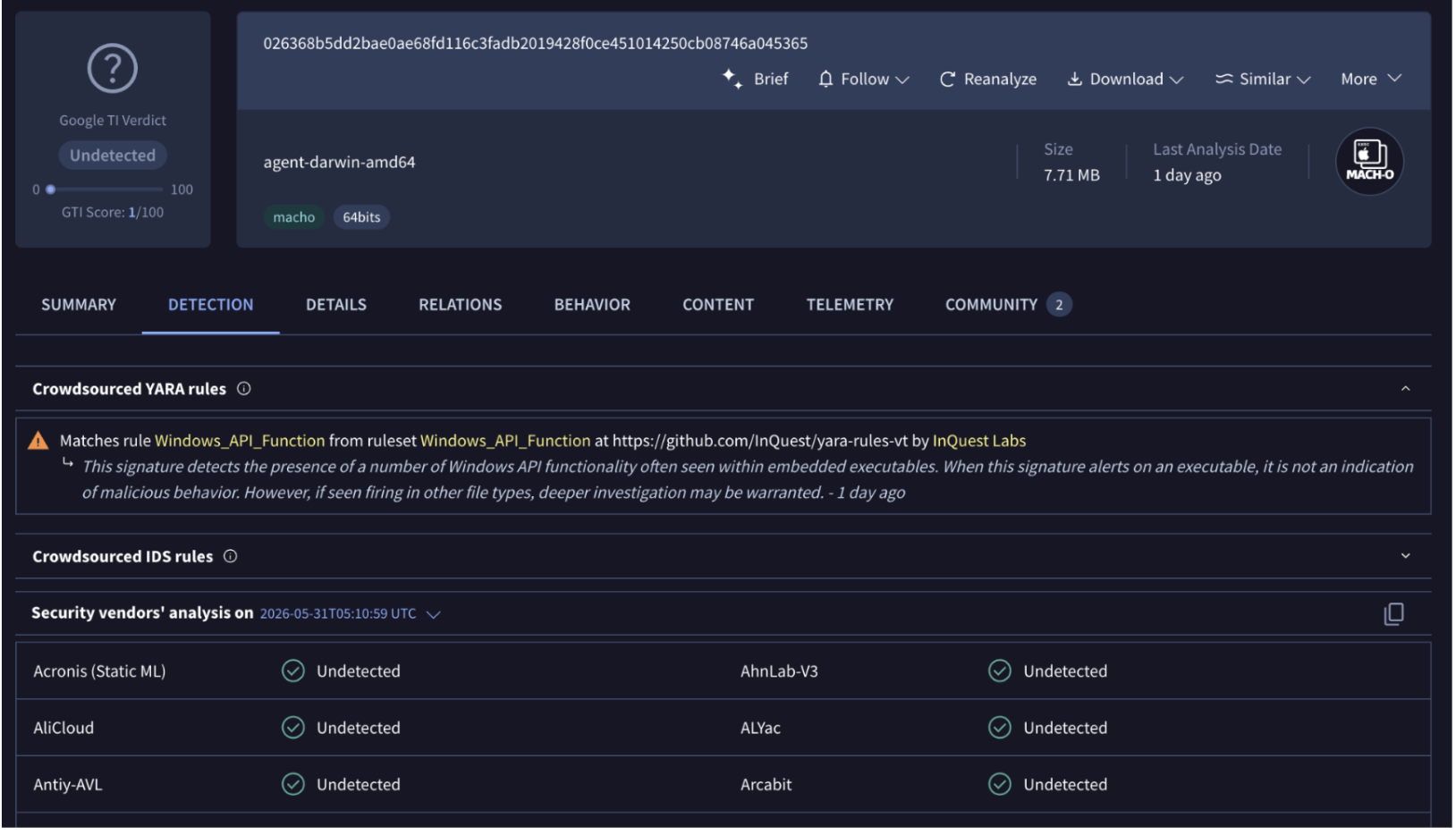
Delivery
The delivery mechanism which was detailed by 0xkoiner is a poisoned npm package named tw-style-utils (version 0.7.1), published to the npm registry on 2026-05-26 by maintainer "superstar777" (paolokarl328@gmail.com). The package masquerades as a Tailwind CSS typography plugin by copying legitimate @tailwindcss/typography code and appending a hidden XOR-obfuscated (key 0x2a) downloader to src/index.js.
The lure is a fake Web3 engineering take-home assessment — a GitHub repository (star45674/smart-contract-engineer-role) presenting a professional-looking "ChainQuest" bounty-escrow project with Solidity contracts, a Next.js/wagmi frontend, and Hardhat deployment instructions. The repository itself is clean. The payload lives entirely in the npm dependency. The trigger is tailwind.config.ts importing tw-style-utils as a plugin:
import twUtils from "tw-style-utils";
const config: Config = {
  plugins: [twUtils],
};
Running npm run dev or npm run build causes Node.js to execute the plugin, which fires the downloader. Importantly, the payload executes at build time — not install time — so npm install --ignore-scripts provides no protection.
Downloader Behavior
The deobfuscated downloader (Node.js path):
- Detects OS and architecture via process.platform / process.arch
- Constructs download URL:
https://api.otter-stack.com/d/IobO0YELAu4CJ2oG4iC4W38OxsOtTk8a/agent?os=<os>&arch=<arch> - Fetches the binary, writes to
os.tmpdir()under a platform-appropriate disguise name - Spawns it detached with
stdio: ignore,windowsHide: true,.unref()— completely orphaned from the parent process
|
Platform |
Initial Filename |
Mimics |
|---|---|---|
|
Windows |
WpnUserSvc.exe |
Windows Push Notification User Service |
|
macOS |
com.slack.autoLaunch.agent.plist |
Slack LaunchAgent |
|
Linux |
packagekit-update.service |
PackageKit systemd unit |
The deployment hashi is shared hardcoded across all agent binary. It functions as both a campaign identifier and a payload routing key. The operator serves different builds at the same URL path based on the os/arch query parameters. Because the package is pinned to "latest" rather than a fixed version, the operator can silently swap the payload at any time without touching the interview repository.
Dropped Files and Persistence
Once the agent binary is running from the temp directory it immediately installs itself to a stable location and registers persistence, then continues running from the stable path.
On macOS:
- Copies itself to
~/.local/share/wpnuersvc-agent/WpnUserSvc - Writes
~/Library/LaunchAgents/com.wpnuersvc.agent.plist(arm64) orcom.googleupdate.sstaragent.plist(x86_64) with RunAtLoad=true, KeepAlive=true - Registers via launchctl bootstrap — survives reboot and re-launches if killed
- Writes
<exe_dir>/sstar-agent-error.txton misconfiguration (operator debug artifact)
On Windows:
- Copies itself to
%APPDATA%\Microsoft\Windows\Start Menu\Programs\Startup\GoogleUpdateService.exe - Startup folder persistence — runs at every user login without registry modifications or elevated privileges
- Every shell command creates a short-lived
sstar-*.cmdfile in %TEMP% (detection artifact) - FreeConsole called on startup — process runs headless with no visible window
The initial temp-directory binary is ephemeral. Once the stable copy is running, the original file can be deleted without affecting persistence. The stable path names — WpnUserSvc, GoogleUpdateService.exe, com.wpnuersvc.agent, com.googleupdate.sstaragent — consistently impersonate Windows services and browser update infrastructure to blend into process and file listings.
This is the fourth documented iteration of this fake-interview delivery pattern, with the previous three using an in-repo obfuscated blob triggered on VS Code folder-open, git hook poisoning via core.hooksPath, and direct curl|sh execution. The npm variant is the hardest to catch on code review — the repo is genuinely clean — while remaining visible to network monitoring.
The operator naming is consistent across layers: the GitHub account is star45674, the npm maintainer is superstar777, and the binary brand string is "SStar agent". This is either deliberate self-branding or a pattern the same operator has been running across multiple campaigns.
Sample Overview
We analyzed four samples sharing the deployment hash IobO0YELAu4CJ2oG4iC4W38OxsOtTk8a.
|
SHA-256 |
Platform |
Architecture |
LaunchAgent Label |
|---|---|---|---|
|
e6d8b769…1ccf |
macOS |
arm64 |
com.wpnuersvc.agent |
|
026368b5…3654 |
macOS |
x86_64 |
com.googleupdate.sstaragent |
|
6b815b91…e5fe |
macOS |
x86_64 |
com.googleupdate.sstaragent |
|
000d65ea…fd3 |
Windows |
amd64 |
N/A |
All four are statically linked Go binaries with full symbol tables intact. The Go module path is "Spy". The shared deployment hash appears in every C2 beacon as a hash field, functioning as a campaign tag that ties infections back to a specific targeting operation.
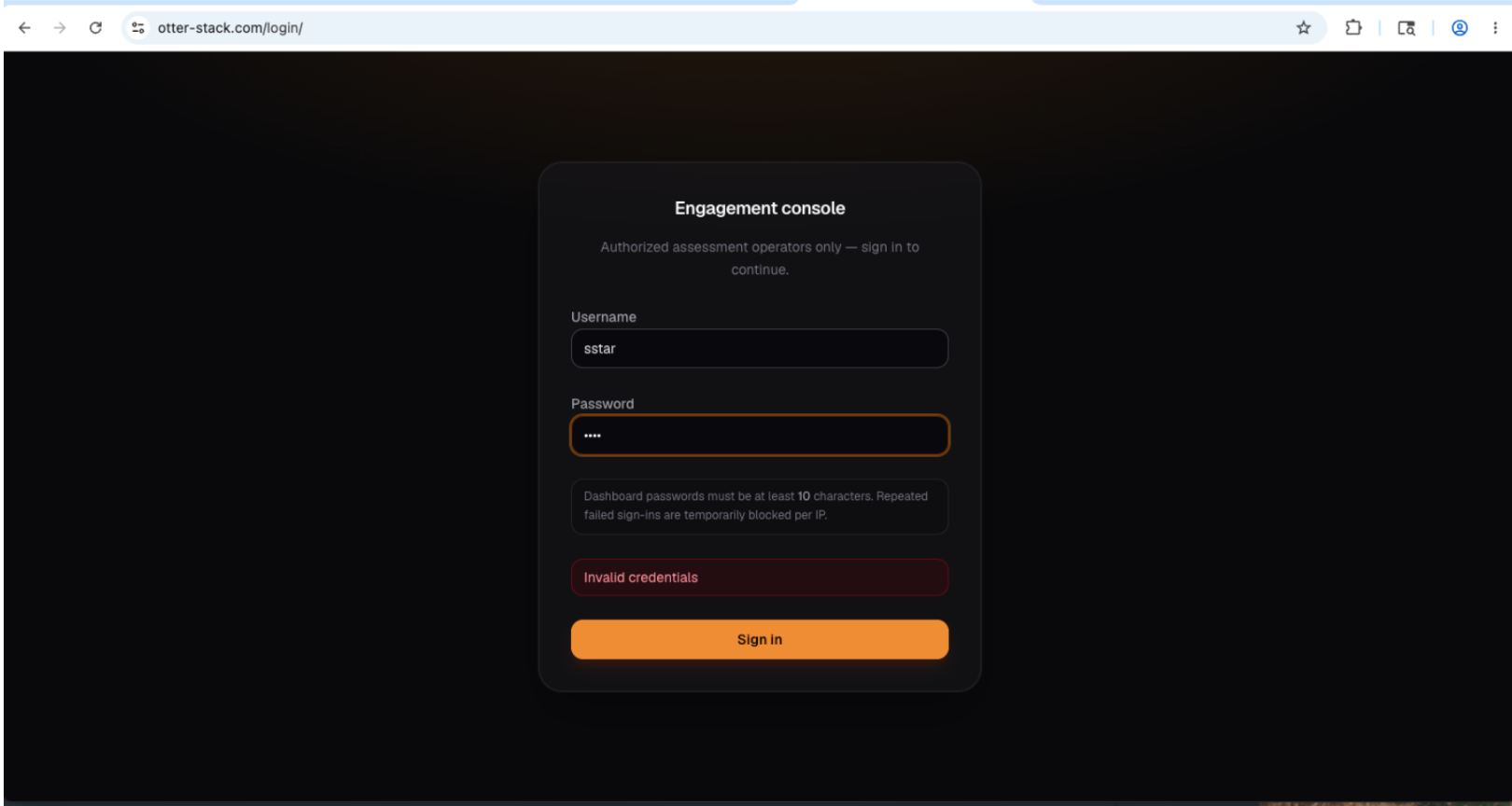
The C2 domain was registered April 22, 2026 through Dynadot with Cloudflare as the nameserver. Visiting the root of api.otter-stack.com returns a web application login page — the operator console. The /api/ path tree is where the agents communicate.
Persistence
On macOS, there are 2 persistence calls. One requires execution via “./<binary name> install” command which just creates the persistence before exiting the program likely used for developer testing for persistence. The other method continues launching of persistence regardless of condition.
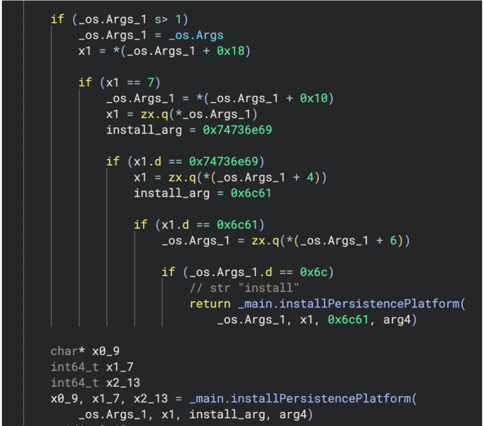 Persistence called via “install” argument
On macOS, the agent copies itself to a stable path before installing persistence:
~/.local/share/wpnuersvc-agent/WpnUserSvcIt then writes a LaunchAgent plist to ~/Library/LaunchAgents/com.wpnuersvc.agent.plist with RunAtLoad and KeepAlive set to true. The registration sequence tries the modern launchd bootstrap API first:
launchctl unload <plist>           # clear any stale registration
launchctl load <plist>
launchctl bootstrap gui/<uid> <plist>
launchctl enable gui/<uid>/com.wpnuersvc.agent
launchctl kickstart gui/<uid>/com.wpnuersvc.agent
If bootstrap fails, it falls back to bootout + load to handle older macOS versions.
The x86_64 sample uses the label com.googleupdate.sstaragent — a nod to Chrome's update agent as cover. The arm64 build uses com.wpnuersvc.agent, impersonating a Windows service name that has no business existing on macOS.
.png?width=740&height=221&name=image%20(14).png) plist
plist
On Windows, the binary drops to a path under LOCALAPPDATA and uses the startup folder for persistence alongside whatever the platform persistence handler registers.
C2 Protocol
The agent runs two Go routines in a permanent loop: one for telemetry beaconing and one for command polling. Both use plain HTTPS POST to api.otter-stack.com with Content-Type: application/json.
Poll Loop
Hits /api/telemetry/poll-command on a jittered interval controlled by SSTAR_POLL_MIN_SEC (20 seconds) and SSTAR_POLL_MAX_SEC (60 seconds). The request body:
{
  "hash": "<deployment_hash>",
  "hostname": "<machine_hostname>",
  "publicIp": "<ip_from_api.ipify.org>"
}
The server responds with a JSON struct containing up to three fields: a text command string, a download request, and a directory scan request. Any combination can be populated in a single response.
Telemetry Loop
Runs independently on its own jittered interval (SSTAR_TELEMETRY_MIN_SEC (45 seconds) / SSTAR_TELEMETRY_MAX_SEC (160 seconds)). Each beacon carries the full Chrome extension inventory, directory structure in the home directory root with every single children file and directory, the hostname, public IP, and Go runtime version, sent on every tick via POST request regardless of whether the operator has issued any commands.
/api/telemetry/report:
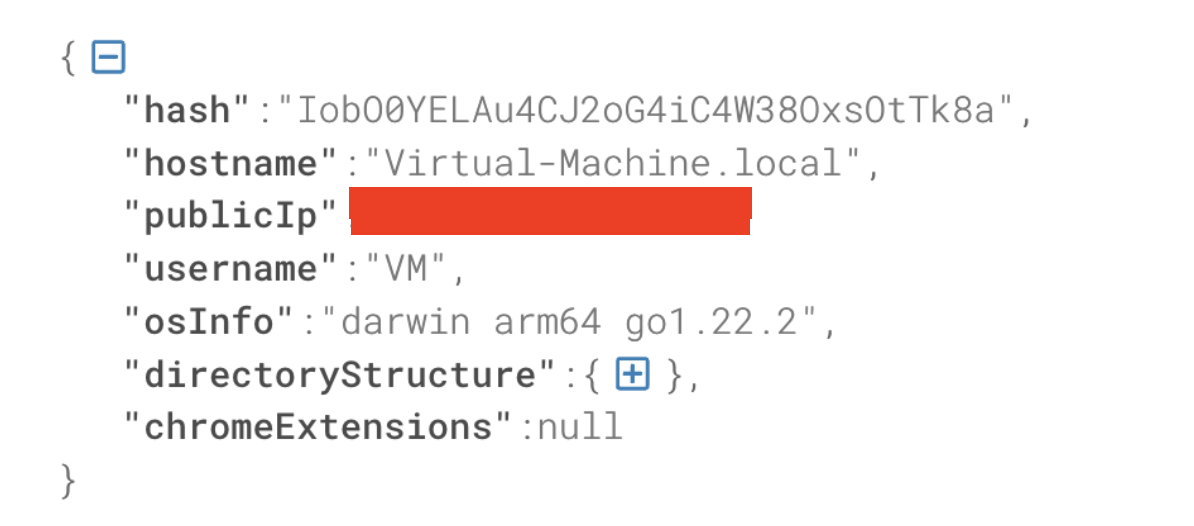
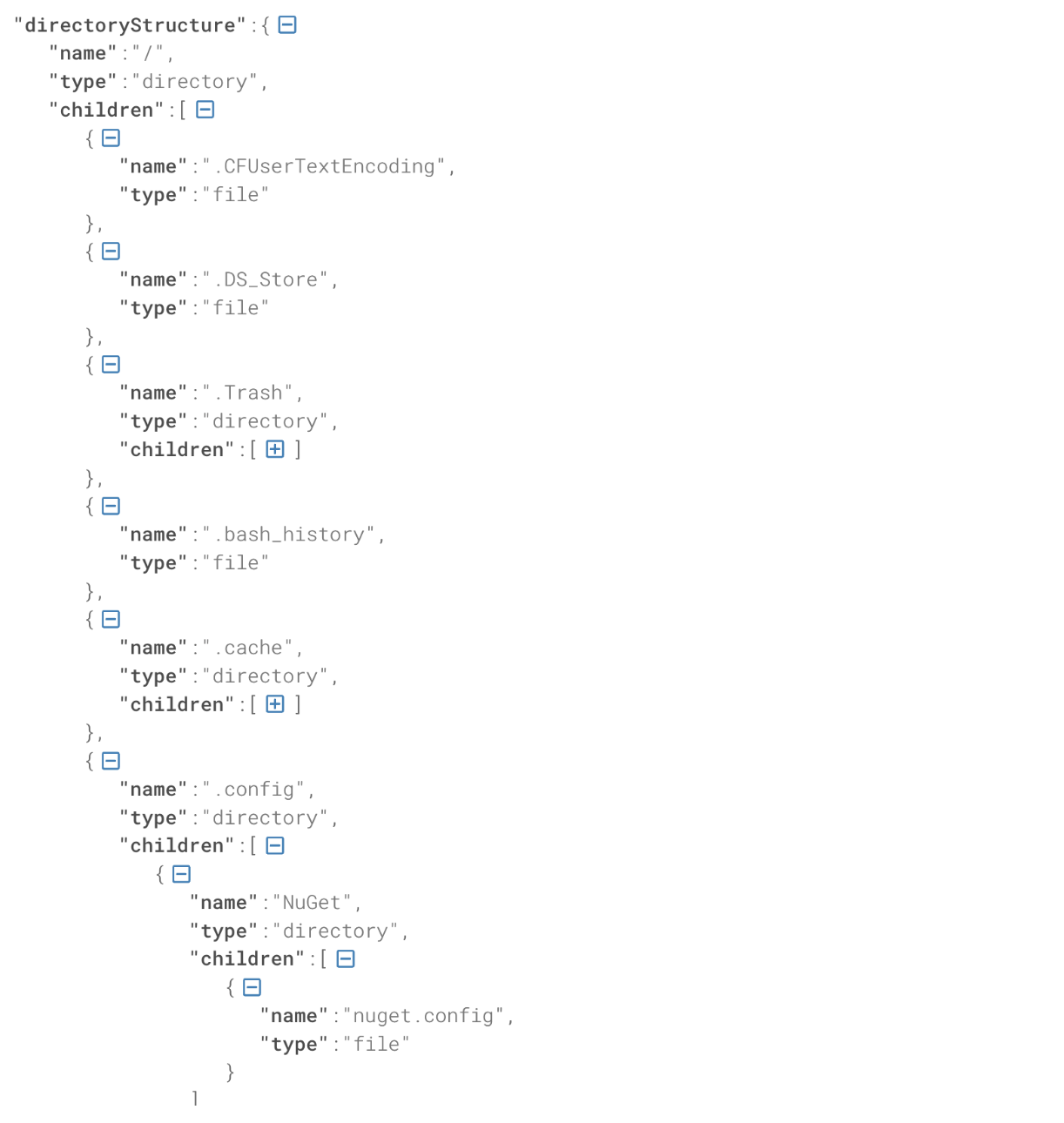 All children file names getting sent.
Capabilities
Chrome Extension Inventory
The agent walks ~/Library/Application Support/Google/Chrome/<profile>/Extensions/, enumerates every extension ID, picks the newest version directory, and parses manifest.json for the name and version. Names using Chrome's __MSG_<key>__ i18n format are resolved by reading _locales/en_US/messages.json or _locales/en_GB/messages.json.
The result is a deduplicated, sorted array of structs which includes ID, display name, version, on-disk path which is exfiltrated with every beacon. The operator can then issue a downloadRequest with type=chrome_extension and a specific extension ID to pull the full extension directory as a zip. There is no filtering for specific extension types. Every extension gets harvested.
The scan path can be overridden with SSTAR_CHROME_EXTENSIONS_DIR for operator testing, and SSTAR_CHROME_EXTENSIONS_JSON can inject known extension metadata into the merged output without requiring disk access.
File Exfiltration
Download requests from the C2 support two types. A path request specifies an arbitrary filesystem path; the agent validates it, copies it to a temp directory, zips it in memory (capped by SSTAR_MAX_DOWNLOAD_ZIP_BYTES, default 3 GB), and uploads it. A chrome_extension request targets a specific extension ID by version directory and zips that.
If the compressed payload exceeds SSTAR_UPLOAD_CHUNK_BYTES (default ~22 MB), the agent splits it across multiple upload requests with partIndex and partCount fields tracking reassembly server-side.
Command Execution
The text command channel supports a small built-in command set handled before falling through to a shell:
|
Command |
Behavior |
|---|---|
|
ls |
os.Getwd() + ReadDir, returns TYPE SIZE NAME formatted table |
|
cd <path> |
os.Chdir, returns empty on success |
|
download <url> |
Spawns goroutine to fetch URL and upload result |
|
screen <sub> |
Routes to screen handler (see below) |
|
exit |
Terminates the command loop |
|
Anything else |
/bin/sh -c <cmd> on macOS, cmd.exe equivalent on Windows; returns combined stdout/stderr |
Keylogger (Windows only)
On macOS, keylogRun is a single return instruction. On Windows it's a complete Windows hook-based keylogger.
_main.keylogRun:
    ret

_main.clipboardRun:
    ret
keylogRun calls keylogEnabled(), which reads the SSTAR_KEYLOG environment variable, then spawns two Go routines. keylogHookLoop installs the low-level keyboard hook via the Win32 API. keylogServiceLoop runs on a 12-second ticker, drains the buffer, and ships batches to C2 via postKeylogBatchJSON.
Every keystroke event is tagged with the foreground window title at the time of capture, retrieved via GetForegroundWindow + GetWindowTextW. Special keys are mapped through vkFriendlyName: [Enter], [Back], [Tab], [Shift], [Ctrl], [Alt], [Esc], [Del], [Arrow], [F1] through [F12].
Clipboard Monitoring (Windows only)
clipboardRun mirrors the keylogger pattern: clipboardEnabled() check, then two goroutines — clipWatchLoop monitors the clipboard for changes, and clipServiceLoop batches and posts events via postClipBatchJSON. Each event is tagged with the active window title at capture time.
Screen Control (Windows only)
handleScreenCommand on Windows handles moveto, click, and type subcommands:
screen moveto <x> <y>→ SetCursorPos via screenMovetoWindows, returns "Cursor moved to x, y"screen click [right]→ screenClickWindows, returns "Left click" or "Right click"screen type <text>→ screenTypeWindows, sends keystrokes to the foreground window
screen capture returns "Screen capture is disabled on this agent." for every platform, macOS arm64, macOS x86_64, and Windows. Screenshots are not implemented anywhere in any of the four samples.
Windows Build: Full Capability Analysis
Keylogger
The keylogger is enabled by default. keylogEnabled() reads the SSTAR_KEYLOG environment variable and returns true unless the value is explicitly set to "0. Any Windows deployment without an agent.env file gets a running keylogger.
Despite the function name keylogHookLoop, the keylogger uses GetAsyncKeyState polling, not SetWindowsHookEx. A dedicated OS thread (LockOSThread) runs a 1ms ticker, loops VK codes 0x01–0xFF each tick, and compares against a shadow state array (main.keyStateWas) to detect key-down edges. On each transition:
- GetForegroundWindow() + GetWindowTextW() captures the active window title
- MapVirtualKeyW(vk, 2) gets the scan code
- ToUnicode(vk, scan, keyboardState) gets the actual character, respecting Shift/Ctrl/Alt state
- vkFriendlyName() provides [Enter], [Shift], [F5] etc. for non-printable keys
Events accumulate in main.keylogBuf (max 2000 events, circular). keylogServiceLoop flushes on a 12-second ticker in batches of 300 via POST /api/telemetry/keylog.
Clipboard Monitoring
clipWatchLoop polls the clipboard every 1.2 seconds from a dedicated OS thread using the full Win32 sequence: OpenClipboard → IsClipboardFormatAvailable(CF_UNICODETEXT) → GetClipboardData → GlobalLock → UTF-16 decode → GlobalUnlock → CloseClipboard. Each capture is compared against the previous snapshot. On change, the active window title is recorded alongside the clipboard content, truncated to 32,000 characters. Events flush every 12 seconds via POST /api/telemetry/clipboard.
Screen Type — PowerShell SendKeys
The "screen type" command injects keystrokes to the foreground window by base64-encoding the input and spawning a hidden PowerShell process:
powershell -NoProfile -NonInteractive -WindowStyle Hidden -Command
  "Add-Type -AssemblyName System.Windows.Forms;
   $b=[Convert]::FromBase64String('<b64>');
   $t=[Text.Encoding]::UTF8.GetString($b);
   [System.Windows.Forms.SendKeys]::SendWait($t)"
Base64 encoding is used to avoid shell quoting issues with special characters. The process runs with CREATE_NO_WINDOW. This is the implementation of remote typing — not a separate backdoor.
Shell Execution — Temp Batch Files
Instead of /bin/sh -c, Windows command execution creates a temporary batch file in %TEMP%:
os.CreateTemp("", "sstar-*.cmd") → @echo off\r\n<command> → cmd.exe /c <tempfile>The file is created, written, executed with CREATE_NO_WINDOW, and deleted on exit. The "sstar-" prefix in the temp filename is a detection artifact, every shell command execution briefly creates a sstar-*.cmd file in %TEMP%.
Persistence
The Windows build drops to the startup folder rather than a registry run key or scheduled task:
%APPDATA%\Microsoft\Windows\Start Menu\Programs\Startup\GoogleUpdateService.exeNo elevated privileges required. The filename GoogleUpdateService.exe masquerades as Google's update service. On startup failure, the agent writes an error log to sstar-agent-error.txt in the executable directory.
Win32 API Surface
All Win32 APIs are resolved lazily via syscall.LazyProc — no static import table entries. Resolved at runtime from embedded proc name strings:
|
API |
Purpose |
|---|---|
|
GetAsyncKeyState |
Key state polling (keylogger) |
|
MapVirtualKeyW |
VK → scan code |
|
ToUnicode |
VK + scan → Unicode character |
|
GetKeyboardState |
Capture modifier state for ToUnicode |
|
GetForegroundWindow |
Active window handle (keylog + clipboard) |
|
GetWindowTextW |
Window title capture |
|
OpenClipboard / CloseClipboard |
Clipboard access |
|
|
Check CF_UNICODETEXT availability |
|
GetClipboardData |
Retrieve clipboard HGLOBAL |
|
GlobalLock / GlobalUnlock |
Access clipboard memory |
|
SetCursorPos |
Mouse move (screen moveto) |
|
mouse_event |
Mouse click simulation |
|
FreeConsole |
Hide console window on startup |
macOS vs. Windows
The function symbols for keylogging and clipboard monitoring exist in both platform builds. The macOS implementations are single-instruction stubs. The Windows build has full implementations that are enabled by default: keylogEnabled() and clipboardEnabled() return true unless SSTAR_KEYLOG or SSTAR_CLIPBOARD is explicitly set to a disabling value. Any Windows deployment without an agent.env file gets both running. This isn't alimitation on macOS. All of it is wired up; the function bodies just aren't written yet.
|
Capability |
macOS arm64 |
macOS x86_64 |
Windows |
|---|---|---|---|
|
Chrome extension inventory |
Yes |
Yes |
Yes |
|
Filesystem tree recon |
Yes |
Yes |
Yes |
|
File exfiltration |
Yes |
Yes |
Yes |
|
Shell command execution |
/bin/sh -c |
/bin/sh -c |
sstar-*.cmd via cmd.exe |
|
Keylogger |
Stub (ret) |
Stub (ret) |
GetAsyncKeyState polling |
|
Clipboard monitoring |
Stub (ret) |
Stub (ret) |
Win32 CF_UNICODETEXT, 1.2s poll |
|
Screen capture |
Disabled |
Disabled |
Disabled |
|
Mouse control |
No |
No |
SetCursorPos + mouse_event |
|
Keystroke injection |
No |
No |
PowerShell SendKeys |
|
Console hiding |
No |
No |
FreeConsole on startup |
|
Persistence |
LaunchAgent |
LaunchAgent |
Startup folder |
C2 Endpoints (Full)
|
Endpoint |
Direction |
Purpose |
|---|---|---|
|
|
C2 → Agent |
Initial payload download (dropper fetches this) |
|
|
Agent → C2 |
Command polling (all platforms) |
|
|
Agent → C2 |
Batched keylog events |
|
|
Agent → C2 |
Batched clipboard events |
|
|
Agent → C2 |
System Reconnaissance |
|
|
Agent → C2 |
File upload (chunked) |
Operator Configuration
Loaded from agent.env in the executable directory. Fifteen known environment variables:
|
Variable |
Purpose |
|---|---|
|
SSTAR_POLL_MIN_SEC / SSTAR_POLL_MAX_SEC |
Command poll jitter range |
|
SSTAR_TELEMETRY_MIN_SEC / SSTAR_TELEMETRY_MAX_SEC |
Telemetry beacon jitter range |
|
SSTAR_DIR_TREE_ROOT |
Filesystem scan root path |
|
SSTAR_DIR_TREE_DEPTH |
Recursion depth (default 5) |
|
|
Entry cap (default 60) |
|
|
Set to 1 to skip tree collection |
|
|
Override Chrome extensions scan path |
|
|
Inject extension metadata as JSON |
|
|
Per-file zip size cap (default 3 GB) |
|
|
Chunked upload part size (default ~22 MB) |
|
|
Per-file size limit within a zip |
|
SSTAR_PUBLIC_IP |
Override public IP resolution |
|
SSTAR_KEYLOG |
Disable keylogger, set to 0/false/off/no (Windows; on by default) |
|
SSTAR_CLIPBOARD |
Disable clipboard monitor, set to 0/false/off/no (Windows; on by default) |
The scale of this surface — per-target tuning of beacon intervals, upload limits, scan depth, and feature toggles — suggests coordinated deployment with per-target configuration files rather than a fixed-function implant.
Indicators of Compromise
Hashes (SHA-256)
|
Hash |
Platform |
|---|---|
|
|
macOS arm64 |
|
|
macOS x86_64 |
|
|
macOS x86_64 |
|
|
Windows |
Network
|
Indicator |
Type |
|---|---|
|
api.otter-stack.com |
C2 domain |
|
|
Payload download URL |
|
|
C2 poll endpoint |
|
|
Keylog upload (Windows) |
|
|
Clipboard upload (Windows) |
|
|
Reporting files of interest on system |
|
api.ipify.org |
Public IP resolution |
|
|
Campaign deployment hash (beacon + download path) |
Dropper
|
Indicator |
Type |
|---|---|
|
tw-style-utils |
Malicious npm package name |
|
0.7.1 |
Observed version |
|
superstar777 / paolokarl328@gmail.com |
npm maintainer |
|
|
Delivery GitHub repository |
Files and Paths (macOS)
|
Path |
Description |
|---|---|
|
|
Agent binary (arm64) |
|
|
LaunchAgent plist (arm64) |
|
|
LaunchAgent plist (x86_64) |
Files and Paths (Windows)
|
Path |
Description |
|---|---|
|
%APPDATA%\Microsoft\Windows\Start Menu\Programs\Startup\GoogleUpdateService.exe |
Agent binary (startup folder persistence) |
|
%TEMP%\sstar-*.cmd |
Ephemeral temp file created per shell command execution |
|
|
Startup error log (written on misconfiguration) |
|
<exe_dir>\agent.env |
Operator config file loaded at startup |
MITRE ATT&CK
|
Technique |
ID |
Notes |
|---|---|---|
|
Persistence via LaunchAgent |
T1543.001 |
com.wpnuersvc.agent / com.googleupdate.sstaragent |
|
System Information Discovery |
T1082 |
Hostname, OS, public IP in every beacon |
|
File and Directory Discovery |
T1083 |
Filesystem tree collected each telemetry cycle |
|
Browser Extensions |
T1176 |
Full Chrome extension inventory; targeted extension exfil |
|
Exfiltration Over C2 |
T1041 |
Chunked zip upload over HTTPS |
|
Input Capture: Keylogging |
T1056.001 |
Windows only; Win32 hook-based, 12-second flush |
|
Clipboard Data |
T1115 |
Windows only; foreground-window-tagged events |
|
Screen Capture |
T1113 |
Stub in all samples; not implemented |
|
Input Capture: GUI |
T1056 |
Windows: screen moveto, click, type |
|
Command and Scripting Interpreter |
T1059 |
/bin/sh -c (macOS), cmd (Windows) fallback handler |
|
Ingress Tool Transfer |
T1105 |
download <url> command fetches and executes second stage |
|
Masquerading |
T1036 |
LaunchAgent names impersonate Windows services and Google updater |