Workforce Identity
 Endpoint Management
 Endpoint Detection & Response
 Vulnerability Management
 Compliance Automation
 Trust Center




In January 2026, the Dutch Data Protection Authority (the agency responsible for protecting citizens' personal data) had its own employee's work-related data accessed and stolen. Attackers exploited critical zero-day vulnerabilities in Ivanti's endpoint mobile management software before patches were even available. That same day, bad actors attacked the European Commission, and Finland's government IT provider lost data on up to 50,000 employees. All three incidents traced back to a single point of failure: endpoint management tools that granted access based on device identity alone, without verifying whether those devices were actually secure.
Endpoint devices are the most common entry point for attackers, and the numbers keep getting worse. For IT administrators and operations leaders managing fleets of Mac, Windows, and Android devices, the question isn't whether someone will try to get through an endpoint. It's whether your security model is built to stop them when they do.
Zero-trust endpoint security is how modern teams can answer that question. Keep reading, and we'll break down how it works, what it takes to build it, and the common mistakes that undermine it.
What is zero-trust endpoint security?
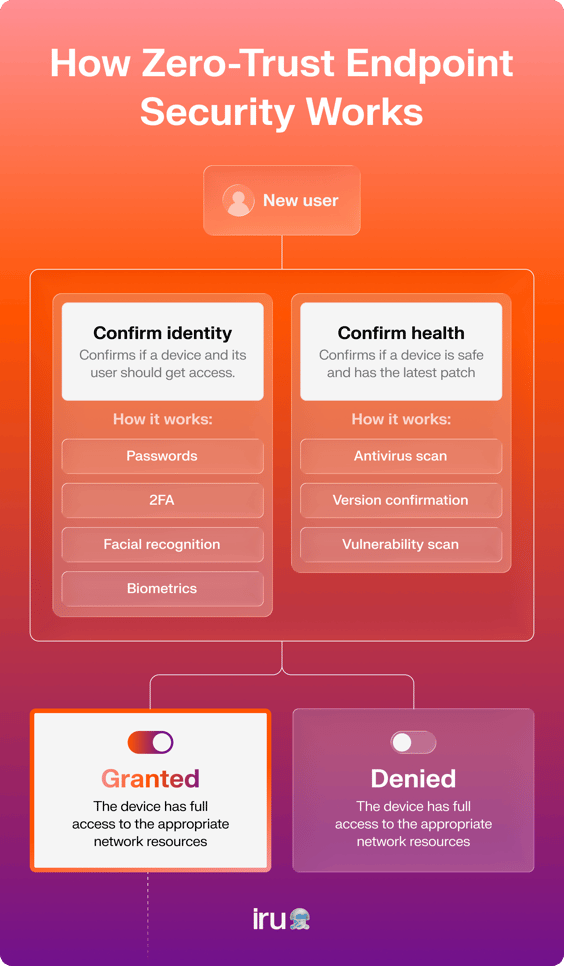
Zero-trust endpoint security operates under the philosophy of "never trust, always verify" regarding devices. Rather than assuming that a computer is secure simply because it is company-issued or that a mobile phone is secure because it connects to the network from a trusted location, each device must prove its trustworthiness before gaining access — every single time.
Traditional network security drew a hard boundary: devices inside the corporate network, or those carrying a domain-joined certificate, were automatically trusted, and everything outside was not. Inside was the trusted network; outside was untrusted. A zero-trust endpoint layer replaces that boundary with a policy, one that treats every access request as unverified regardless of where it originates. A MacBook in headquarters and an Android phone on a contractor's home network are evaluated the same way: continuously, based on real-time device health and user identity, not assumed trust. Access is scoped only to what that specific device and user actually need.
Endpoints are often where zero-trust implementation begins, because they're where most attacks start:
- Phishing lands in an email client on a device
- Malware executes on a device
- Stolen credentials get used on a device
That said, identity is a strong case for where to start as well. Identity is the common thread across every access decision: it shows up at the endpoint, in the application, and at the network layer. In practice, endpoints and identity are the two highest-priority layers of any zero-trust rollout, and the right starting point depends on your organization's specific risk profile. If your biggest exposure is unmanaged or poorly configured devices, start at the endpoint. If credential compromise or overprivileged access is the larger concern, identity may be the more urgent first move.
Building your security posture around both, and not treating them as sequential, is where the model becomes most effective.
How does zero-trust differ from standard endpoint security?
Standard endpoint security, like antivirus, firewalls, and VPNs, was designed for a world where employees worked from office buildings on one company network that could be protected. The model assumed that if a device was inside the perimeter, it was probably safe, and you knew who the user was.
However, that security model doesn't work in the post-COVID era, with hybrid and remote work environments. When your employee connects their laptop from a home network, a coffee shop, or a coworking space, there's no moat to protect them. And more importantly, that approach doesn't account for human error, meaning that even company-owned, previously verified devices can now easily be compromised.
Zero trust treats every connection attempt as potentially hostile, regardless of its origin. It doesn't matter if the device has connected successfully a hundred times before; it'll evaluate each request against live signals:
- Is the device encrypted?
- What's the OS; is it current?
- Is the user who they claim to be?
Once those checks are passed, you can grant access to only the minimum resources needed.How to Deploy Apple Devices at Scale
Benefits of zero-trust endpoint security
For IT administrators managing dozens to thousands of devices, zero trust changes the nature of the work, from reactive patching and incident response to proactive, continuous control:
- Compliance support: Zero-trust control maps directly to SOC 2, ISO 27001, HIPAA, and other compliance frameworks. Continuous verification and access logging produce the documentation that those audits require, without scrambling to pull records when an audit arrives.
- Enhanced visibility: Instead of a periodic snapshot of device health, you get real-time status across every enrolled endpoint. You know which devices are compliant, which have drifted, and which represent active risk.
- Reduced breach blast radius: Least-privilege access and device isolation mean a compromised endpoint can't move freely across the network. The damage from any single incident is contained to what that device could actually reach.
- Distributed workforce coverage: Trust is enforced at the device level, not the network perimeter. Policy applies consistently whether your employees are in the office, remote, or traveling.
- Faster incident response: Automated behavioral detection and quarantine cut the window between detection and containment. Instead of a security analyst manually triaging alerts hours after an incident starts, the response immediately begins.
- Unified security management: Patching, compliance, monitoring, and access controls managed through a single platform reduce the administrative overhead of maintaining multiple tools across a mixed Apple, Windows, and Android fleet.
Implementing zero-trust endpoint security: a practical approach
A zero-trust device management framework is built over time, and implementing it isn't always straightforward. Each organization's architecture, existing tooling, fleet, and risk profile will shape the actual process.
1. Run a security posture assessment and add all devices
Zero-trust posture assessments are necessary before implementing any zero-trust policies. This process determines your current architecture, analyzes your current controls, and helps identify areas that you may lack control over, such as devices that are unmanaged, unpatched, or untracked by IT.
This starts with a full device inventory, so every endpoint that connects to company resources needs to be accounted for, enrolled in MDM, and assessed. The enrollment process differs by platform:
- Mac: Automated Device Enrollment (ADE) via Apple Business Manager provides zero-touch setup and ensures devices are enrolled before a user even reaches the login screen.
- Windows: Microsoft Intune manages all processes, using Windows Notification Services for command execution and enforcement.
- Android: Android devices may register for conditional access services via a registration application delivered through a QR code or a link sent by e-mail. Android's Work Profile capability separates personal apps and data from corporate resources on the same device.
Any device that has access to company resources without enrollment is a blind spot. Zero-trust policies can't cover what isn't enrolled, so closing that gap comes before anything else.
2. Define and enforce device health baselines
Device health baseline is the minimum level of security required for any device to gain access to organizational resources. Once you set the baseline, your MDM and access controls enforce it automatically.
Baselines typically cover:
- OS version: Devices below the approved minimum are flagged or blocked
- Encryption: FileVault on Mac, BitLocker on Windows, must be active
- Required apps: Endpoint protection, approved browsers and required security agents must be installed and running.
The baseline isn't just a policy document. It needs to be connected to actual access controls, so a device that drifts out of compliance loses access automatically.
3. Implement identity-aware access controls
Once device health is being monitored, you connect that data to access decisions. Device posture and user identity are evaluated together, not separately.
Multi-factor authentication (MFA) is the minimum here, but it's not sufficient on its own. Moving toward passwordless authentication (hardware keys, biometrics, certificate-based access) eliminates the credential theft risk that makes MFA necessary in the first place.
The micro-segmentation component makes the whole layer effective structurally. A verified user won't get access to broad network segments. Instead, they'll only get access to specific apps, services, and data required for their role. If a device or account becomes compromised, there's nowhere to move laterally because there was never unnecessary access to begin with.
4. Deploy continuous monitoring and behavioral detection
Periodic scans will give you the facts as they were at that time. Real-time monitoring will show you what's going on right now. The changeover between the two is where zero trust comes into effect.
This layer includes:
- Behavior analytics (UEBA): Detecting patterns that suggest credential misuse, insider threat, or account compromise
- Log analysis: Access, authentication, and endpoint activity logs provide the evidence trail for both real-time response and post-incident investigation
- Proactive threat hunting: Rather than waiting for alerts, experienced security teams actively look for indicators of compromise that haven't triggered automated detection yet
The goal is visibility without friction. Heavy-handed monitoring that generates noise burns out security teams and trains users to ignore security controls. The system should catch real threats and let normal work continue unimpeded.
5. Establish a response and remediation workflow
What happens when a device fails a health check or triggers a behavioral alert? Without a defined workflow, the answer is usually "someone looks into it eventually." That's just not fast enough. A response workflow should define:
- Automated quarantine: Devices that fail critical health checks are isolated from network access until remediated, without waiting for human approval.
- Mandatory MFA step-up: Certain access requests or behavioral signals trigger additional authentication, adding friction at the moment of potential compromise.
- Root cause analysis: After an alert is resolved, documenting what happened and how it was addressed improves the system over time.
- Guided remediation: Users receive clear instructions on what they need to do to restore compliance, rather than just losing access with no explanation.
The response workflow closes the loop. Detection without response is just expensive logging.
Vulnerability management
Unpatched endpoints are one of the primary ways attackers gain initial access. Once a vulnerability is publicly disclosed, attackers move fast and often faster than IT teams can respond. According to the latest research, the average time organizations take to fix a known software vulnerability has risen to eight-and-a-half months, a 47% increase over the past five years.
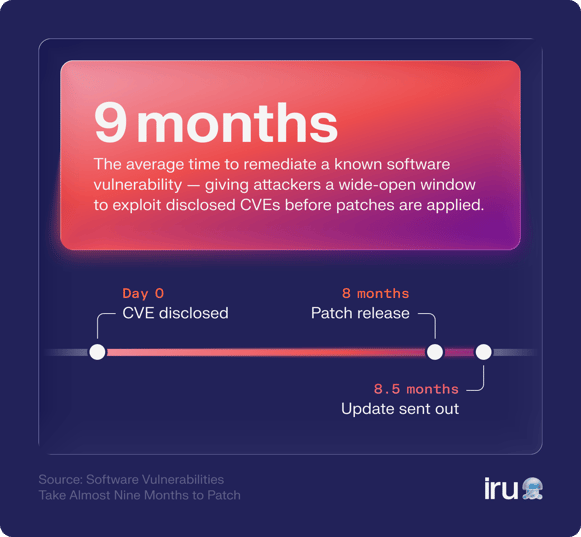
That gap leaves a wide-open window for attackers. Zero trust treats patch status as a live trust signal. A device running a version of macOS with a known critical flaw shouldn't receive the same access as a fully-patched device, and in a well-configured zero-trust system, it won't.
Automated vulnerability scanning identifies gaps across the fleet without requiring manual audits. Patch enforcement can restrict access for devices that fall out of compliance, creating a built-in incentive to stay current. Iru's vulnerability management tools provide continuous detection and autonomous remediation workflows, so that your team spends less time hunting for what's exposed and more time closing gaps before attackers find them.
Benefits of zero-trust endpoint security
For IT administrators managing dozens to thousands of devices, zero trust changes the nature of the work, from reactive patching and incident response to proactive, continuous control:
- Compliance support: Zero-trust control maps directly to SOC 2, ISO 27001, HIPAA, and other compliance frameworks. Continuous verification and access logging produce the documentation that those audits require, without scrambling to pull records when an audit arrives.
- Enhanced visibility: Instead of a periodic snapshot of device health, you get real-time status across every enrolled endpoint. You know which devices are compliant, which have drifted, and which represent active risk.
- Reduced breach blast radius: Least-privilege access and device isolation mean a compromised endpoint can't move freely across the network. The damage from any single incident is contained to what that device could actually reach.
- Distributed workforce coverage: Trust is enforced at the device level, not the network perimeter. Policy applies consistently whether your employees are in the office, remote, or traveling.
- Faster incident response: Automated behavioral detection and quarantine cut the window between detection and containment. Instead of a security analyst manually triaging alerts hours after an incident starts, the response immediately begins.
- Unified security management: Patching, compliance, monitoring, and access controls managed through a single platform reduce the administrative overhead of maintaining multiple tools across a mixed Apple, Windows, and Android fleet.
Implementing zero-trust endpoint security: a practical approach
A zero-trust device management framework is built over time, and implementing it isn't always straightforward. Each organization's architecture, existing tooling, fleet, and risk profile will shape the actual process.
1. Run a security posture assessment and add all devices
Zero-trust posture assessments are necessary before implementing any zero-trust policies. This process determines your current architecture, analyzes your current controls, and helps identify areas that you may lack control over, such as devices that are unmanaged, unpatched, or untracked by IT.
This starts with a full device inventory, so every endpoint that connects to company resources needs to be accounted for, enrolled in MDM, and assessed. The enrollment process differs by platform:
- Mac: Automated Device Enrollment (ADE) via Apple Business Manager provides zero-touch setup and ensures devices are enrolled before a user even reaches the login screen.
- Windows: Microsoft Intune manages all processes, using Windows Notification Services for command execution and enforcement.
- Android: Android devices may register for conditional access services via a registration application delivered through a QR code or a link sent by e-mail. Android's Work Profile capability separates personal apps and data from corporate resources on the same device.
Any device that has access to company resources without enrollment is a blind spot. Zero-trust policies can't cover what isn't enrolled, so closing that gap comes before anything else.
2. Define and enforce device health baselines
Device health baseline is the minimum level of security required for any device to gain access to organizational resources. Once you set the baseline, your MDM and access controls enforce it automatically.
Baselines typically cover:
- OS version: Devices below the approved minimum are flagged or blocked
- Encryption: FileVault on Mac, BitLocker on Windows, must be active
- Required apps: Endpoint protection, approved browsers and required security agents must be installed and running.
The baseline isn't just a policy document. It needs to be connected to actual access controls, so a device that drifts out of compliance loses access automatically.
3. Implement identity-aware access controls
Once device health is being monitored, you connect that data to access decisions. Device posture and user identity are evaluated together, not separately.
Multi-factor authentication (MFA) is the minimum here, but it's not sufficient on its own. Moving toward passwordless authentication (hardware keys, biometrics, certificate-based access) eliminates the credential theft risk that makes MFA necessary in the first place.
The micro-segmentation component makes the whole layer effective structurally. A verified user won't get access to broad network segments. Instead, they'll only get access to specific apps, services, and data required for their role. If a device or account becomes compromised, there's nowhere to move laterally because there was never unnecessary access to begin with.
4. Deploy continuous monitoring and behavioral detection
Periodic scans will give you the facts as they were at that time. Real-time monitoring will show you what's going on right now. The changeover between the two is where zero trust comes into effect.
This layer includes:
- Behavior analytics (UEBA): Detecting patterns that suggest credential misuse, insider threat, or account compromise
- Log analysis: Access, authentication, and endpoint activity logs provide the evidence trail for both real-time response and post-incident investigation
- Proactive threat hunting: Rather than waiting for alerts, experienced security teams actively look for indicators of compromise that haven't triggered automated detection yet
The goal is visibility without friction. Heavy-handed monitoring that generates noise burns out security teams and trains users to ignore security controls. The system should catch real threats and let normal work continue unimpeded.
5. Establish a response and remediation workflow
What happens when a device fails a health check or triggers a behavioral alert? Without a defined workflow, the answer is usually "someone looks into it eventually." That's just not fast enough. A response workflow should define:
- Automated quarantine: Devices that fail critical health checks are isolated from network access until remediated, without waiting for human approval.
- Mandatory MFA step-up: Certain access requests or behavioral signals trigger additional authentication, adding friction at the moment of potential compromise.
- Root cause analysis: After an alert is resolved, documenting what happened and how it was addressed improves the system over time.
- Guided remediation: Users receive clear instructions on what they need to do to restore compliance, rather than just losing access with no explanation.
The response workflow closes the loop. Detection without response is just expensive logging.
Pitfalls when implementing zero-trust security for endpoints
The concept of zero trust is clear enough, but most companies run into issues during implementation. Most failures trace back to a handful of predictable mistakes:
Treating it as a one-time deployment
Zero trust requires ongoing maintenance with new devices joining the fleet, vulnerabilities being discovered, and access patterns emerging as teams change. Organizations that implement zero trust and then stop actively managing it drift back toward implicit trust over time.
Skipping device inventory
Policies applied to known, enrolled devices don't protect you from the devices that aren't in your system. Unknown endpoints accessing company resources are zero-trust blind spots that the rest of your controls can't see.
Failing to audit existing devices
Your existing devices enrolled in MDM might not be up-to-date with health baselines required at present. This is a mistake that IT managers can make, taking for granted that all existing enrollments will be compliant.
Ignoring BYOD
Access by personal devices to company assets can pose great risks if left unmanaged. You cannot enforce the principle of zero trust in a meaningful way without requiring device enrollment via all possible access channels, from a contractor's cell phone to the CEO's personal laptop.
Failing to align endpoint security with IAM
Endpoint security and identity management must be considered together, because otherwise the trust signal chain will be broken. The two aspects cannot coexist successfully if the related teams have different tools and information sets available to them.
Siloing endpoint and identity teams
This is an organizational failure as much as it is a technical one. Zero trust requires these two functions to work from shared data and policies.
Best practices when implementing zero-trust endpoint security
Zero trust is an ongoing process, and the organizations that do it well treat these practices as continuous operational habits rather than a project with an end date. Here are common best practices for zero-trust endpoint security:
- Run posture assessments on a schedule: Your fleet changes constantly. Regular assessments catch new gaps, unmanaged devices, and drift from your defined baselines before attackers do.
- Perform proactive threat assessments: Don't wait for alerts. Actively look for indicators of compromise, unusual access patterns, and configuration drift across your devices.
- Commit to regular policy reviews: Access policies that made sense six months ago may not reflect the current structure of your team, your applications, or your risk environment. Review and update them on a defined cycle.
- Operate under an assume-breach mindset: Design your controls as if a device in your fleet is already compromised. What can that device reach, and how far could an attacker move? The answers shape your segmentation and access policies.
- Implement context-aware policies: Access decisions should factor in more than device health and user identity. Time of day, geographic location, behavioral signals, and the sensitivity of the resource being requested all add context that improves the quality of access decisions.
- Establish tiered device trust: Not every access decision is binary. A fully managed, enrolled corporate device warrants different access than a BYOD device, which warrants different access than an unverified device. Build those tiers into your access model rather than forcing everything into an allow/block binary.
- Treat certificate rotation as continuous: Certificates that aren't automatically rotated become static credentials over time, which defeats the always-verified model. Automate rotation and monitor for expired or stale certificates across your fleet.
Manage your endpoints at scale with Iru's MDM solution
Zero-trust endpoint security is one of the most consequential steps an IT team can take, and one of the most complex to execute at scale across a mixed Apple, Windows, and Android fleet. Every pillar covered here, from continuous verification to vulnerability management to identity-aware access control, depends on having the visibility and tooling to enforce policies consistently across every enrolled device.
Iru's MDM platform brings those capabilities together. Automated compliance monitoring, continuous vulnerability detection, AI-driven endpoint detection and response, and integrated identity management give IT administrators and security teams a single place to build, manage, and refine a zero-trust posture, without stitching together five different tools.
If you're building a zero-trust compliance program or want to see where your current posture has gaps, request a demo and see how Iru's endpoint security platform handles it in practice.