Skip to content
What Mac Admins Need to Know about Rosetta 2
Iru Team

6 min read

What Mac Admins Need to Know about Rosetta 2

The release of macOS Big Sur and Apple silicon in 2020 brought a lot of changes to the Mac environment. Apple introduced Rosetta 2 to help make those changes easier for developers and for Mac admins, by enabling code designed for older Intel-based hardware to run on the new Apple systems. As the transition to Apple silicon continues, with the ongoing release of new Mac computers using the M1 chip, Rosetta 2—which is free—still has a role to play. Here are some quick answers to the questions admins have about this technology: What is Rosetta? How do you install Rosetta? Which apps require Rosetta?

Recent News
Kandji Raises $60 Million Series B to Drive the Future of Apple Enterprise Management
Iru Team

2 min read

Kandji Raises $60 Million Series B to Drive the Future of Apple Enterprise Management

Kandji is excited to announce its $60 million Series B round of funding, led by Felicis Ventures with participation from SVB Capital, Greycroft, B Capital Group, Okta Ventures, and the Spruce House Partnership.

Recent News
Level Up Your Deployment with Enrollment Customization
Iru Team

5 min read

Level Up Your Deployment with Enrollment Customization

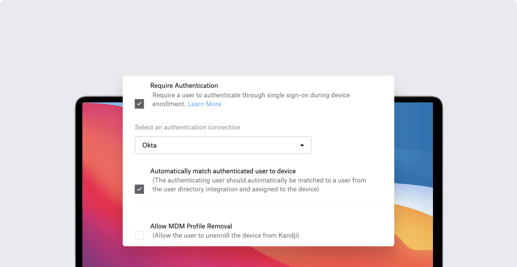
Apple is famous for the out-of-box experience new users get when they open up a Mac, iPhone, or iPad for the very first time. Kandji can help make that unboxing moment even better—for you as an Apple admin and for your users—with enrollment customization, by requiring users to sign in with their Single Sign-on (SSO) credentials the first time they boot up a new device. It’s a streamlined experience for you and for them; as they authenticate, they can be automatically matched from your user directory and assigned to their devices. Kandji recently added support for enrollment customization. Kandji’s Head of Solutions, Weldon Dodd, recently hosted a webinar to talk about how this new feature works. Here’s what he had to say.

Recent News
How MDM and IT Asset Management Can Work Together
Iru Team

4 min read

How MDM and IT Asset Management Can Work Together

Using IT asset management and mobile device management (MDM) in tandem can make life easier for you as an Apple IT admin. Kandji’s MDM solution now integrates with Oomnitza’s Enterprise Technology Orchestration solution; here’s what an integration like that can do. A quick overview of the topics we’ll cover: What Is IT Asset Management? What IT Asset Management Can Do Using MDM and IT Asset Management Together

Recent News
Mac Admins' Top Tips for Managing Apple Devices
Iru Team

6 min read

Mac Admins' Top Tips for Managing Apple Devices

At Kandji, we get a lot of questions about best practices in mobile device management. We decided to get answers to some of those questions by asking the best sources we know: The IT admins who manage Apple devices day in and day out. We’ve recently posted their thoughts on migrating to macOS Big Sur and on the subtle science of managing users. But we were particularly interested in hearing about their suggestions for adopting Apple-focused MDM solutions (such as Kandji) to manage fleets of Mac computers, iPad and iPhone devices, and Apple TVs. Here’s what they told us: Take the time to find the right solution. Don’t wait to start managing mobile devices. Take advantage of Automatic Device Enrollment. Lean on existing skills. Test early and often. Nail down security. Stay one step ahead.

Recent News
Managing Network Settings on macOS Big Sur and MAC Address Randomization in iOS 14
Iru Team

8 min read

Managing Network Settings on macOS Big Sur and MAC Address Randomization in iOS 14

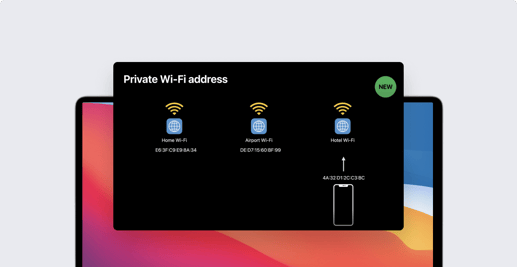
A lot of exciting changes have come to macOS Big Sur and iOS 14. In this guide, we’re going to do a deep dive into managing network settings in Big Sur, and then we’ll break down the new MAC address randomization feature in iOS 14. Here’s a quick overview of what we’ll cover: networksetup: Changes in macOS Big Sur What’s the new MAC Address Randomization Feature? Implications for IT: MAC Address Randomization and MDM

Recent News
Upgrading to macOS Big Sur: Mac Admins Share Their Thoughts
Iru Team

9 min read

Upgrading to macOS Big Sur: Mac Admins Share Their Thoughts

With the public release of macOS Big Sur back in November, a lot of IT administrators are busy testing their company Mac computers for compatibility with the latest OS. At Kandji, we've gotten a lot of questions about how other Mac admins are approaching the transition to Big Sur. So, we compiled some of the most common questions and asked for input from several Mac admins. In this article, we're going to explore some of the answers we got about how and why Mac admins are deferring updates, how the upgrade process is going in their environment, and what advice they have for their peers.

Recent News
Managed Apps on macOS Big Sur
Iru Team

6 min read

Managed Apps on macOS Big Sur

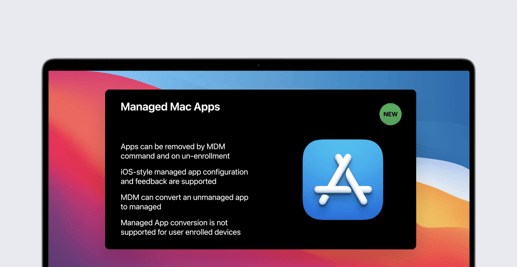
For years, Managed Apps have been a powerful MDM capability for iOS devices, and now they're coming to the Mac. In this guide, we're going to discuss what we know about Managed Apps on macOS Big Sur, how using them extends the management capabilities of IT, what the process is like to transition to Managed Mac Apps, and more. Here's a quick overview: macOS Big Sur Brings Managed Apps to the Mac What to Expect from Managed Mac Apps Moving from Personal Apps to Managed Apps Moving from Non-App Store Apps to App Store Apps

Recent News
macOS Big Sur and MDM: The Comprehensive Guide for Mac Admins
Iru Team

15 min read

macOS Big Sur and MDM: The Comprehensive Guide for Mac Admins

When macOS Big Sur was first unveiled at the Worldwide Developers Conference (WWDC) 2020, it was clear that Apple was bringing significant changes to the Mac. Beyond completely overhauling user-facing features and design, they’re also making a lot of changes with Mac management in mind. In this article, we’re going to take stock of the biggest MDM-Big Sur changes, talk a bit about their implications for macOS device management, and share some tips to make your transition to Big Sur smooth. Update 11/12/20: We're proud to announce release day support in Kandji's device management (MDM) solution for the new features in macOS Big Sur. We’re going to cover a lot of ground here, so here’s an overview of what you’ll find in this article: How to Manage Public Betas and Defer Software Updates Changes to macOS Supervision Auto Advance has Come to Mac Account Creation with SCIM vs. JIT Big Changes Come to PPPC Changes to Bootstrap Token Changes to Kernel Extensions (KEXTs) Mac Transitions to Apple Silicon Automated Device Enrollment on Big Sur Lights Out Management Comes to the Mac Pro Managed Apps on macOS Big Sur New Content Caching MDM Command Security Updates for macOS Big Sur

Recent News
The Mac Admins’ Guide to Apple Silicon
Iru Team

8 min read

The Mac Admins’ Guide to Apple Silicon

Apple made a big announcement in June that they’re transitioning the Mac to Apple Silicon. This move will boost performance and introduce a lot of new and redesigned features to macOS Big Sur. In this guide, we’re going to catalog those changes and briefly discuss their implications for mobile device management (MDM) in Big Sur. Here’s a quick overview of the topics we’ll cover: What’s Apple Silicon? A Primer on the Apple Silicon Mac The Biggest Changes Apple Silicon Brings to Mac

Recent News
Changes to Secure Token and Bootstrap Token in macOS Big Sur
Iru Team

7 min read

Changes to Secure Token and Bootstrap Token in macOS Big Sur

At WWDC 2020, Apple announced some exciting changes coming to Bootstrap Token and Secure Token on macOS Big Sur. In this guide, we’re going to take a look at how these tokens work and what the latest changes mean for device management for Mac computers. Here’s a quick overview of what we’ll cover: What’s New with Big Sur? What’s Secure Token? What’s Bootstrap Token? How to Acquire Bootstrap Token

Recent News
Privacy Preferences Policy Control (PPPC): Changes in macOS Big Sur
Iru Team

3 min read

Privacy Preferences Policy Control (PPPC): Changes in macOS Big Sur

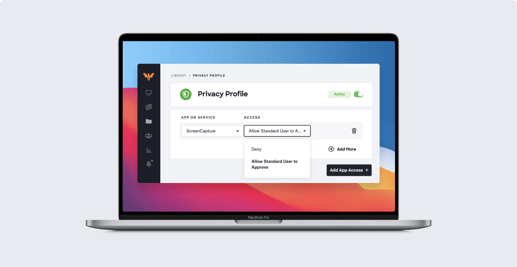
Apple recently announced new changes coming to PPPC on macOS Big Sur. With macOS Big Sur, standard users are prevented from approving applications for certain sensitive system-level PPPC controls, Screen Recording and Input Monitoring, which was not the case for macOS Catalina. However, a more recent release allows IT to use MDM and the PPPC profile to allow standard macOS users to approve defined applications for Screen Capture and Input Monitoring on macOS Big Sur. In this quick article, we’re going to see what’s changing and explore what its implications are for Mac device management.

Recent News
Manual Device Enrollment Now Results in macOS Supervision, New from WWDC 2020
Iru Team

6 min read

Manual Device Enrollment Now Results in macOS Supervision, New from WWDC 2020

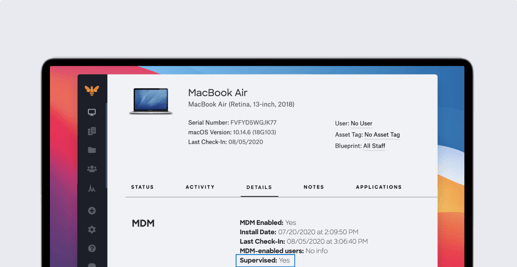
A lot of big news came out of the Worldwide Developers Conference (WWDC) 2020, including a new update for macOS Big Sur regarding device supervision, manual Device Enrollment, and User Approved MDM (UAMDM). Automated Device Enrollment (formerly DEP) used to be the only way to supervise your devices, but Apple’s latest update changes that. In this post, we’re going to talk about how manual Device Enrollment with User Approved status now results in device supervision, what this means for IT administrators, and why Automated Device Enrollment is still important. Here’s an overview: What’s Changing in Device Enrollment & Supervision with Big Sur? What are the Implications for IT? Why Automated Device Enrollment Still Matters

Recent News
Guide for Apple IT: Auto Advance for Mac
Iru Team

9 min read

Guide for Apple IT: Auto Advance for Mac

Auto Advance is a great feature that lets IT administrators set up Apple TV devices at scale – And now this feature is coming to Mac. At the World Wide Developer Conference (WWDC) 2020, Apple announced the new Auto Advance for Mac capability, opening up a new way to set up Mac computers at scale. This has big implications for device management, which we’ll explore in this guide along with configuration walkthroughs, common Auto Advance use cases, and some of the latest information we have on Auto Advance for Mac. Here’s an overview of what we’ll cover: What’s Auto Advance? Using Auto Advance for tvOS Using Auto Advance for Mac

Recent News
Extensible Enterprise SSO Framework: Kerberos Extension and What’s New with Big Sur
Iru Team

10 min read

Extensible Enterprise SSO Framework: Kerberos Extension and What’s New with Big Sur

Apple’s Extensible Enterprise SSO (single sign-on) framework has big implications for device management and authentication. In this article, we’re going to take a look at how the Kerberos single sign-on extension works, what it can do for you, and how you can configure and deploy it. We’ll also discuss how Kandji’s SSO Extension Profile makes it easy to leverage the Kerberos Extension. Here's an overview of this guide: A Primer on SSO Extensions What’s the Kerberos Single Sign-On Extension? Building and Deploying a Kerberos Configuration Profile What’s New in macOS Big Sur Kerberos Extensions?

Recent News

Stay up to date

Iru's weekly collection of articles, videos, and research to keep IT & Security teams ahead of the curve.