Workforce Identity
 Endpoint Management
 Endpoint Detection & Response
 Vulnerability Management
 Compliance Automation
 Trust Center





Automated patch management is a process that uses software to scan devices for missing updates, download and test patches, and deploy them to targeted devices. It’s like putting your clothes in a washing machine instead of washing them by hand.
A critical Common Vulnerabilities and Exposures (CVE) entry drops for an app your team uses. A fix is already available, but the next maintenance window is weeks away. While the patch waits, attackers have time to scan for the same flaw and find systems that still leave the door open.
Manual patching can’t keep pace with that cycle. Automated patch management helps you stay ahead by finding vulnerable software and getting fixes where they need to go. Find out how it works, where Iru can help, and what to look for in a patch management solution.
Why automated patching matters
The longer a vulnerability sits unfixed, the longer your systems remain exposed. A vulnerability assessment can show you what needs attention, but finding the problem is only the first step. The real challenge begins when a patch is available and vulnerable software remains in use while attackers look for systems they can exploit.
CISA’s Known Exploited Vulnerabilities (KEV) Catalog tracks flaws that attackers actively exploit. It lists nearly 1,700 CVEs, and the number keeps growing. CISA urges organizations to prioritize timely remediation, but critical vulnerabilities can still take an average of four weeks to remediate, with some taking one to three months.
Manual patching adds more friction to an already tight race. Your team has to identify affected software, decide what to fix first, test updates, and push them across the environment. Every handoff can add time. Meanwhile, attackers only need one overlooked program.
Automated patch management helps you move from finding vulnerable software to applying available fixes faster.
How does automated patch management work?
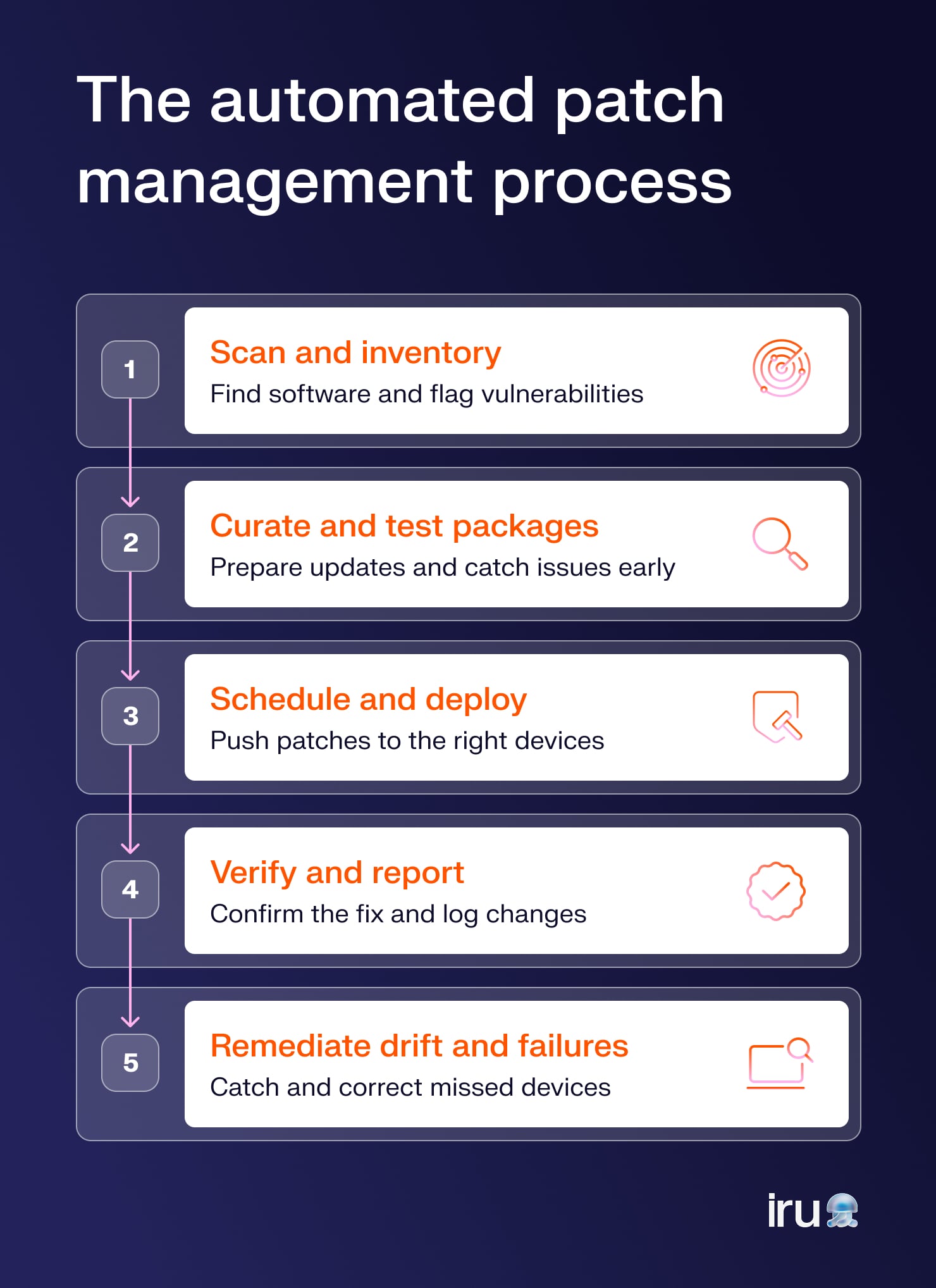
Patch management automation turns patching into a repeatable process that keeps moving without your team chasing every update by hand. The exact workflow varies by tool, but most follow a similar path:
- Scan and inventory: Identify the software running across your environment and flag versions with known vulnerabilities. Device management gives you the visibility needed to connect each vulnerable app to the devices where it runs.
- Curate and test packages: Review available updates and prepare packages for deployment. With regular testing, you can catch compatibility issues before an update reaches a larger group of devices.
- Schedule and deploy: Set rules for when patches should be installed, then deploy them to the affected devices. Automation reduces the manual work involved in patching software across your environment.
- Verify and report: Ensure that the update was installed successfully and confirm that the vulnerable version is no longer present. Reports give you a clear record of what changed and what still needs attention.
- Remediate drift and failures: Identify devices that missed the update and bring them back into compliance. Automated follow-up can bring those devices back in line and prevent small issues from quietly becoming larger ones.
Benefits of automated patch management
With the right automation, patching becomes a process your team can control at scale, rather than a stream of manual tasks. It helps you:
- Save time: Endpoint management gives you a central view of your devices, while automation handles much of the repetitive work involved in finding and deploying updates. Your team spends less time chasing individual patches.
- Remediate vulnerabilities faster: Patching automation keeps updates moving once your team defines the right rules and schedules. That can reduce the delay between discovering a vulnerable program and applying an available fix.
- Shrink attack windows: Faster patching leaves attackers with less time to exploit known vulnerabilities. Every day an affected program remains unpatched can extend that window.
- Reduce human errors: Manual patching often involves repetitive steps across many devices. Automation applies the same rules consistently, reducing the chance that a device gets missed or an update goes to the wrong place.
- Keep compliance evidence ready: Vulnerability management records can show what your team found, what you fixed, and where issues remain. That gives you a clearer trail when it’s time to demonstrate how you manage software risk.
- Scale with your environment: A process that works for 50 devices can become a full-time job at 5,000. Automation handles a growing number of devices without requiring your team to repeat the same work for each one.
- Improve the user experience: Well-planned patch schedules can install updates at less disruptive times. Users get the software updates they need with fewer unexpected interruptions to their work.
What to look for in automated patch management software
The right automated patch management software gives you visibility into what needs fixing and control over how updates reach your devices. As you compare options, look beyond basic patch deployment. Consider your operating systems, third-party apps, remote devices, and users.
Real-time inventory and patch detection
You need an accurate picture of the software running across your environment before you can fix what’s vulnerable. Real-time inventory and patch detection help you spot outdated versions as they appear and connect them to the affected devices.
It’s like checking your car’s dashboard before a long drive. You want to know about a warning light before you’re miles from home.
OS and third-party app coverage
Operating system patches are only part of the job. Many security problems come from the third-party applications your users rely on every day, so your patch management software should cover both.
Broad app coverage can also reduce the number of separate tools your team needs to manage updates. For a closer look at automating Mac patching, see how automation can help keep your Mac software up to date.
Cross-platform support
Managing separate patching processes for every operating system creates more work and makes it harder to see what’s happening across your environment.
Cross-platform support gives you a more consistent way to manage updates across the devices you support, which means you can spend less time jumping between tools and more time focusing on the patches that need attention.
Flexible scheduling
A patch can fix a security issue, yet still cause frustration if it arrives at the worst possible moment.
Flexible scheduling lets you control when updates deploy, giving you room to account for maintenance windows, business hours, and different device groups. Automated patching should work around the reality of your environment rather than forcing your environment to work around it.
Severity-based remediation
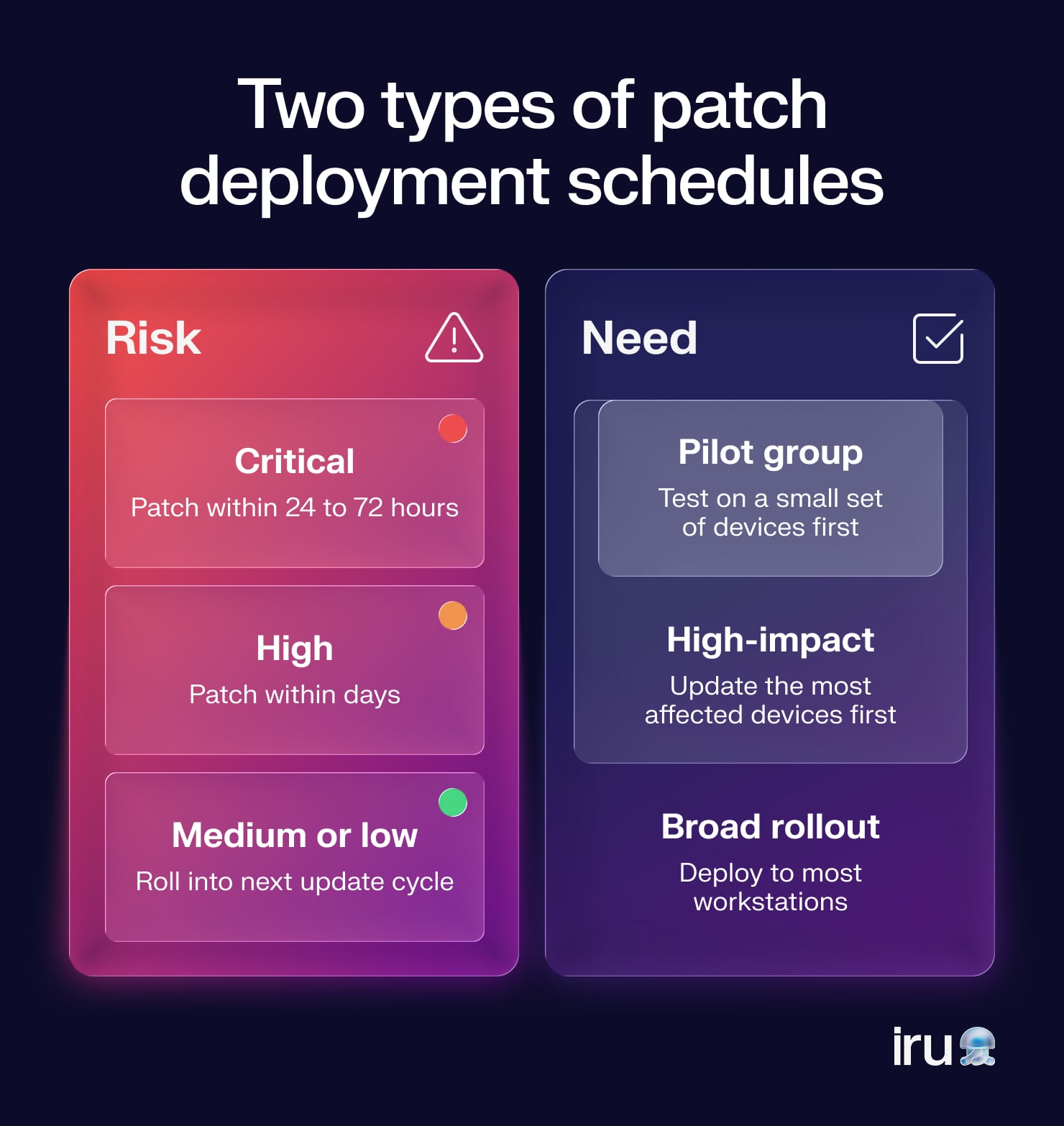
A long list of vulnerabilities doesn’t tell you where to start. Severity-based remediation helps you prioritize patches by risk, so critical issues move to the front of the line while lower-risk updates follow an appropriate schedule.
That focus becomes even more valuable when you’re also evaluating other security tools, such as endpoint detection and response (EDR) solutions.
Update enforcement
Some devices miss scheduled updates because they’re offline, users delay a restart, or an installation fails.
Update enforcement helps you follow up and keep those devices from drifting further behind. A good system should provide a way to reapply the update or require action when a device remains vulnerable.
Compliance evidence
Patching often creates a paper trail, especially when your organization needs to show how it handles security risks.
Good reporting gives you evidence of what software was vulnerable, when you deployed a fix, and whether the update succeeded. When an auditor comes knocking, you’ll have records ready instead of digging through old spreadsheets like an IT archaeologist.
Best practices for automated patch management
A good patching process needs more than a button that says “deploy.” Here’s what you can do to reduce risk while keeping updates manageable:
- Stage rollouts with pilot groups: Test patches with a small group of devices before deploying them across your environment. A pilot can reveal compatibility issues early, when fixing them is far less disruptive.
- Prioritize commonly exploited apps: Focus first on software that attackers frequently target, such as browsers and other widely used applications. Threat intelligence and endpoint monitoring can help you spot the vulnerabilities that deserve faster attention.
- Set enforcement deadlines with user prompts: Give users advance notice and time to install an update before the deadline arrives. Clear prompts can reduce surprise interruptions while still ensuring critical patches are eventually applied.
- Prepare for bad patches: Updates can occasionally cause problems, so plan for failures before they happen. Have a rollback option or recovery process so your team can respond without turning one bad patch into a very long afternoon.
- Measure patch compliance fleet-wide: Track which devices successfully installed updates and which ones still need attention. With fleet-wide reporting, you can identify issues that individual device checks might miss.
- Watch for patch failures and drift: A successful deployment doesn’t guarantee that every device stays up to date. Monitor for failed installations, missed deadlines, and devices that fall behind after the initial rollout so you can bring them back in line.
Automate patch management with Iru
Patching your entire environment by hand is a little like playing whack-a-mole with a growing pile of hammers. The work keeps coming, and every missed update can leave another security hole behind.
Iru brings patching and vulnerability management into the same platform, so you can identify vulnerable software and automatically deploy available updates across your Mac and Windows devices. Set deployment rules, stage rollouts, prompt users, and enforce deadlines without having to chase every device yourself. With Iru, you can automate much of that work.
Book a free demo to see how Iru can help you automate patch management.