Workforce Identity
 Endpoint Management
 Endpoint Detection & Response
 Vulnerability Management
 Compliance Automation
 Trust Center



Modern IT environments rarely stay still. Employees work across offices, homes, and coworking spaces. New devices join the fleet. Software changes. Configurations drift. And then the compliance audit notice arrives.
You need to know which devices are compliant, which are missing critical updates, and where changes have occurred. Without a centralized view of your environment, answering those questions can quickly become a scramble. Endpoint drift often happens quietly, creating visibility gaps that are easy to miss until an audit or security review.
That's where endpoint monitoring starts to matter. Here's why, along with a more detailed rundown of what endpoint monitoring is, how it works, and how to carry it out effectively.
What is endpoint monitoring?
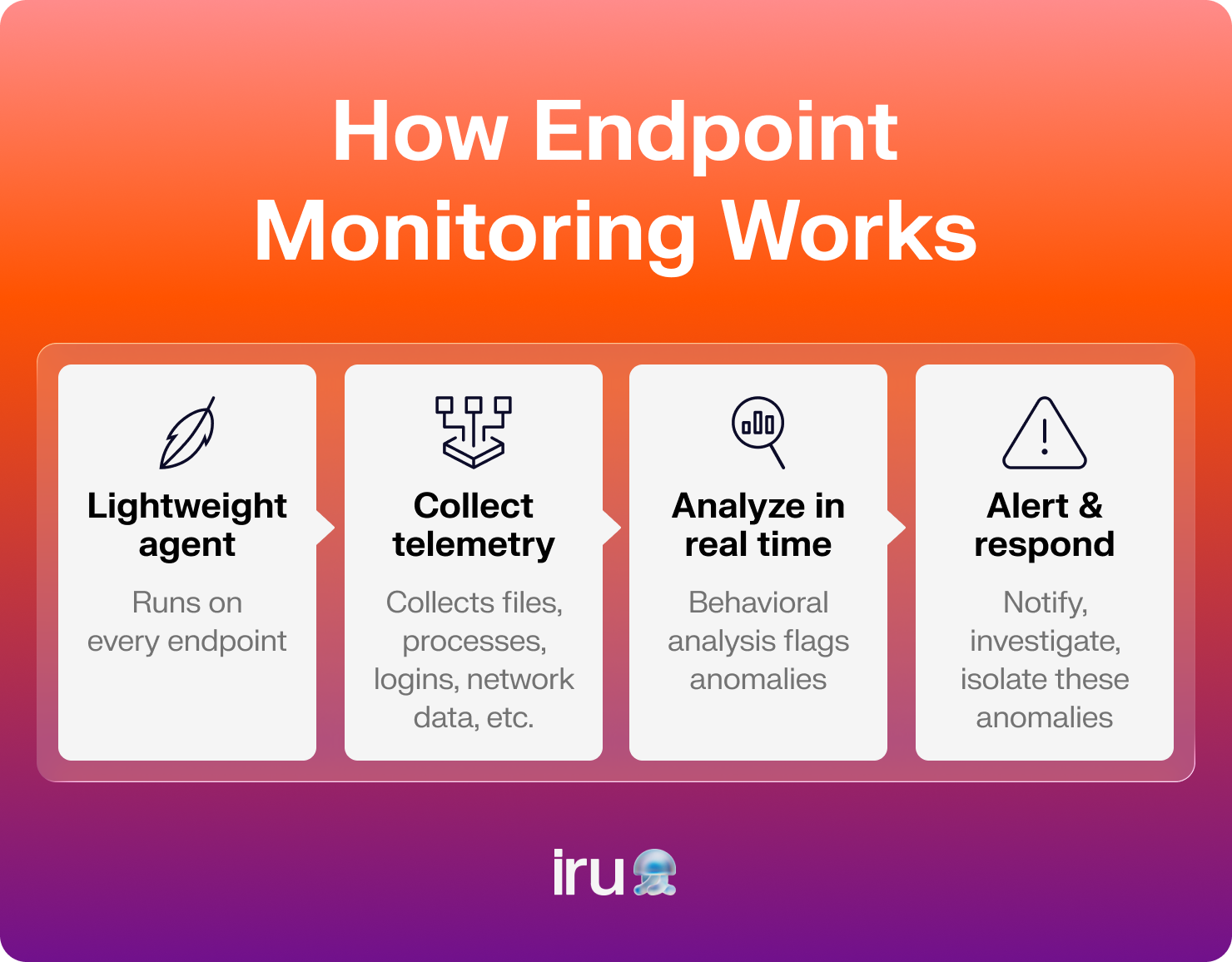
Endpoint monitoring is the ongoing process of tracking activity, performance, and security events across the devices connected to your organization’s network. These devices, or endpoints, include laptops, desktops, smartphones, tablets, servers, and other systems your employees use to access company resources.
Unlike basic device management, endpoint monitoring focuses on what’s happening on those devices in real time. It can track:
- File operations
- Process execution
- Application activity
- Configuration changes
- User behavior
- Network connections
- Other indicators that affect performance, compliance, or security
Many organizations already use remote monitoring and management (RMM) tools to manage devices and automate routine tasks. That's useful, but it isn't the same as a dedicated endpoint detection platform.
Endpoint security monitoring goes deeper by continuously collecting and analyzing endpoint activity, helping you detect risks, investigate incidents, and maintain control across your environment.
Types of endpoint monitoring tools
Endpoint monitoring isn't a single technology. Most organizations rely on a combination of tools to monitor device activity, detect threats, enforce policies, and maintain visibility across their environments.
Some tools focus on security. Others track user activity, file changes, or device health. Together, they support effective endpoint monitoring and management across the modern workplace.
| Tool category | Best for | What it monitors | Typical use case | Common examples |
|---|---|---|---|---|
| Security tools | Threat detection and incident response | Malware activity, suspicious behavior, and attack indicators | Detecting ransomware, malware, credential theft, and other cyber threats | Antivirus, EDR, XDR, EPP |
| Activity monitors | Visibility and auditing | File changes, user actions, network, and system changes | Tracking user activity, monitoring sensitive files, and supporting investigations | FIM, UAM, DLP, NCM |
| Management tools | Endpoint operations and lifecycle management | Device health, compliance status, applications, policies, and backups | Managing devices, enforcing policies, deploying software, and maintaining compliance | Backup and recovery, MDM, UEM, Mac MDM |
Security tools
Security-focused endpoint monitoring tools help detect malicious activity, identify vulnerabilities, and respond to threats before they spread across your environment.
Common examples:
- Antivirus software, which scans for known malware and other malicious files
- Endpoint detection and response (EDR) platforms, which monitor endpoint activity and help investigate and contain threats
- Extended detection and response (XDR) tools, which correlate data from endpoints, networks, cloud services, and other security tools
- Endpoint protection platforms (EPPs), which combine preventative controls such as antivirus, threat prevention, and device protection in a single solution
Activity monitors
Activity monitoring tools focus on understanding what's happening on endpoints day to day. They provide visibility into user actions, system changes, and data movement.
Examples include:
- File integrity monitoring (FIM) tools, which track changes to critical files and configurations
- User activity monitoring (UAM) tools, which record and analyze user actions on managed devices
- Data loss prevention (DLP) solutions, which help prevent sensitive information from leaving the organization
- Network configuration monitoring (NCM) tools, which track network and configuration changes that could affect security or performance
Management tools
Some solutions combine monitoring with management, recovery, and compliance capabilities. These tools often provide broader operational visibility across the endpoint lifecycle.
Here are some examples:
- Mobile device management (MDM) platforms, which monitor and manage smartphones, tablets, and computers
- Backup and recovery solutions, which monitor backup status and help restore systems after data loss or ransomware incidents
- Unified endpoint management (UEM) platforms, which extend device management across multiple operating systems and device types
- Specialized solutions such as Mac MDM platforms, which provide monitoring, security, and management capabilities tailored to Apple environments
Why endpoint monitoring matters for IT and security teams
The number of endpoints you need to manage and protect keeps growing with the size of your organization. Without visibility into those devices, small issues can turn into security incidents, compliance failures, or hours of manual investigation.
And the real challenge isn't just the number of endpoints but also the lack of a single view across them.
Poor endpoint visibility often leads to:
- Tool sprawl, where security, monitoring, and management data is scattered across multiple platforms
- Fragmented alerting that forces your teams to jump between tools to investigate issues
- Operational fatigue from manually checking devices, teams, or locations for problems
- Slower response times when threats, vulnerabilities, or performance issues emerge
- Compliance gaps that make frameworks such as SOC 2 and ISO 27001 harder to maintain
- Limited visibility into remote devices that may rarely connect to a corporate network
- Difficulty maintaining consistent endpoint performance monitoring across distributed environments
These challenges become even more pronounced for remote and hybrid teams since endpoints are spread across homes, offices, coworking spaces, and public networks. Every device becomes part of a larger attack surface, making continuous visibility and control essential.
TensorIoT saw this firsthand. Before improving endpoint visibility and automation, its IT team spent hours each day manually checking security settings and identifying devices that needed updates. By automating those processes, the company saved 25% of IT staff time while improving security oversight.
Capabilities of endpoint monitoring tools that make IT’s lives easier
Not all endpoint monitoring tools offer the same capabilities. The most effective solutions combine visibility, security, automation, and compliance features that help your IT and security teams spend less time reacting and more time staying in control.
Device onboarding
Device onboarding tools automate the process of preparing new devices for users. Instead of manually configuring settings, installing applications, and enforcing policies, your IT teams can deploy standardized setups at scale.
This saves time, reduces configuration errors, and helps ensure devices are monitored from day one. Strong onboarding capabilities are a key part of automated endpoint management, especially for growing or distributed teams.
Just as important, onboarding creates a foundation for the security controls and monitoring capabilities that follow.
Endpoint detection and response
EDR tools continuously monitor endpoint activity for signs of malicious behavior. Rather than relying solely on known malware signatures, they analyze behavioral indicators that may signal an active attack.
This visibility helps your security teams identify suspicious activity, investigate incidents, and respond to threats in real time. Modern EDR software can also help detect zero-day exploits and emerging threats that traditional security tools may miss.
Once threats are visible, the next challenge is reducing the vulnerabilities that attackers often exploit in the first place.
Vulnerability management
Vulnerability management helps you identify, prioritize, and remediate software weaknesses across your device fleets. Continuous monitoring makes it easier to spot outdated applications, missing patches, and other security risks before they become larger problems.
Many modern vulnerability management tools also automate patch deployment and software updates, allowing your IT teams to roll out fixes across hundreds or thousands of devices from a central location.
Reducing vulnerabilities strengthens security posture and supports another critical goal: maintaining compliance.
Compliance and identity tools
Compliance and identity tools help you verify who is accessing company resources and whether devices meet security requirements. Together, they provide the visibility and controls needed to support modern security frameworks.
Many organizations are adopting passwordless workforce identity solutions that replace traditional passwords with hardware-backed authentication methods such as passkeys. This reduces the risk of credential theft, phishing attacks, and password reuse while improving the user experience.
Combined with continuous compliance monitoring, these tools help you stay audit-ready and demonstrate that security controls remain in place over time.
Questions to ask before picking an endpoint monitoring provider
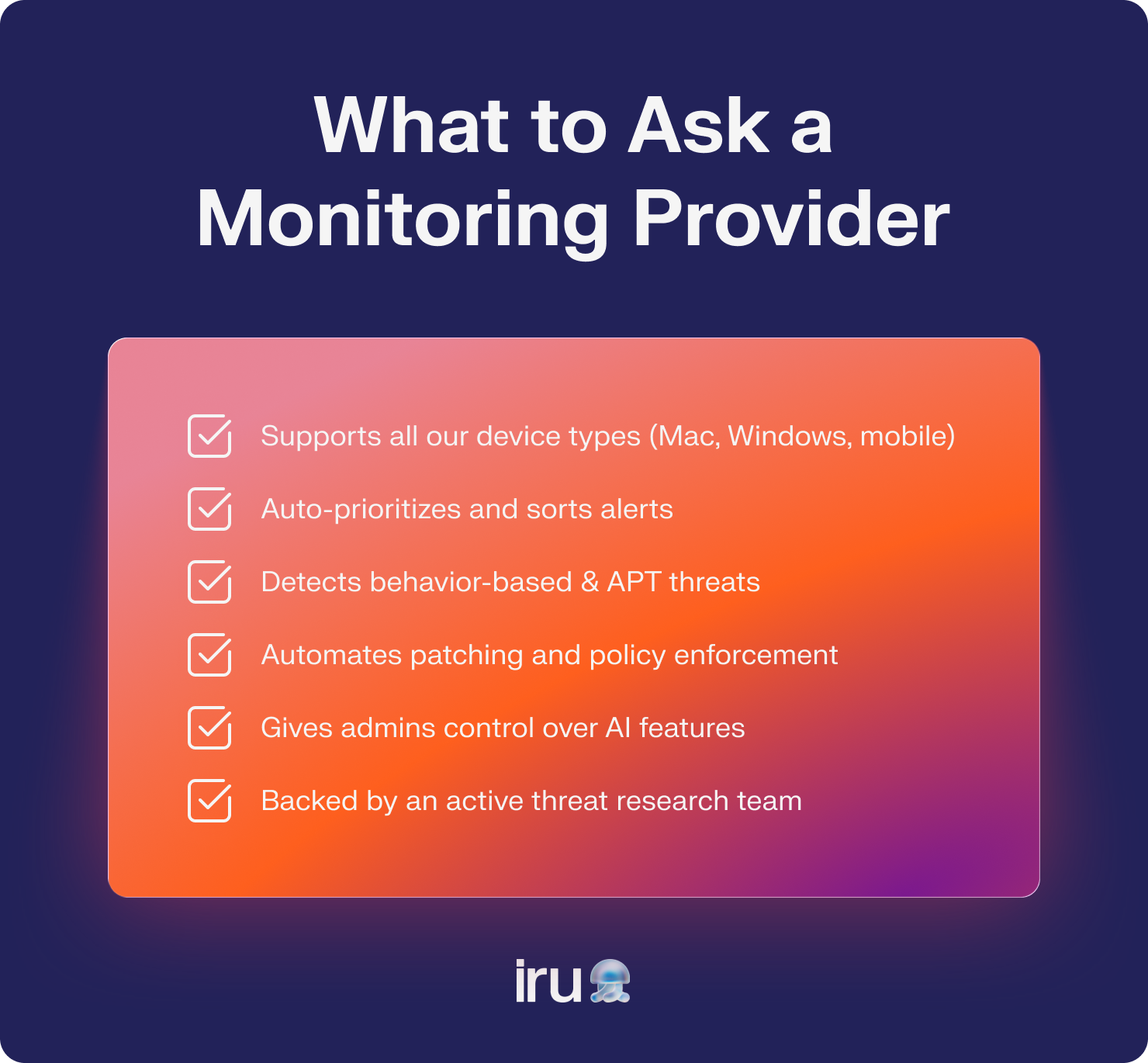
The right endpoint monitoring provider should help your team reduce manual work, strengthen security, and maintain visibility as your environment grows. As you evaluate options, keep these questions in mind. Strong endpoint activity monitoring capabilities are important, but they're only part of the picture.
How many device types do they support?
Not every organization manages the same mix of devices. Some primarily support Mac computers, while others manage Windows, Android, iPhone devices, tablets, servers, and others.
Look for a platform that supports the devices you use today and the ones you may need tomorrow. The best endpoint management software should scale with your environment instead of forcing you to adopt additional tools as your fleet grows.
Do they automatically handle or sort some alerts?
Alert fatigue is one of the biggest challenges facing IT and security teams. When every event generates a notification, important threats can get buried in the noise.
Look for providers that automate alert prioritization, investigation workflows, or remediation actions. Remember, the goal isn't more alerts. It's fewer distractions and a security stack that lets you build a tech stack that runs itself.
Can they handle advanced persistent threats (APTs)?
Traditional security tools often rely on known threat signatures. That approach can struggle against sophisticated attacks, including AI-generated malware that behaves differently from previously identified threats.
Behavior-based monitoring found in many UEM and EDR solutions can help detect unusual activity associated with advanced persistent threats. When evaluating providers, look beyond signature matching and consider whether they're delivering capabilities comparable to the best EDR solutions available today.
Do they automate patch management and device policy enforcement?
Patch management and policy enforcement are foundational security controls, but they can quickly become overwhelming in large environments.
Automation helps ensure your devices receive updates on time and remain aligned with organizational requirements. It also supports compliance efforts by helping you build a smarter OS update strategy with declarative device management rather than relying on manual processes.
How do they use AI?
AI is becoming part of nearly every area of endpoint security and management, from threat detection to compliance workflows and operational automation.
Ask how AI is used, what problems it solves, and whether administrators can control when and where it's applied. The most useful platforms give you flexibility, including the ability to enable or disable AI-powered capabilities based on your needs through features such as user-based vs. device-based security exclusions.
Do they have an internal research team?
Threats evolve constantly. Security providers need dedicated teams that study emerging attack techniques, analyze malware, and identify new risks before they become widespread.
An active research team demonstrates an ongoing investment in security. It also helps providers respond to emerging threats, including campaigns such as spreading macOS malware via Music Plugin DMG Loader, before they impact their clients.
Automate endpoint monitoring and security with Iru
Effective endpoint monitoring requires more than visibility alone. Your IT and security teams need tools that help them reduce complexity, respond faster, and maintain control as their environments grow.
Iru’s UEM platform brings endpoint management, EDR, and vulnerability management under one roof, so you can onboard devices, monitor activity, detect threats, automate patching, and enforce policies from one place. This means less manual work, stronger security, and more time to focus on strategic priorities.
Book a free demo to see Iru in action and how it can help you simplify endpoint monitoring.