
 Workforce Identity
 Endpoint Management
 Endpoint Detection & Response
 Vulnerability Management
 Compliance Automation
 Trust Center




What is endpoint management? Endpoint management is the practice of provisioning, configuring, securing, monitoring, and maintaining every device that connects to your organization’s network of laptops, desktops, smartphones, tablets, servers, and IoT devices. It covers the full device lifecycle, from initial enrollment through retirement, including patching, application deployment, and security policy enforcement.
Managing endpoints used to be simple, and if something broke, someone in the office could walk over and fix it. But that’s not the environment that IT managers are responsible for anymore. Today, they’re managing hundreds or thousands of devices spread across multiple operating systems, remote locations, and ownership models.
Bring-your-own-devices (BYOD) policies alone have exposed billions of mobile endpoints that sit outside traditional firewalls. Compliance requirements from SOC 2, HIPAA, and ISO 27001 require documented controls for all devices, yet one survey found that 48% of a company’s devices are at risk because its IT department can no longer detect them. And when someone joins or leaves the company, provisioning or wiping their device correctly is a security requirement.
The complexity has outpaced the tooling that most teams are still using. Stitching together separate MDMs, patch managers, EDR tools, and identity platforms creates gaps, and gaps are where breaches happen.
Keep reading, and we’ll explain how endpoint management actually works, what a good process looks like, and how a unified platform changes the calculus for IT administrators who are done managing tools instead of managing endpoints.
How does endpoint management (EM) work?
The endpoint management process follows a cycle in which endpoints are enrolled, configured, kept up to date, monitored, and any deviations are remedied. The most common way of achieving this is by using Mobile Device Management (MDM) software, which interacts with the enrolled endpoints to remotely deploy configurations, collect information, and perform remediation tasks.
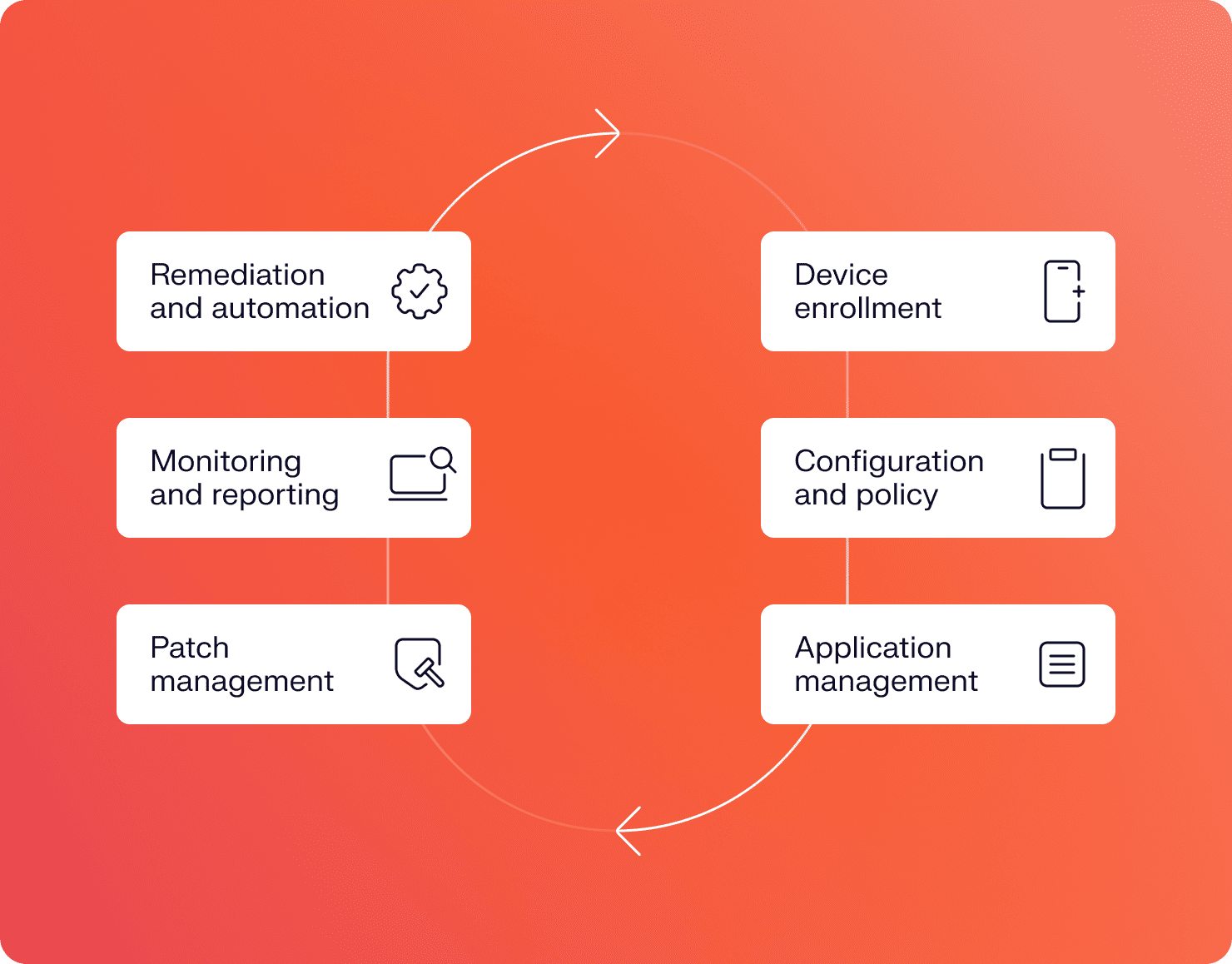
Platforms like Iru’s IT endpoint management solution go further, combining MDM functions with security tooling, application management, and compliance automation in a single agent rather than requiring separate products for each layer.
1. Device enrollment
Before you can manage a device, you need to enroll it to reduce as much friction as possible for your team and users. Modern enrollment uses zero-touch deployment and configures itself based on your policies with no IT hands required.
On Mac, this runs through Apple’s Business Manager’s Automated Device Enrollment. Windows uses Autopilot, and Android supports enrollment via QR code or email link, with Android’s Work Profile separating corporate and personal data on the same device.
Key components of this stage include:
- Liftoff:Zero-touch provisioning automatically enrolls and configures devices on first boot so that employees can get started immediately without IT. For example, Iru has leveraged zero-touch to help Planview navigate its multiple acquisitions.
- Self-service:A user-friendly portal where employees can install approved apps, request resources, and resolve common issues without submitting IT tickets.
- Auto-discovery and inventory logging:Every enrolled device is cataloged immediately, keeping your fleet inventory up to date. The management agent deploys automatically, enabling policy enforcement and monitoring from day one.
2. Configuration and policy enforcement
Good endpoint management doesn’t stop at Apple’s Native MDM profile capabilities. Once enrolled, every device needs to be configured to your standards. A platform like Iru extends configuration enforcement through its own endpoint agent, applying dozens of prebuilt security controls that go beyond what standard profiles support. When a device drifts from its assigned configuration, the system detects it and reinforces the baseline automatically.
Components that drive this stage:
- Blueprint-based configuration:Templates define the exact state a device should be in, applied consistently at scale
- Compliance templates:Baseline profiles that map to security frameworks like SOC 2 or CIS benchmarks
- Encryption management:FileVault on Mac, BitLocker on Windows, enforced and verified automatically
3. Application management
Keeping applications current is one of the highest-volume, lowest-leverage tasks in IT, or at least it should be. Application management automates the entire cycle without touching individual devices. A self-service app catalogs and lets employees install approved software on their own, which cuts ticket volume while keeping IT in control of what’s available. Iru’s Auto Apps library handles silent installation and automatic remediation for common business applications, so your fleet stays current without anyone scheduling a maintenance window.
Components at this stage:
- Remote installation and removal:Deploy or pull any application across the fleet in minutes
- License tracking and app allowing/blocking:Control exactly what’s installed and enforce software policies at the device level
- Auto apps with auto-remediation:Automatically re-installs or updates applications that fall out of their expected state
4. Patch management
Unpatched endpoints are one of the top attack vectors in enterprise security. Security updates still average a 97-day rollout window, leaving attack surfaces exposed for months after vulnerabilities are publicly disclosed.
Automated patch management ensures that updates to operating systems and other applications are applied according to schedules that account for business hours, and users can defer patching but aren’t allowed indefinite delays. Patch compliance reports show exactly which machines have been updated and which ones have not, so there’s no second-guessing during an audit or incident.
Components that matter during this stage include:
- Vulnerability scanning: Continuous identification of missing patches and known exposures across the fleet
- Auto apps with auto-remediation: Connected to vulnerability management, so identified gaps are closed automatically, not just flagged
- Rollback capabilities: If an update causes performance issues or compatibility problems, administrators can quickly revert devices to the previous stable version
5. Monitoring and reporting
Real-time telemetry within the fleet allows IT administrators to know the actual condition of the devices rather than the state at which they were checked during the previous schedule.
Iru’s Context Model ties device telemetry to user and application context, so anomalies are easier to spot and investigate. This enables anomalies to be easily detected and analyzed, as all relevant data regarding an anomalous device will already be present with real-time alerts and dashboards for the entire fleet.
Key monitoring components include:
- EDR: Endpoint security telemetry integrated within the management platform to detect behavioral threats
- Vulnerability scanning: Continuous, not periodic, so your vulnerability response process catches new exposures as they emerge rather than at the next scheduled scan.
- Audit logs and performance metrics: The evidence trail that compliance frameworks require, collected automatically
6. Remediation and automation
Without responsiveness, endpoint detection is simply wasteful logging. If something goes wrong during the compliance check or behavioral alert phase, the system must respond immediately and, preferably, without human approval for each step of the way.
Automated workflows handle the common cases: re-enforcing a configuration baseline, quarantining a device from network access, revoking credentials, or opening a helpdesk ticket with context already attached.
Core remediation components include:
- Self-healing scripts: Automatically correct configuration drift without manual intervention
- Device isolation and quarantine: Pull a compromised device off the network remotely, without physically retrieving it
- Remote wipe and lock: Full device wipe or screen lock triggered from the management console
Importance of endpoint management
The stakes are clear, but it’s worth naming directly why managed endpoint services are so important:
- Security: Endpoints are the #1 attack surface. In fact, 68% of organizations have had to manage at least one successful endpoint attack that breached their data or IT infrastructure.
- Efficiency: Manual device management doesn’t scale, especially with acquisitions or mergers. Imaging machines, pushing updates one at a time, and troubleshooting configuration issues across hundreds of endpoints burn IT hours that should go toward higher-value work.
- Compliance and audit readiness: SOC 2, ISO 27001, HIPAA, and PCI DSS all require documented endpoint controls. Real-time compliance monitoring means the evidence is collected continuously, not assembled in a panic the week before an audit.
- Visibility: Without managed endpoint services, shadow devices go undetected until something breaks. You can’t enforce policy on a device you don’t know exists.
- Remote and hybrid work expanded the perimeter: The corporate network is no longer the boundary. Devices connect from home networks, coffee shops, and airports. Endpoint administration enforces consistent policy regardless of where a device is, because the policy lives on the device, not the network.
Benefits of endpoint management
Unmanaged devices create unnecessary work. A well-run endpoint management program shifts IT from reactive to proactive, saving hours for teams managing hundreds or thousands of devices across multiple operating systems and locations. Done well, endpoint management changes the experience for IT teams and employees alike:
- Reduced attack surface: Centralized patching and configuration enforcement keep devices current and consistently locked down.
- Faster onboarding and offboarding: Zero-touch deployment gets new hires productive on day one; offboarding workflows wipe corporate data and revoke access before the exit interview ends.
- Lower IT support burden: Automated patching, self-service app catalogs, and proactive monitoring cut ticket volume significantly.
- Continuous compliance: Real-time compliance monitoring replaces point-in-time audits. Evidence collection is automatic, making audit prep seamless rather than a quarterly fire drill.
- Improved employee experience:Fewer disruptions, faster provisioning, and self-service capabilities mean employees spend less time dealing with IT issues and more time doing their jobs.
- Tool consolidation and cost savings: Replacing three to five point solutions with a unified platform reduces licensing costs, integration complexity, and the overhead of managing multiple vendor relationships.
- Distributed workforce coverage:A device shipped to a new hire in Berlin can enroll, configure, and lock down automatically, with no local IT presence required. Iru’s zero-touch provisioning handles this across Mac, Windows, and Android from a single platform: the device ships, the employee powers it on, and it’s enrolled, configured, and locked down before they open their first email.
Unified endpoint management (UEM) vs. regular EM
In traditional endpoint management, the solution usually catered to a particular device type, such as PCs and laptops running a single operating system. However, this is not possible if your employees use Mac, Windows, iPhone, and Android-based devices, and half of them access the network from off-site locations.
Unified Endpoint Management (UEM) extends the same management framework across all device types and operating systems from a single platform. One console, policy engine, and compliance report covering the entire fleet, rather than running separate tools for Mac, Windows, and mobile management, so UEM consolidates them, which eliminates the gaps that form when those tools don’t share data.
The tradeoff with broader coverage is more complexity, but platforms built for UEM handle that complication, so that IT teams don’t have to. Iru manages mixed Apple, Windows, and Android fleets from a single platform, without requiring IT to stitch together multiple integrations or reconcile conflicting data from separate tools.
Endpoint security vs. endpoint management
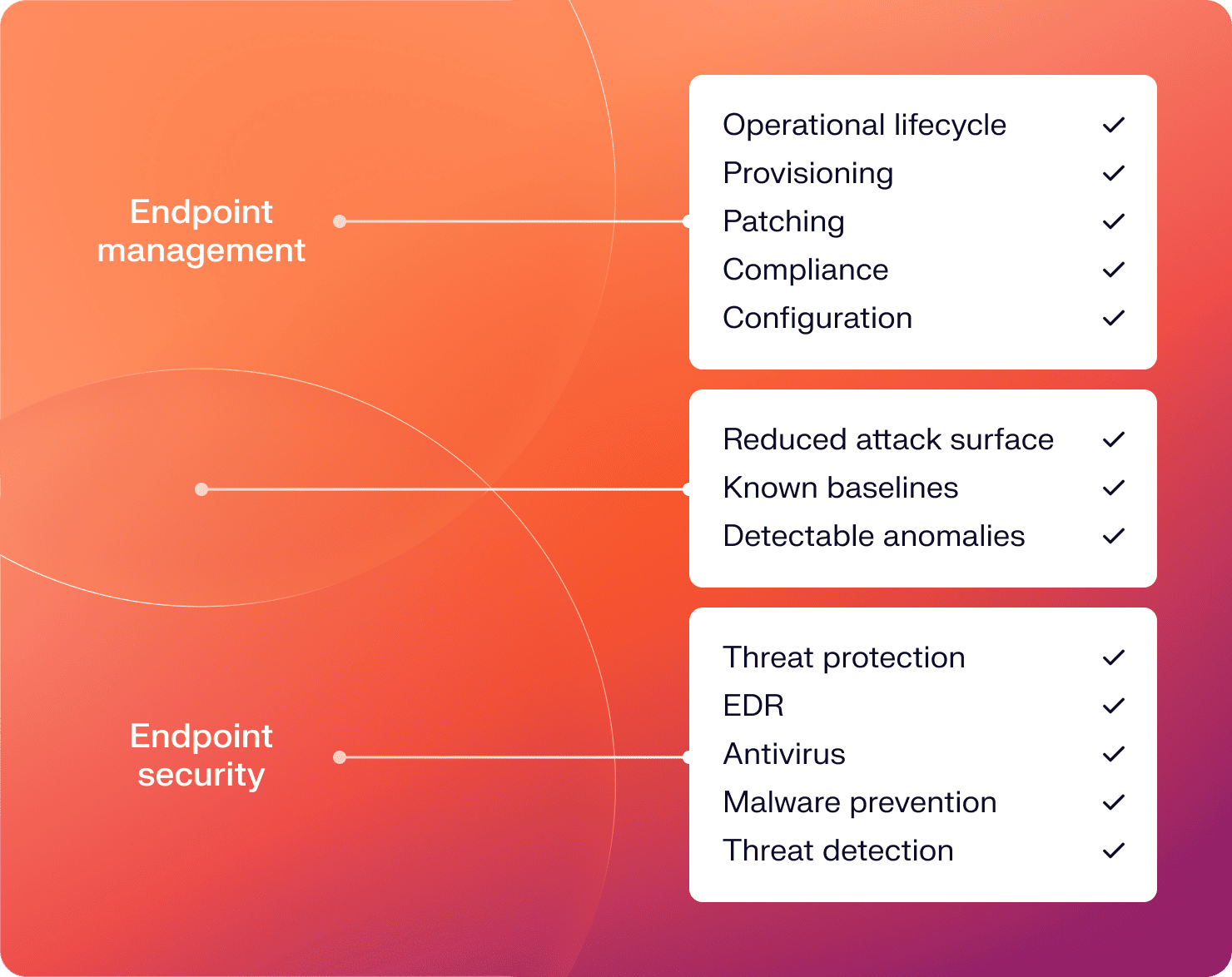
Endpoint security and endpoint management get used interchangeably, and they shouldn’t. Together, they form what many organizations describe as endpoint security management, the combined discipline of managing devices while also protecting them from threats:
- Endpoint managementcovers the operational lifecycle. It makes sure endpoints are set up correctly, kept current, and compliant with organizational policy.
- Endpoint securitycovers threat protection: detecting, preventing, and responding to malware, ransomware, phishing, and attacks targeting devices. Tools in this category include EDR, antivirus, and threat intelligence platforms.
The two are complements, not competitors. Good management creates the conditions for good security; a patched, correctly configured, monitored device is a much harder target than an unmanaged one. And endpoint security tools are more effective when they run on a well-managed fleet where baselines are known, and anomalies are detectable. A cybersecurity risk assessment typically covers both dimensions, since gaps in either create exposure.
Types of tools used in endpoint management
Most organizations arrive at using endpoint managed services after layering tools as problems arrive. Together, all these tools create tool sprawl, overlapping licenses, integration maintenance, and data that doesn’t flow between systems. The common categories include:
- Traditional MDMs (Jamf, Microsoft Intune) – device enrollment and configuration management, primarily for specific OS families
- EDRs (CrowdStrike, SentinelOne) – behavioral threat detection and response, typically OS-agnostic but separate from MDM
- Identity providers (Okta, Azure AD) – authentication and access management, usually not integrated with device health data
- Patch managers (Automox, ManageEngine) – OS and application patching, often operating independently from the MDM
- Compliance tools (Drata, Vanta) – evidence collection and framework mapping, pulling data from multiple sources
Each of these tools does its job. The problem is they don’t talk to each other without custom integrations, and those integrations break. Iru’s endpoint management platform consolidates these functions into a single agent, so device health, security telemetry, patch status, and compliance data all live in the same place.
Simplify endpoint management with Iru
The management of endpoint devices has turned out to be one of the most complicated issues that the IT department is facing. It’s not because the concepts themselves are difficult, but because the number of types of these endpoint devices is increasing, the workforce is becoming even more dispersed, and threats are becoming more serious.
There’s also a newer challenge worth naming: non-human identities. API keys, service accounts, and the automated scripts that AI tools run inside your environment are endpoints too. They need to be inventoried, monitored, and managed with the same rigor as the laptop on your developer’s desk, and most endpoint management frameworks don’t address them yet.
A UEM approach that covers devices, enforces consistent policy across operating systems, and integrates security and compliance tooling into a single platform is the architecture that scales. Unmanaged devices create friction for employees and exposure for security teams. The solutions to both problems are the same.
Iru manages Mac, Windows, and Android fleets from a single agent, including handling enrollment, configuration, patching, monitoring, and remediation without requiring a stack of separate tools. If you want to see Iru’s managed endpoint services in action, request a demo and explore the endpoint management platform in detail.