Workforce Identity
 Endpoint Management
 Endpoint Detection & Response
 Vulnerability Management
 Compliance Automation
 Trust Center




What is vulnerability remediation? Vulnerability remediation is the process of eliminating security vulnerabilities before attackers can exploit them. It involves identifying affected systems, prioritizing the most critical risks, and taking corrective action.
It's 4:47 p.m. on a Friday. A critical Common Vulnerabilities and Exposures (CVE) entry drops, and your security team quickly identifies every affected device.
Then the real work begins. Who owns the fix? Which systems need immediate attention? Can you patch now, or does the update need testing first? Without a defined vulnerability remediation process, those questions create delays while the risk continues to grow.
And finding vulnerabilities is only the starting point. Reducing risk means taking the right action at the right time, whether that's patching software, changing configurations, removing vulnerable applications, or using device isolation to contain an active threat. The faster you move from detection to remediation, the smaller the window of opportunity for attackers.
Learn how you can do that by understanding what vulnerability remediation is and why it matters. We’ll also share some ways to build a faster, more reliable remediation process.
How does vulnerability remediation work? (The remediation lifecycle)
Security teams don't remediate vulnerabilities one at a time or based on instinct. They follow a repeatable process that identifies security gaps, ranks them by risk, fixes them efficiently, and verifies that the problem is actually gone.
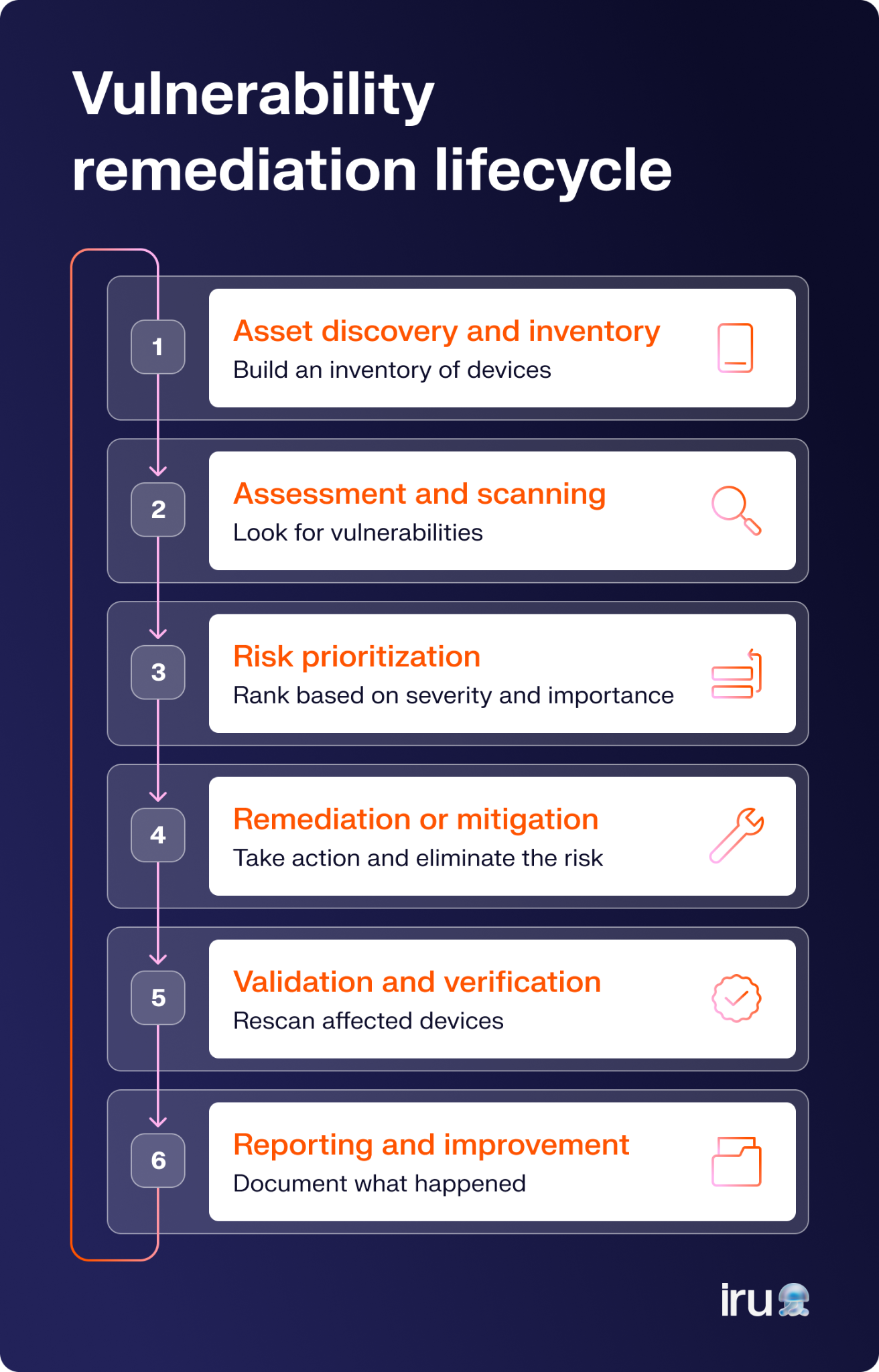
Here’s what a typical remediation lifecycle looks like:
- Asset discovery and inventory: Build an accurate inventory of your devices and applications so you know exactly what's exposed when a new vulnerability is disclosed.
- Assessment and scanning: Scan your environment for vulnerable software, missing patches, and insecure configurations. Regular assessments help you find new risks before attackers do.
- Risk prioritization: Rank vulnerabilities by severity, exploitability, business impact, and the importance of the affected asset, so your team focuses on the highest-risk issues first.
- Remediation or mitigation: Take the most appropriate action to reduce or eliminate the risk. That could mean applying a patch, updating a configuration, removing vulnerable software, or isolating a device until a permanent fix is available.
- Validation and verification: Rescan affected devices to confirm the fix worked and review any security exclusions to make sure they're still necessary.
- Reporting and improvement: Document what happened. Then measure how long remediation took. Use those insights to strengthen future vulnerability assessment and remediation efforts.
Remediation vs. mitigation vs. acceptance
When a vulnerability is discovered, you don't always respond the same way. The right approach depends on the risk, available fixes, and business priorities. Your options generally fall into three categories: remediation, mitigation, or acceptance.
Remediation eliminates the vulnerability altogether. That usually means applying a patch, updating vulnerable software, fixing a misconfiguration, or removing the affected application. Once the underlying weakness is gone, attackers can no longer exploit it.
Mitigation reduces the risk when an immediate fix isn't possible. For example, you might restrict network access, enable device isolation, tighten firewall rules, or disable a vulnerable feature until a permanent fix is available.
Acceptance means acknowledging the risk and deciding not to address it immediately because the likelihood or business impact is low, or the cost of fixing it outweighs the benefit.
| Remediation | Mitigation | Acceptance | |
|---|---|---|---|
| Function | Removes the vulnerability completely | Reduces the likelihood or impact of exploitation | Leaves the vulnerability in place |
| What is involves | Usually involves patching, upgrading, reconfiguring, or removing software | Uses temporary or compensating controls, such as network restrictions or device isolation | Requires a documented business decision and ongoing review |
| Long/short-term | Long-term solution | Short-term or interim solution until remediation is possible | Appropriate only when the risk is understood and considered acceptable |
Four ways to handle vulnerability remediation
The right way to address a vulnerability depends on how severe the risk is, whether a fix is available, and how much disruption your organization can tolerate. Here are four common ways.
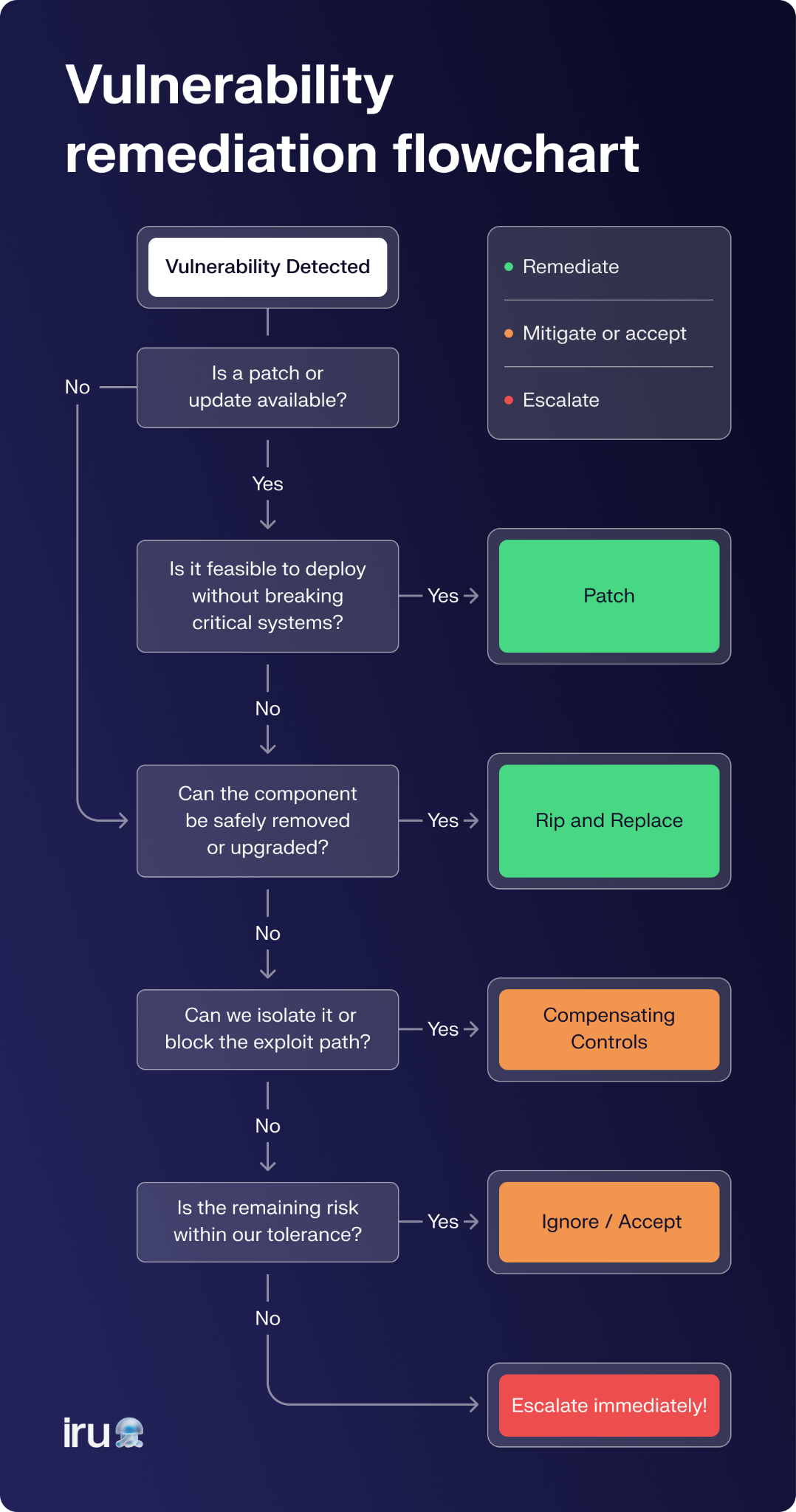
1. “Rip and replace” vulnerable parts (remediate)
Sometimes the safest option is to remove the vulnerable component entirely and replace it with a more secure alternative. That could mean retiring unsupported software, replacing an outdated application, or swapping aging hardware that's no longer receiving security updates.
Think about an office router that's several years old. Even if it still works, it may stop receiving firmware updates, leaving known vulnerabilities unpatched. Replacing it with a newer model removes that risk.
The same principle applies to software. If an application has reached the end of its life or no longer receives security updates, replacing it is often the best long-term solution.
This approach is usually the simplest because it eliminates the root cause. The downside is cost. Replacing software, hardware, or entire systems across hundreds or thousands of devices can quickly become expensive and operationally disruptive.
2. Patch vulnerable parts (remediate)
In most cases, you don't need to replace the entire system. You simply apply the vendor's security update that fixes the vulnerable code. This is the most common way organizations remediate vulnerabilities. Instead of replacing an application used across the business, IT teams deploy patches to affected devices and verify the vulnerability has been resolved.
It's far less expensive than replacing entire components, but patching large device fleets manually can quickly become a full-time job. That's where automated Mac patch management and cross-platform patching tools make a difference.
You can use solutions like Iru's Endpoint Management, which automatically deploys software updates across Apple, Windows, and Android devices, helping you maintain a consistent security vulnerability remediation process without having to chase individual devices.
3. Use compensating controls (mitigate)
Sometimes a fix isn't available yet. In those cases, you reduce the risk until permanent remediation is possible. For example, let’s say your company relies on a popular AI application with a newly disclosed vulnerability, but the vendor won't release a patch for another 90 days.
Rather than continuing to use it as usual, you might restrict access to approved users, block high-risk features, strengthen monitoring, or apply Zero Trust endpoint security policies to limit exposure. Those temporary controls reduce risk while you wait for a permanent fix.
4. Ignore the issue (acceptance)
If your cybersecurity risk assessment determines that the likelihood and potential impact of a vulnerability are extremely low, you may formally accept the risk.
For example, a vulnerability might exist in software installed on a disconnected test computer that never accesses production systems or sensitive data. Rather than spend time fixing a low-risk issue, you can document the decision, monitor the situation, and revisit it if circumstances change.
Reminder: Risk acceptance should be a deliberate business decision, not the result of limited time or resources. Even accepted vulnerabilities should be reviewed periodically, as new exploits, cracking tools, or changes to the environment can increase their risk over time.
Tips for effective vulnerability remediation
A strong remediation program helps you reduce risks quickly, consistently, and with as little disruption as possible. Here are a few ways to do that.
Focus on critical assets first
Prioritize devices and applications that support essential business operations or store sensitive data. Fixing high-impact systems first reduces your overall risk much faster than treating every vulnerability equally.
Establish clear ownership
Everyone should know who's responsible for identifying vulnerabilities, approving fixes, deploying patches, and verifying remediation. Clear ownership prevents delays when critical issues emerge.
Automate patch management
Automating software updates reduces human error, speeds up remediation, and frees your IT teams to focus on higher-value work. Combined with endpoint security software, automated patching helps reduce the exposure window.
Use real-time exploit data
Don't rely on severity scores alone. Combine CVSS with threat intelligence and exploitability data to prioritize vulnerabilities that attackers are actively targeting.
Segment vulnerable devices
If you can't patch a device immediately, isolate it from critical systems or restrict its network access until remediation is complete. Network segmentation limits exposure to other devices if a vulnerability is exploited.
Verify every fix
Applying a patch doesn't always mean the vulnerability is gone. Rescan affected devices and confirm remediation was successful before closing the ticket.
Combine prevention with detection
Patching reduces future risk, but threats can still slip through. Pair your remediation efforts with endpoint detection and response (EDR) to detect suspicious activity quickly and contain attacks before they spread.
Streamline vulnerability remediation with Iru
Most remediation workflows break down because they're spread across multiple tools. Iru’s Vulnerability Management brings vulnerability detection, prioritization, autonomous patching, EDR, and device management together through a single lightweight agent, eliminating cross-tool handoffs.
Instead of juggling separate scanners, patching tools, and endpoint platforms, you can move through one workflow: detect, prioritize, auto-remediate, and verify. Its built-in device context, combined with AI-powered prioritization and autonomous patching, helps you reduce your vulnerability backlog in no time.
Book a free demo and see how Iru can help you identify, prioritize, and remediate software vulnerabilities.