




Managed endpoint detection and response (MEDR) gives you access to security experts who monitor threats and respond on your team’s behalf. With expert support, you can investigate suspicious behavior faster and limit the damage an attack can cause.
A single compromised laptop can give attackers a way into your business network. Your security software may spot suspicious activity, but someone still needs to investigate the alert and decide what to do next. And if your IT team already has its hands full, that response can take longer than you’d like.
The solution is managed endpoint detection and response. Here's how it works, what it brings to your security setup, and which features to look for when choosing a provider.
What is MEDR?
MEDR combines EDR technology with an external security team that monitors threats and handles incident response. EDR software detects suspicious activity on various devices, and the managed service adds security experts who investigate alerts and take action when they find a threat.
MEDR comes in two delivery models:
- A fully managed service: The provider handles initial alert checks, known as Tier 1 triage, and manages threat response using its own staff.
- A co-managed service: The provider works alongside your internal security team, sharing monitoring and response tasks based on your needs.
MEDR also strengthens your broader device management efforts by spotting and responding to threats across your endpoints. This comes in handy when your internal team lacks the time or staff to handle every alert.
How does managed EDR work?
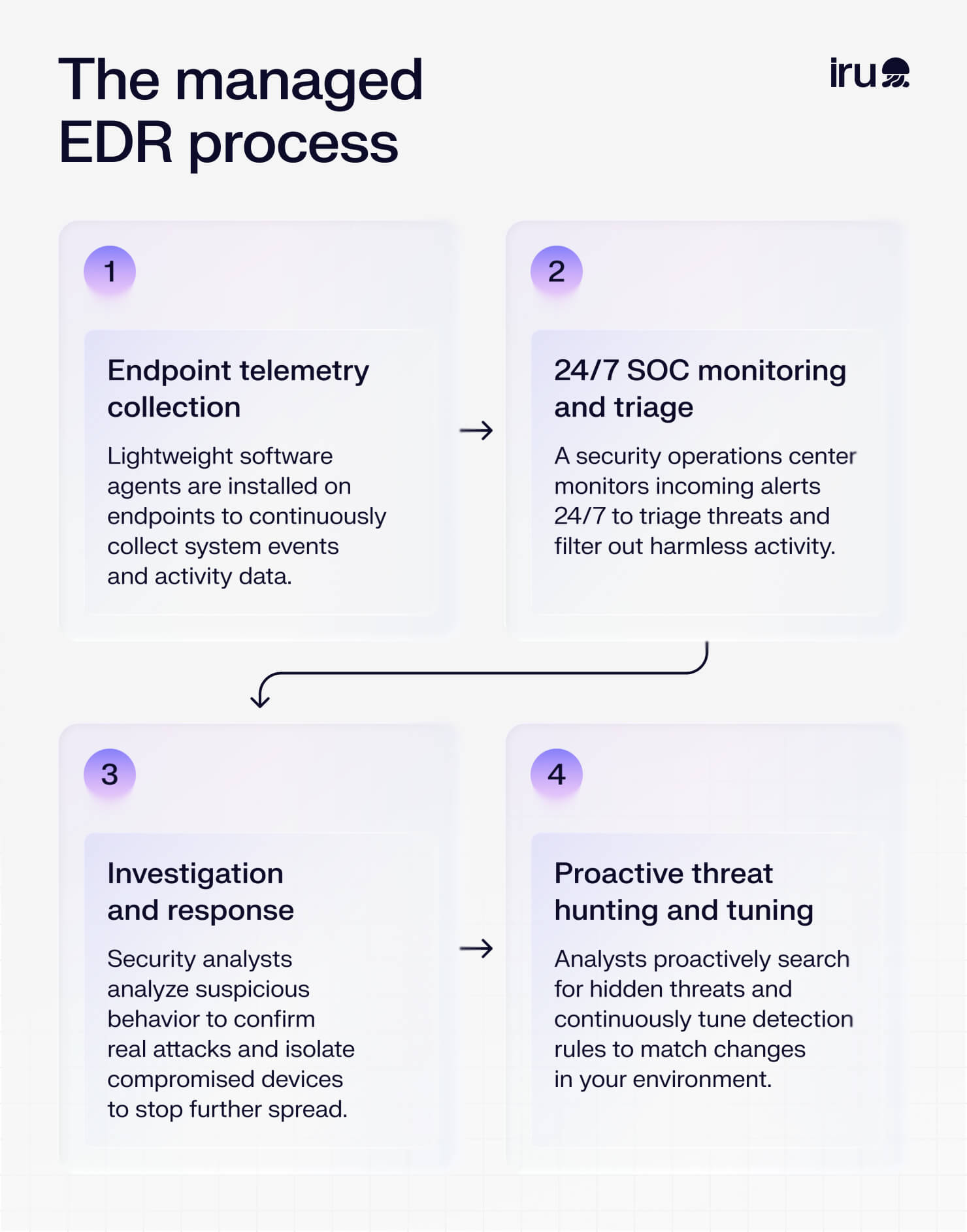
MEDR follows a continuous cycle: Software collects activity data from your devices, a security operations center (SOC) reviews alerts, and analysts investigate and respond to threats. The security team also hunts for hidden threats and adjusts detection rules to keep your defenses up to date. Each stage feeds the next, from data collection to active threat hunting.
Endpoint telemetry collection
MEDR agents run on endpoints such as laptops and servers, monitoring device and application activity. They track events like programs starting, files changing, and network connections opening.
The agents filter out routine activity to reduce noise before securely sending relevant data to a central platform. Your external SOC team uses that data to spot suspicious behavior across your endpoints.
24/7 SOC monitoring and triage
An SOC team monitors alerts around the clock, so threats get a response even outside regular work hours. Analysts review alerts, check context, and separate potential threats from harmless activity, such as routine administrative tasks.
If an alert points to a real threat, the team investigates further and starts the response process. That triage keeps your IT staff from losing hours to false alarms.
Investigation and response
Security analysts use behavioral analysis to spot suspicious actions that traditional antivirus software may miss. For example, an application might try to access sensitive files or run commands it has no reason to use.
If a device appears compromised, the SOC team can isolate it from the network to limit the spread of malware. Depending on your service agreement, analysts may handle vulnerability remediation directly or guide your internal team through recovery.
Proactive threat hunting and tuning
MEDR platforms collect endpoint activity in a central cloud environment, giving analysts a broader view of potential attacks. They can use frameworks such as MITRE ATT&CK to search for signs of known attacker techniques, including attempts to move between devices or maintain access to a system.
Analysts also refine detection rules to reduce false alarms and keep pace with changes in your environment. For example, updates to your mobile device management (MDM) policies may require adjustments to detection settings. Your endpoint management tools and endpoint security tools then enforce the same policies, so device protection stays consistent.
Managed EDR vs. unmanaged EDR
With unmanaged EDR, your team handles deployment, monitoring, policy tuning, and threat response. You get more control and lower service costs, but false alarms can overwhelm an understaffed team. This model suits businesses with the staff and skills to run their own security operations.
Managed EDR adds an external team for round-the-clock monitoring and response, giving you expert support without hiring a full security team. You’ll pay more and have less direct control over daily operations.
Choose unmanaged EDR if you have in-house security expertise, or managed EDR if you need 24/7 coverage.
Managed EDR vs. MDR vs. XDR
MEDR focuses on threats to endpoints, while managed detection and response (MDR) covers a broader range of activity. Extended detection and response (XDR) connects signals across different systems to help you spot related threats.
They differ across these dimensions:
| MEDR | MDR | XDR | |
|---|---|---|---|
| Primary focus | Endpoint threats | Threats across a broader range of systems | Connecting security signals across systems |
| Data sources | Laptops, desktops, and servers | Endpoints, networks, cloud workloads, and identity systems | Multiple domains, such as endpoints, networks, cloud, and identity |
| Threat detection | Detects suspicious endpoint activity | Analyzes activity across covered data sources | Correlates signals from different domains to identify related threats |
| Monitoring | Managed by an external security team | Managed by an external security team | Handled in-house or through a service provider |
| Threat response | Provider investigates and responds based on the service agreement | Provider investigates and responds across covered systems | Depends on the platform, configuration, and operating model |
| Best for | Teams that need expert endpoint monitoring | Teams that need managed security coverage beyond endpoints | Teams that want a unified view of threats across multiple systems |
| Main advantage | Expert endpoint protection without staffing a full SOC | Broader threat monitoring and response | Better visibility into attacks that span multiple systems |
Vendors sometimes use MEDR and MDR interchangeably. So, before choosing a security partner, check which data sources the provider monitors and whether the provider can contain threats directly or only recommend actions.
Platforms like Iru combine an EDR platform with MDM, vulnerability management, and identity capabilities. This gives you a broader view of device security and potential weaknesses, helping you manage endpoint risks alongside the controls that protect access and devices.
Benefits of managed EDR
Managed EDR services give you access to security expertise and round-the-clock threat monitoring without building a full SOC.
Each benefit maps to a concrete business outcome:
| Benefit | Business outcome |
|---|---|
| 24/7 coverage without hiring an SOC | Keeps watch over your endpoints outside business hours without recruiting staff for overnight shifts |
| Faster response | Contains threats sooner to limit downtime, data loss, and disruption to daily operations |
| Reduced alert fatigue | Frees your IT team from routine alert reviews so they can focus on higher-priority work |
| Fewer false positives | Cuts time spent investigating harmless activity and reduces the risk of overlooking genuine threats |
| Access to expertise | Provides help from experienced security analysts without having to recruit and train specialists yourself |
| Predictable operating costs | Plans security spending around a recurring service fee rather than the cost of building and staffing an internal SOC |
| Compliance support | Offers monitoring records and incident reports to support audits and demonstrate security oversight |
Disadvantages of managed EDR
Managed endpoint detection and response services come with trade-offs, too. Your experience depends on the provider’s capabilities, service terms, and how well the service fits your environment.
Watch out for:
- High recurring expenses: Service fees can add up as you protect more endpoints or require extra support.
- Loss of direct control: Your team may have less control over daily monitoring and response decisions.
- Reliance on third-party quality: Slow investigations or weak response procedures can leave threats unchecked for longer.
- Endpoint blind spots: Devices with missing agents or poor connectivity may provide limited activity data.
- Potential response delays: Providers may need your approval before isolating devices or making major changes, depending on your agreement.
- Integration challenges: Connecting the service to your existing security tools and workflows may require extra setup and ongoing work.
What to look for in a managed EDR provider
Choosing the right managed EDR service takes more than comparing prices. Look at how the provider handles threats, which devices it covers, and how well it fits your existing security setup.
Response authority and SLAs
Ask whether the provider can contain threats directly or only send alerts to your team. Check the escalation process and service-level agreements (SLAs) for clear response-time targets, including mean time to respond (MTTR). Also, confirm who approves actions such as isolating a device.
Platform and OS coverage
Check support for Windows, macOS, Linux, and mobile devices, including which detection and response features each operating system gets. If your business uses a mix of devices, ask for a feature-by-feature breakdown. A supported-OS list alone won’t tell you how much protection each device receives.
Noise handling, reporting, and compliance evidence
Detection quality shows up in how often the provider tunes rules and how clearly its reports explain what happened. Review sample dashboards and incident reports to see if they explain what happened and how the team responded. And if you have audit requirements, confirm that the service supplies records your governance, risk, and compliance (GRC) team can use.
Fit with your existing stack and pricing
Check how the service integrates with your existing MDM, identity, and vulnerability management tools. Compare per-endpoint pricing, onboarding fees, and the cost of running another security agent and console alongside your current tools.
Also, your endpoint management tools should work well with your managed EDR service. Check how the two share device data and support your IT team's existing workflows, since it can help avoid extra manual work.
When managed EDR is the right fit, and when a unified platform makes more sense
Managed EDR gives you expert threat monitoring without the cost of staffing your own SOC. A unified platform may make more sense if your bigger challenge is managing too many security tools and alerts.
When to choose managed EDR
Managed EDR is a strong fit if your business needs specialist security support but lacks the resources to handle every threat internally. Consider it if you:
- Lack of staff to monitor and respond to threats around the clock.
- Need outside security expertise quickly.
- Must meet regulatory or board requirements for 24/7 coverage but cannot staff it internally.
- Face a high risk of targeted attacks and need expert oversight without building an SOC.
When to choose unified platforms
A unified platform may be a better fit if your IT team can manage security but struggles with scattered tools and workflows. Consider one if you:
- Have a capable IT team but struggle with alert fatigue and too many security tools.
- Already manage separate MDM, vulnerability management, and identity solutions.
- Want to reduce the number of agents and consoles your team must maintain.
Outsourcing security operations can ease alert fatigue, but adding another vendor and console may create more work. A unified platform like Iru reduces tool sprawl by consolidating device management and security capabilities.
For example, Planning Center consolidated device management and endpoint detection and response with Iru. The organization reported spending about 15% less time on endpoint security management, a win for a small IT team.
Simplify endpoint security with Iru
Handling endpoint security gets harder when your team has to jump between separate tools and consoles. Bringing device management and security capabilities together can make day-to-day work easier.
Iru combines UEM with EDR, vulnerability management, and identity capabilities so you can keep track of your devices and identify security risks while overseeing access from a more connected platform. With fewer tools to juggle, your IT team can feel more in control of endpoint security and less stretched by the work.
Book a free demo to see how Iru can simplify endpoint management and save you time.