Workforce Identity
 Endpoint Management
 Endpoint Detection & Response
 Vulnerability Management
 Compliance Automation
 Trust Center




- Mac endpoint security combines built-in macOS protections with centralized tools that help you monitor devices, enforce policies, detect threats, and respond quickly across your entire fleet.
- Built-in macOS security features like Gatekeeper and XProtect provide a strong foundation, but they don't offer the visibility, automation, threat detection, or behavior detection needed to secure Mac devices at scale.
- Layering third-party tools such as endpoint management, endpoint detection and response (EDR), and vulnerability management closes those gaps.
- With Iru, you can manage and remediate your Mac fleet from a single AI-powered platform, giving your IT and security teams more time and control.
Your Mac fleet grows one device at a time. Then, almost overnight, you're supporting remote employees, multiple offices, and hundreds of endpoints. At that point, endpoint security for Mac isn't just about protecting individual devices. It's about knowing what's happening across your entire environment.
Built-in macOS security is a strong starting point, but it doesn't give you the visibility or control to manage a growing fleet. Missing patches, unnoticed threats, and manual security tasks quickly become harder to keep up with.
In this guide, you'll learn what endpoint security for macOS includes and why it matters. We’ll also talk about the capabilities that help you protect every Mac at scale.
What is Mac endpoint security?
Endpoint security for Mac is the set of tools and practices used to protect macOS devices from cyberthreats while giving your IT and security teams centralized visibility, policy enforcement, and incident response across every managed Mac.
Many organizations are expanding their Apple deployments because Mac devices offer strong built-in security features and reliable performance.
Apple Business adoption continues to grow as companies standardize on Mac for developers, designers, and knowledge workers. But built-in security isn't the same as complete security. As Mac and AI adoption grows, the platform becomes a more attractive target for cybercriminals, making centralized protection more important than ever.
The threat landscape reflects that broader trend. The FBI's Internet Crime Complaint Center (IC3) received more than 859,000 cybercrime complaints in 2024, with reported losses reaching $16.6 billion. Ransomware remained a major threat to organizations and critical infrastructure, while phishing, extortion, and data breaches continued to dominate reported incidents.
That's where endpoint security makes the difference. It helps you detect suspicious activity in real time, enforce security policies consistently, patch vulnerabilities quickly, and respond to threats before they spread across your Mac fleet.
The built-in security features that come with macOS
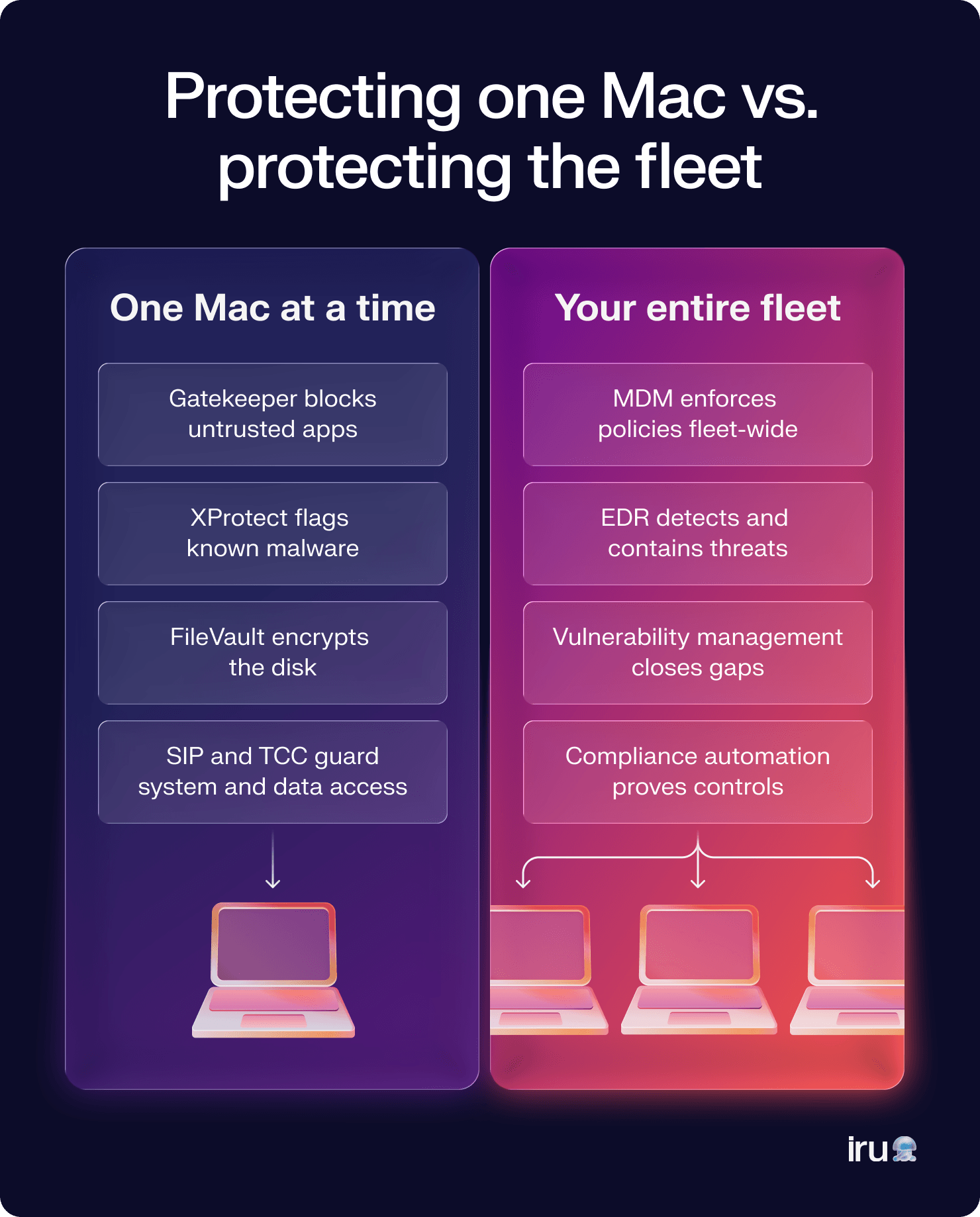
macOS includes several built-in protections that help defend against malware, unauthorized changes, and data theft. They're an important foundation for Mac endpoint protection, but they work best alongside centralized management and monitoring with a Mac MDM solution.
Here are some key macOS security features:
- Gatekeeper verifies that apps come from trusted developers before they run. It helps reduce the risk of users installing malicious or tampered software.
- XProtect is Apple's built-in malware detection technology. It automatically checks files against known malware signatures and blocks identified threats.
- App sandboxing limits what an app can access on a Mac. If an app is compromised, sandboxing helps contain the damage by restricting access to system resources and user data.
- FileVault encrypts the entire startup disk, protecting data if a Mac is lost or stolen. Authorized users can still access their files with the correct credentials.
- System Integrity Protection (SIP) prevents unauthorized processes from modifying critical system files and directories. This helps preserve the integrity of the operating system.
- Transparency, Consent, and Control (TCC) requires user permission before apps can access sensitive data and services, such as the camera, microphone, contacts, or desktop files. It gives you greater control over your privacy while limiting unnecessary access.
Where native macOS defenses fall short
The security features built into macOS do a good job of protecting individual devices. But if you're responsible for dozens or hundreds of Mac computers, you need more than protection that works on one device at a time. You need visibility across your entire fleet.
This matters most for high-privilege users. Developers and anyone with local admin rights can install software from anywhere, which widens your attack surface every time an unvetted tool lands on a managed Mac. Scoping admin rights to who actually needs them, and pairing that with endpoint management that flags unauthorized installs, keeps those users productive without leaving the fleet exposed.
Without endpoint protection for Mac, it's difficult to see which devices are missing critical patches, spot suspicious activity as it happens, or respond quickly when something goes wrong. As your workforce becomes more distributed, those blind spots only get bigger, and manual security tasks become harder to keep up with.
Zero Trust endpoint security closes those gaps. It gives you centralized visibility, continuous monitoring, consistent policy enforcement, and the ability to contain threats before they spread. Instead of reacting after an incident, you stay in control of every managed Mac from a single place.
Layering tools for complete Mac endpoint protection
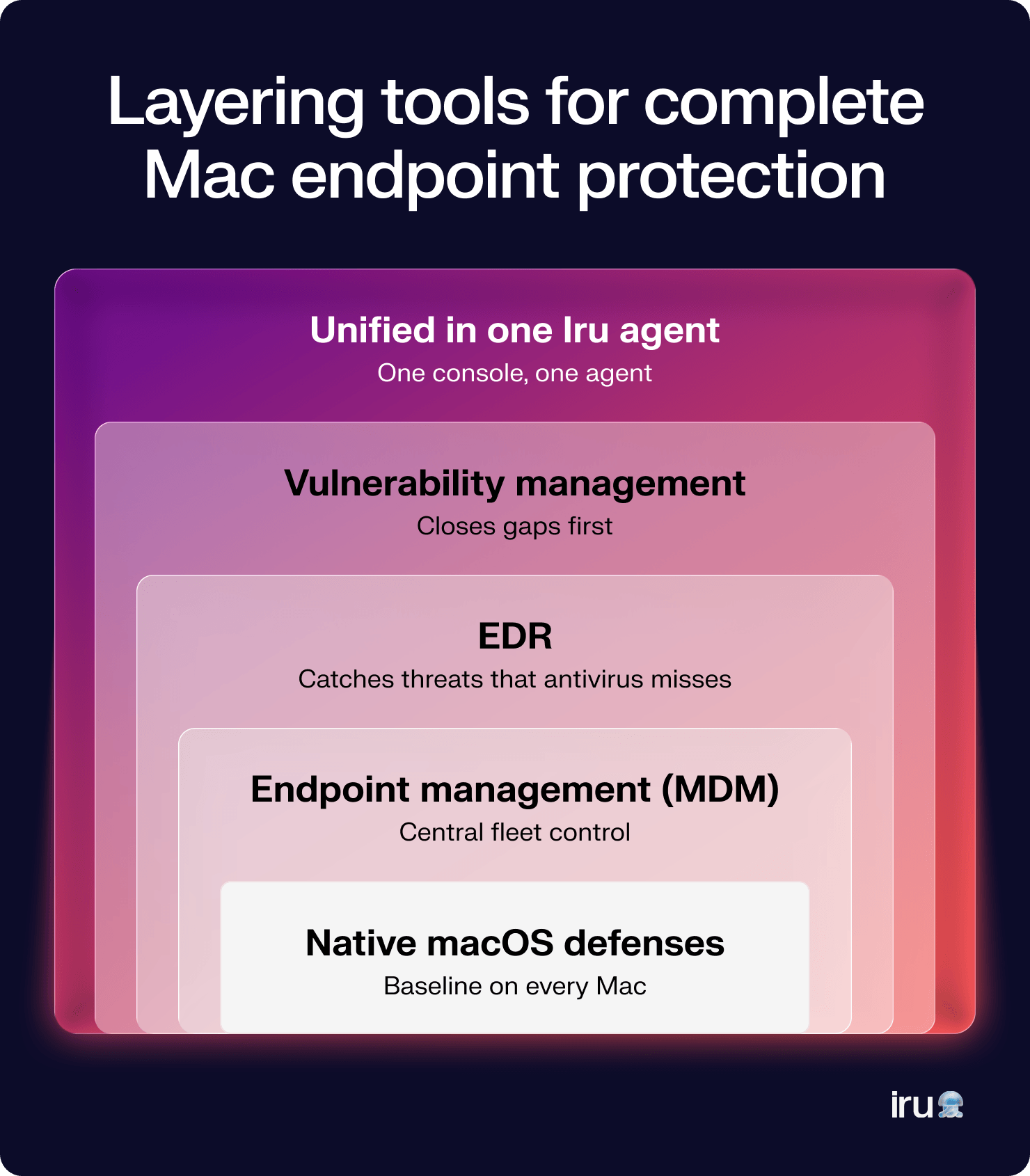
No single tool can protect every part of your environment. You need effective endpoint security software that combines preventive controls, centralized management, threat detection, and vulnerability management to protect your Mac fleet from every angle.
Antivirus software
Antivirus software scans for known malware and blocks malicious files before they can cause harm. It's a foundational layer that protects against common threats using malware signatures and other detection techniques.
While important, antivirus alone can't monitor device posture, investigate suspicious behavior, or respond to advanced attacks. That's why it's only one part of a modern endpoint security strategy.
MDM tools
A mobile device management (MDM) solution lets you configure, secure, and manage Mac devices from a central location. You can enforce security policies and deploy applications while automating operating system updates and monitoring device compliance without relying on manual processes.
An MDM tool also gives you the visibility that's missing from native macOS protections. Instead of managing devices one by one, you can apply consistent security controls across your entire fleet, whether employees work in the office or remotely.
Iru Endpoint Management builds on these capabilities with advanced automation that helps you onboard users, enforce policies, update apps, and manage your Apple devices from a single platform.
EDR tools
Endpoint detection and response (EDR) continuously monitors endpoint activity for suspicious behavior that traditional antivirus software may miss. An EDR for Mac helps detect threats such as ransomware, credential theft, and malicious scripts in real time.
It also speeds up incident response. Your security teams can investigate alerts, isolate compromised devices, and contain threats before they spread across the rest of the environment.
Vulnerability management
Vulnerability management identifies outdated software, missing patches, and other security weaknesses before attackers can exploit them. It helps you prioritize the issues that pose the greatest risk instead of treating every vulnerability the same.
Combined with endpoint management and EDR, vulnerability management gives you a more complete view of your security posture. You can find risks, remediate them quickly, and reduce your attack surface across every managed Mac.
Key features to look for in a Mac endpoint security tool
The best Mac security platforms help you stop malware, manage devices, reduce manual work, and respond to threats from a single place. If you're evaluating a solution with Mac EDR capabilities, these are the features that matter most:
- Native Apple support: A platform built for Apple's management framework helps you adopt new macOS security features faster and stay current with operating system updates.
- Automated compliance tools: Built-in compliance automation helps you enforce security baselines, monitor policy adherence, and generate evidence for audits without chasing spreadsheets or screenshots.
- Centralized management console: Managing every Mac from one dashboard makes it easier to monitor device health, enforce policies, investigate alerts, and respond quickly when issues arise.
- Automated remediation: Your security platform should automatically isolate compromised devices, deploy patches, or trigger predefined response actions. Faster remediation limits the impact of security incidents while reducing manual effort.
- Vulnerability management: Continuous vulnerability scanning helps you find outdated software, missing patches, and risky configurations before attackers do. Prioritization ensures your team focuses on the issues that matter most.
- Support for Automated Device Enrollment (ADE): ADE streamlines device provisioning by enrolling Mac computers into management as soon as they're activated. That means every new device starts with the right security policies and configurations from day one.
- Integrated endpoint management and security: The strongest platforms combine endpoint management, EDR, vulnerability management, and compliance in one place. That shared context helps you move faster without switching between disconnected tools.
Best practices for Mac endpoint security
Strong security isn't just about choosing the right tools. It's about putting consistent processes in place that keep every device protected as your environment grows. These best practices help reduce risk, simplify management, and prevent endpoint drift over time.
Enforce updates and regular patching
Attackers often exploit known vulnerabilities that already have available fixes. Keeping macOS and third-party applications up to date closes those gaps before they become entry points.
Automating patch deployment ensures consistent enforcement across your fleet. Iru uses Apple's Declarative Device Management (DDM) to schedule and enforce managed OS updates, so devices move to the required macOS version on your timeline rather than waiting on users. That keeps every Mac on the same security baseline with less manual follow-up.
Enable least privilege/RBAC
One of the simplest ways to secure your Mac environment is to give users only the access they need. Limiting administrative privileges reduces the damage a compromised account or accidental change can cause.
The same principle applies to your IT team. Role-based access control (RBAC) ensures administrators only have access to the tools and permissions required for their responsibilities, reducing unnecessary risk without slowing down day-to-day work.
FileVault enforcement
FileVault protects sensitive data by encrypting the startup disk, but it only works if it's enabled consistently across your organization. Relying on users to turn it on manually often leads to gaps in coverage.
An MDM tool lets you enforce FileVault across every managed Mac and verify that encryption remains enabled. With Iru Endpoint Management, you can apply encryption policies at scale instead of configuring devices one by one.
Regular internal audits
Security isn't something you configure once and forget. Regular audits help you identify outdated software, misconfigured devices, unnecessary permissions, and policy gaps before they become security incidents.
A unified platform makes these reviews much simpler. Instead of piecing together data from multiple tools and dealing with tool sprawl, you get the visibility needed to identify risks and verify compliance so you can take action from one place.
Improve your Mac endpoint security with Iru
Mac security shouldn't mean juggling separate tools for management, threat detection, and remediation. Iru’s EDR software brings everything together in one platform. It uses real-time behavioral analysis to detect advanced threats and automatically contain malicious activity, helping your team investigate incidents faster.
Because EDR is unified with endpoint management and vulnerability management, you can monitor devices, patch vulnerabilities, and respond to threats from the same console. Less switching between tools. More time spent improving your security posture.
Book a free demo to see how Iru helps you secure every Mac at scale.