




Patch management is the process of finding, testing, and applying updates to software and operating systems to fix security flaws and keep devices running smoothly.
A new security patch lands for your company’s software, but hundreds of devices still need the update. Some employees use different applications, and not every device follows the same update schedule. Patch management is how you decide which updates to apply, roll them out across your organization, and check that they’re installed successfully.
Missed patches can leave known security flaws open to attack, while delayed or failed updates can leave devices exposed for longer. A clear patch management process means your team can prioritize critical fixes, deploy updates consistently, and verify that they’ve been installed successfully. Here’s how the process works and what you need to get it right.
Why patch management matters
Patch management closes known software flaws before attackers can exploit them. Regular updates also keep devices stable and reduce disruptions to daily work.
The stakes are high. In January 2026, the Warlock ransomware group breached SmarterTools through an unpatched SmarterMail server. The attack affected about 12 Windows servers and a secondary data center. Timely patching reduces the risk of similar attacks.
IT patch management also plays a key role in vulnerability management by addressing known vulnerabilities before they become incidents. It supports compliance with requirements under frameworks such as HIPAA, PCI DSS, and GDPR, where applicable.
A breach can also leave your organization with a hefty bill. In 2026, Labcorp agreed to a $35 million settlement over a 2019 data breach at a medical debt collection vendor. The incident potentially exposed the personal information of over 27.5 million people.
Although the incident wasn't a confirmed patching failure, it shows how costly a breach can become. Preventing avoidable security incidents can protect your budget, too.
Different types of software patches
Each patch serves a different purpose. Some fix security weaknesses, while others correct software problems or add new capabilities. Security patches protect your systems from attacks, but bug fixes and feature updates also help keep software reliable, compatible, and fit for everyday use.
Your patch management process should account for all three:
- Security patches: Fix known security flaws that attackers could exploit. Regular security updates are essential for protecting devices, including those covered by your Mac patch management process.
- Bug fixes: Correct software errors that cause crashes, glitches, or unexpected behavior. Applying these patches can keep applications reliable and reduce interruptions for your team.
- Feature updates: Add new capabilities or improve existing ones. These updates can give your team access to useful tools and improvements that support their daily work.
Together, these patches enable you to protect your systems, keep software working as expected, and get more value from the tools you use.
The patch management process
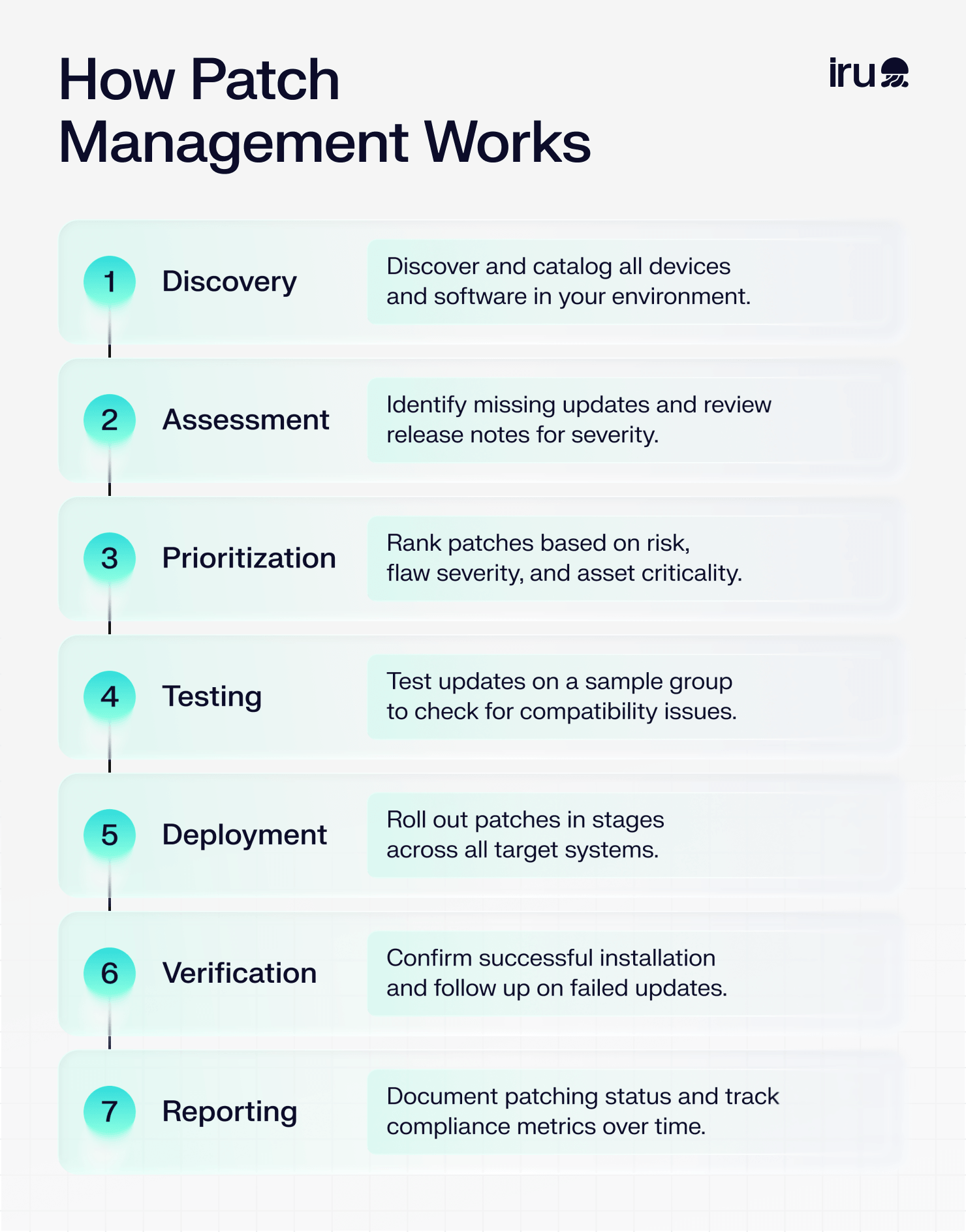
A repeatable patch management process lets you find missing updates and address the most serious risks first while confirming that patches work as expected. Follow these seven steps to keep your devices up to date and your organization better protected.
Inventory/discovery
Start by building a complete inventory of your devices, operating systems, and installed applications. You need a clear view of your environment to know which systems need updates.
Once you have that inventory, you can use vulnerability scanning tools to identify known weaknesses in the software running on those devices. Keep your inventory current as employees join, devices change, and new applications enter your organization.
Assessment
Next, compare available patches with your inventory to identify missing updates. Review each patch’s release notes to check the security issues it addresses, its severity, and any known problems.
For endpoint vulnerability management (EVM), the Common Vulnerabilities and Exposures (CVE) list provides records of publicly disclosed security vulnerabilities. Use these records to identify relevant flaws and determine which patches your devices need.
Prioritization (by risk)
Your team may find dozens of missing patches, but some need attention sooner than others. Prioritize actively exploited vulnerabilities and critical flaws on business-critical systems. Consider the severity of each CVE alongside the threat it poses to your organization.
A critical vulnerability on a system that handles sensitive data may deserve immediate attention. By contrast, a routine update that fixes a minor issue in a noncritical application may be able to wait for the next scheduled patching window. Ranking patches by risk helps you focus on the issues that could cause the most harm.
Testing
Before deploying patches across your organization, test them on a small group of devices. Include representative applications and configurations to catch compatibility problems early.
Check that essential apps still work and that the patch doesn't disrupt normal tasks. A little testing can save you from a much larger troubleshooting job later.
Deployment
Once testing is complete, roll out patches in stages, starting with a pilot group before expanding to more devices. Schedule deployments outside business hours when possible to reduce interruptions.
Endpoint management tools can deploy updates across managed devices and track their status. Prepare a rollback plan, too, so you can respond if a patch causes serious problems.
Verification
A deployment report doesn't always mean every device installed its patch successfully. Check the installed versions and confirm that each device has the intended update.
Follow up on devices that missed the deployment or reported an error. These stragglers can leave known vulnerabilities open even after you patch the rest of your environment.
Reporting
Record which patches you deployed, which devices remain unpatched, and any failures that need attention. These records help you demonstrate compliance to auditors and give stakeholders a clear view of your security posture.
Track patching trends over time, including deployment success rates and how long critical vulnerabilities remain unresolved. Use those findings to improve your process and decide where your team needs to focus next.
How does patch management differ from vulnerability management?
Vulnerability management is the broader process of finding security weaknesses, assessing their severity, and deciding which risks to address first. Some weaknesses require software patches, while others call for configuration changes or additional security controls.
Patch management handles the deployment of vendor-issued updates to fix known software flaws. You can use endpoint management tools to deploy these updates across managed devices.
The two processes work together: Vulnerability management identifies and prioritizes risks, and patch management applies the relevant updates.
The table below breaks down where they diverge:
| Patch management | Vulnerability management | |
|---|---|---|
| Focus | Deploying software fixes | Finding and prioritizing security weaknesses |
| Question it answers | Is this update installed everywhere it should be? | What are you exposed to, and which risks matter most? |
| Output | Patched, up-to-date devices | A prioritized list of risks to address |
| Scope of fixes | Vendor-issued updates | Patches, configuration changes, system hardening, and compensating controls |
| How they connect | Applies updates to address identified vulnerabilities | Identifies and prioritizes risks that patching or other remediation measures can address |
Automated vs. manual patch management
Manual patch management can work well when you only manage a handful of devices. As your fleet grows, tracking updates on every device becomes harder. Missed patches can leave known vulnerabilities exposed for longer, while repetitive tasks eat into your IT team’s time.
Automated patch management applies updates based on set policies, so you can keep deployments consistent across a larger fleet.
Here’s how the two approaches compare:
| Manual patch management | Automated patch management | |
|---|---|---|
| Effort | High, with repetitive tasks for each device | Lower after setup, with policy-driven updates |
| Speed to deploy | Depends on staff availability and manual action | Can deploy critical patches faster, depending on configuration |
| Consistency | More prone to missed devices and human error | Applies consistent policies across managed devices |
| Scale | Becomes harder to manage as the fleet grows | Supports patching across hundreds or thousands of devices |
| Security posture | Can leave vulnerabilities exposed for longer | Can shorten the time between patch release and deployment |
What to include in your patch management policy
A patch management policy gives you a clear process for handling software updates across your organization. It defines who handles each task and how quickly teams must act. The same policy also tells you what to do when a patch causes problems or cannot be applied.
Here are the key elements to include in your policy:
- Policy scope: Define which devices, operating systems, and applications your policy covers. A clear scope keeps systems from slipping out of the patching process.
- Roles and responsibilities: Assign ownership for identifying, testing, approving, and deploying patches. Everyone should know which tasks they’re responsible for.
- Patch prioritization and deadlines: Establish rules for vulnerability prioritization based on severity, active exploitation, and business impact. Set service level agreements (SLAs) that define how quickly your team must deploy patches at each risk level.
- Testing and staging procedures: Outline how your team tests patches on a small group of devices before wider deployment. Include checks for compatibility and application performance.
- Deployment schedules: Set regular update windows and define when your team can deploy urgent patches outside the usual schedule. This keeps routine maintenance predictable while allowing a quick response to serious threats.
- Backup plans: Specify how your team backs up critical data and systems before applying risky updates. Document recovery steps in case a patch causes a failure.
- Exception process: Explain how teams request an exemption when they can’t patch a system. Require a documented reason, approval, and alternative security controls to manage the risk.
- Compliance and reporting: Lay down which patching records your team must maintain and how often it reports progress. Use your patching system to track deployment status, failed updates, and unresolved vulnerabilities.
What to look for in patch management software
The patch management software you choose should fit your device environment and give your IT team control over how updates roll out. Look for automation that reduces manual work and broad application support. It should also report on vulnerability remediation and verify patch status across your fleet.
Automation and policies
Look for tools that let you schedule updates, target specific device groups, and set enforcement deadlines. These controls keep patching consistent while aligning deployments with business needs.
Some platforms can also identify vulnerable applications and deploy fixes based on severity. Check which steps the software automates, since scanning, testing, and deployment may require separate capabilities.
OS and third-party support
Choose a platform that supports the operating systems and applications your organization uses. If your team manages Windows or macOS, verify support for each one, along with the third-party apps employees rely on, such as browsers and office software.
Iru’s Auto Apps feature offers an example of automated application patching. It provides a curated catalog of apps for Mac and Windows, with scheduled updates, user prompts, and enforcement controls to keep apps up to date.
Reboot and deferral controls
Updates can interrupt employees when they arrive at the wrong time. Look for options to schedule installations outside business hours, give users time to save their work, and manage restart prompts.
Flexible deferrals and enforcement deadlines let you balance employee productivity with security needs. Your team can allow a short delay for routine updates while enforcing urgent patches within a defined timeframe.
Compliance and audit reporting
Your team needs a clear record of which devices have received updates and which still need attention. Look for dashboards that show patch status, failed deployments, and unresolved vulnerabilities, along with reports you can share with auditors and stakeholders.
With Iru Compliance Automation, you can prepare for audits by turning frameworks into tailored controls and tasks. Iru AI collects, validates, and maps evidence to the right controls, flags outdated evidence, and keeps records organized for auditor review. This means your team can keep compliance evidence organized and show auditors how your patch management practices support relevant security controls.
Automate your patch management with Iru
As your organization grows, keeping every application up to date can become a tall order. Your IT team needs a way to roll out updates consistently across devices without letting overdue patches slip through.
Iru’s Endpoint Management software takes the legwork out of patching. Its Auto Apps feature automates deployment and patching for more than 500 common business applications across Mac and Windows devices. You can also monitor update status and enforce policies across your fleet, making it easier to spot devices that need attention before they fall behind.
Book a free demo to see how Iru can automate patch management and take it off your plate.