Workforce Identity
 Endpoint Management
 Endpoint Detection & Response
 Vulnerability Management
 Compliance Automation
 Trust Center




What are SOC tools? SOC tools are software that help a Security Operations Center (SOC) monitor an organization’s environment, detect threats, investigate incidents, and respond to security issues. They give you the visibility and capabilities you need to protect systems and respond when something goes wrong.
A security incident hits. Your lean SOC team opens one console, then another, then six more. Alerts keep pouring in, but half of them look familiar. Some say almost the exact same thing in slightly different words. Meanwhile, someone is still monitoring endpoint alerts while trying to figure out which tool actually has the necessary context.
A good SOC stack can make that chaos easier to manage. This guide breaks down the essential SOC tools to consider, what each one brings to the table, and where their jobs can overlap. You’ll have a clearer path to building a security setup that covers the work without collecting a dozen tools that all do the same job.
Why are SOC tools so important?
Modern attacks can move across users, devices, applications, and other digital surfaces, turning a small security event into a much larger problem before anyone has time to react. Security operations center tools give analysts a way to spot suspicious activity as it happens and act before an incident grows.
The value comes from how SOC tools support the day-to-day work of an SOC. They can help you:
- Detect threats in real time so you can act on suspicious activity sooner.
- Respond to incidents faster with the information and actions you need in one place.
- Reduce alert fatigue by helping you focus on signals that need attention.
- Improve endpoint monitoring and visibility across the network and other digital surfaces.
Without these capabilities, you would spend far more time chasing alerts and jumping between systems to piece together what happened. Also, critical warning signs can get buried in the noise, and during an active incident, that extra work can turn minutes into hours. SOC tools give you a fighting chance to see the full picture while there’s still time to act.
Types of SOC tools at a glance
SOC tools cover different parts of the security workflow, from finding weaknesses before an attack to detecting suspicious activity and responding when something goes wrong. Here’s a quick look at the main categories and where each one fits:
| SOC tool category | Key features and capabilities | Popular example(s) |
|---|---|---|
| Endpoint detection and response (EDR) and extended detection and response (XDR) | EDR continuously monitors endpoints (computers, servers) in real time to stop malicious behavior; XDR extends visibility to networks, cloud, and email | Iru, CrowdStrike, SentinelOne, and Palo Alto Networks |
| Security information and event management (SIEM) | Aggregates and analyzes log data across various sources; combines data management and event analysis to investigate and respond to threats; flags suspicious behavior or policy violations | Splunk, Microsoft Sentinel, and Exabeam |
| Security orchestration, automation, and response (SOAR) | Connects disparate security products to automate threat collection and incident response workflows; uses pre-built playbooks for automated remediation actions (e.g., isolating devices) | Palo Alto Cortex XSOAR and Splunk SOAR |
| Network detection and response (NDR) | Continuously monitors network traffic using AI, ML, and behavioral analytics; detects lateral movement; analyzes encrypted traffic; ideal for securing unmanaged/IoT/guest devices | Vectra AI, Darktrace, and ExtraHop |
| Threat intelligence platforms (TIP) | Aggregates and filters cyber threat data (malicious URLs, hashes, hacker tactics) from various sources; deduplicates alerts and removes false positives; automates the triage of daily security alerts | MISP, Recorded Future, and Anomali |
| Vulnerability management | Discovers IT assets, scans systems for security flaws, and tracks fixes; provides automatic remediation (e.g., pushing patches and updates); performs re-scanning to verify resolution | Iru, Tenable, Qualys, and Rapid7 |
| Identity and access management (IAM) | Controls access to data and systems via authentication and role-based authorization; manages the entire user lifecycle (from onboarding to offboarding); logs access activity for investigations | Microsoft Entra ID, Okta, and CyberArk |
| User and entity behavior analytics (UEBA) | Employs AI and ML to establish baselines for user/device activity; flags anomalous actions (e.g., impossible travel, mass downloads); assigns risk scores to prioritize potential insider threats | Exabeam, Microsoft Sentinel, and Securonix |
| Cloud security | Protects cloud infrastructure and workloads via CSPM (misconfigurations), CDR (cloud threat response), CIEM (permission management), CWPP (workload protection), and CNAPP (full lifecycle application security) | Microsoft Defender for Cloud, Wiz, and Prisma Cloud |
| Managed detection and response (MDR) | Outsourced 24/7 security operations providing threat monitoring and incident mitigation; relies on expert human analysis to triage alerts and execute containment (e.g., host isolation) | Arctic Wolf, CrowdStrike Falcon, and SentinelOne Vigilance |
1. Endpoint/extended detection and response (EDR/XDR) platforms
- Popular examples: Iru, CrowdStrike, SentinelOne, and Palo Alto Networks Cortex
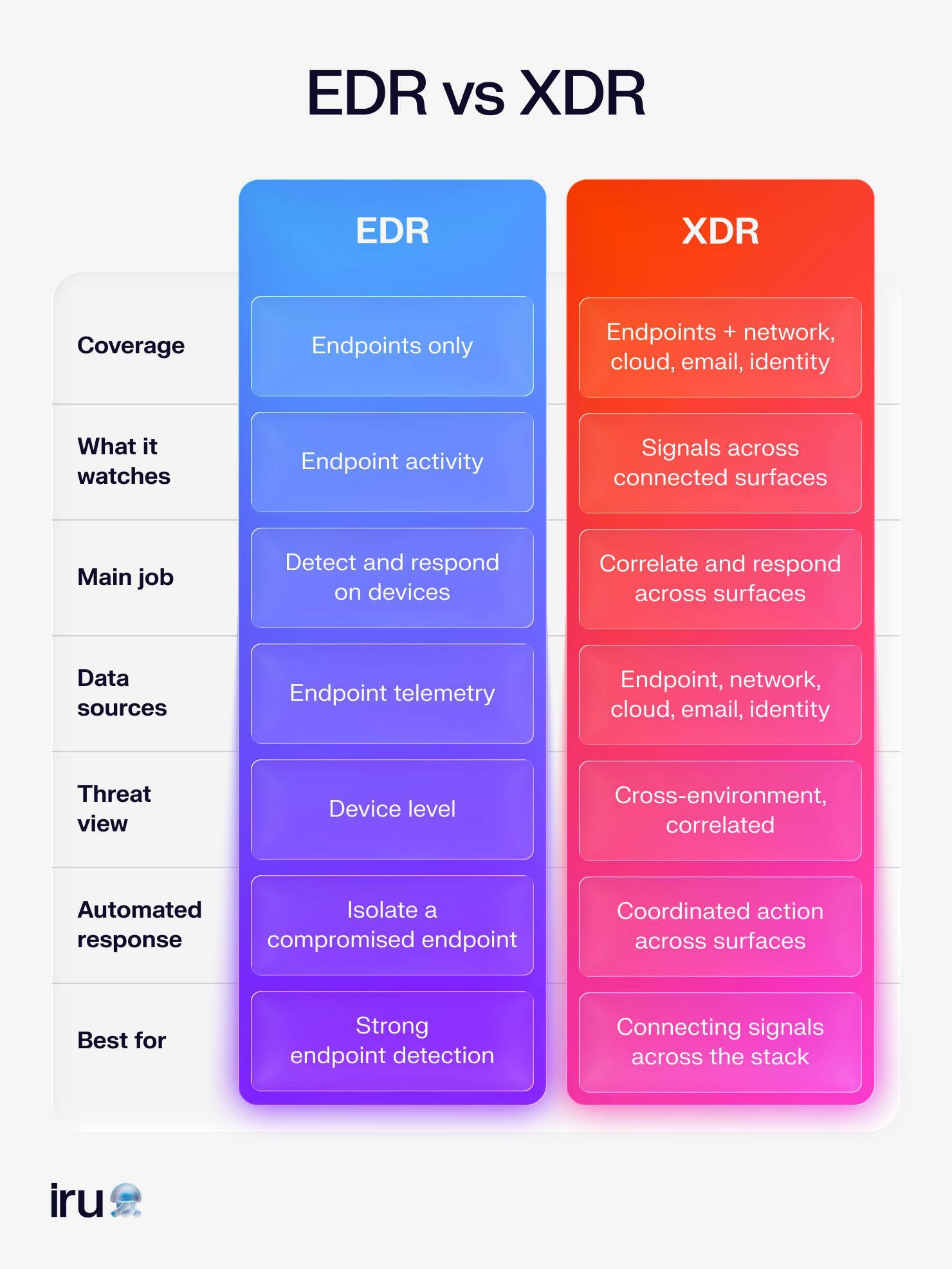
Endpoint detection and response (EDR) tools closely monitor your endpoints, such as computers, phones, and servers. They continuously monitor activity to detect malicious behavior and respond to threats in real time. That gives you a front-row seat when something starts going sideways on a device.
Extended detection and response (XDR) takes the same idea across more of your environment. XDR tools can bring signals from endpoints together with activity across networks, cloud workloads, email, and other systems.
While a SIEM platform focuses on collecting and analyzing security data, XDR places greater emphasis on detecting active threats across connected sources and responding to them.
Some XDR and EDR platforms, including Iru, can also take action automatically when they detect a known threat. The platform might isolate a compromised endpoint while containing malicious activity, giving your team fewer fires to put out by hand. That can be especially useful after a cybersecurity risk assessment reveals areas where your team needs faster protection.
In a setup with SOC monitoring tools, EDR and XDR can serve as the hands that move when an alert becomes a real threat.
2. Security information and event management (SIEM) tools
- Popular examples: Splunk, Microsoft Sentinel, and Exabeam
SIEM tools give your security team a central place to work with data from across the environment. They collect events from different systems and analyze them for activity that could signal a threat or policy violation. That shared context can make it easier to investigate what happened and decide where to focus.
Tools like Splunk show how a SIEM works in practice. Splunk’s security platform pulls data from sources across an organization and makes that information available for search and analysis. You can use the resulting data to investigate activity, spot patterns, and build detections for potential threats. The same approach can help you trace an incident across different parts of the environment rather than investigating each event in isolation.
For teams building SOC SIEM tools into a broader security stack, the main value comes from having a common view of security events. You can use that information alongside other systems when investigating an incident or deciding what needs attention.
For example, connecting SIEM data with vulnerability remediation workflows can give you more context when you assess the risk around a vulnerable asset.
3. Security orchestration, automation, and response (SOAR) tools
- Popular examples: Palo Alto Cortex XSOAR and Splunk SOAR
SOAR tools connect the security products your team members already use, so they can work together during an incident. A SOAR platform can pull threat data from tools such as firewalls, email filters, and antivirus software, then use that information to guide the next steps. This way, it takes repetitive work off your plate while keeping responses consistent.
Phishing triage is a good example to understand these tools. When a suspicious email comes in, a SOAR platform can check the message and pull out potentially malicious links. It can then remove matching emails from inboxes.
If an endpoint starts showing signs of malware, the platform can also trigger device isolation to disconnect the computer from the network. Your team gets more time to investigate the incident while the routine containment work runs automatically.
You can configure these actions with pre-built playbooks that define what the platform should check and how it should respond. That makes SOAR a useful part of modern SOC tools and technologies, especially when your endpoint security platforms generate more alerts than your team can reasonably handle.
4. Network detection and response (NDR) tools
- Popular examples: Vectra AI, Darktrace, and ExtraHop
NDR tools watch network traffic continuously, looking for behavior that could signal an attack. They use machine learning and behavioral analytics to spot activity that stands out from normal patterns. NDR tools are particularly useful when an attacker gets past the first layer of defense and starts moving through your environment.
Let’s take lateral movement as an example. An attacker who gains access to one system may try to reach other internal systems from there. NDR can spot unusual communication between devices and flag activity that suggests an attacker is moving deeper into your environment.
Some platforms can also examine encrypted traffic for signs of malware without decrypting the underlying content, helping you investigate threats while preserving data privacy.
NDR can also watch devices that lack their own security agents. Think Internet of Things (IoT) devices or guest devices that connect to your network but don’t participate in local security controls.
For an SOC analyst, that extra visibility can reveal activity that endpoint-focused tools might never see. It gives analysts another source of evidence when piecing together an incident, much like having a security camera pointed at a hallway your other cameras can’t reach.
5. Threat intelligence platforms (TIPs)
- Popular examples: MISP, Recorded Future, and Anomali
TIPs collect cyber threat data from multiple sources and turn it into information your security team can use. The raw material can include malicious web addresses, file hashes, and details about attacker tactics. A TIP sorts through that data to identify useful warning signs while filtering out duplicates and unreliable information.
That filtering matters when your team is dealing with thousands of security alerts every day. A TIP can automate much of the cleanup, so you spend less time sorting through noise. Along the way, it can:
- Collect threat data from different sources.
- Organize raw indicators into usable intelligence.
- Filter duplicate or unreliable information.
- Surface warning signs that need attention.
Once the useful signals are ready, your team can feed them into other security systems and use them to investigate potential threats. That means TIPs give you a more reactive approach, helping you respond to known indicators as new threats appear.
TIPs can also support compliance management tools by adding useful context to security records and risk decisions.
6. Vulnerability management tools
- Popular examples: Iru, Tenable, Qualys, and Rapid7
Vulnerability management tools help you identify weaknesses across your environment before attackers can exploit them. They can automatically discover assets and scan systems for known security flaws, giving you a clearer picture of where vulnerabilities exist and which fixes still need attention.
Once a vulnerability is found, the work shifts from identifying the problem to fixing it. These tools can track remediation and, in some cases, automate it by pushing patches or updates to affected systems. Some platforms also include vulnerability scanners that scan networks and devices for known vulnerabilities, helping you uncover issues that might otherwise go unnoticed.
And the work doesn’t stop after the fix. Vulnerability management tools can rescan affected systems to confirm that remediation worked and the vulnerability no longer appears. That creates a useful feedback loop for your security team: Find the weakness, fix it, then check that the fix actually stuck.
Iru Vulnerability Management identifies known vulnerabilities across your fleet and prioritizes them by severity, so analysts know which exposures to address first, rather than working through a flat list of CVEs. Since Iru already manages your devices, it can push the patches and app updates needed to close those gaps. It then confirms the fix through ongoing detection, which means fewer handoffs between the team that finds a vulnerability and the team that fixes it.
Book a free demo to see how Iru helps simplify your vulnerability management process.
7. Identity and access management (IAM) tools
- Popular examples: Microsoft Entra ID, Okta, and CyberArk
IAM tools decide who can access your organization’s data, applications, and networks. Authentication checks that a user is who they claim to be, while authorization determines what that user can access. Together, those controls help you keep sensitive resources in the right hands.
IAM follows the user throughout their time at the company:
- When someone joins, the system can create the accounts and access they need.
- When their role changes, their permissions can change with it.
- When they leave, IAM tools can help remove that access before an old account becomes an unwanted souvenir.
IAM tools can also log access activity, giving you a record to review during investigations.
For teams managing endpoint vulnerability management (EVM), IAM adds another layer of context around who can reach affected systems and resources. That comes in handy when a vulnerability appears on a device or service, since knowing what that system can access helps your team judge the potential risk.
8. User and entity behavior analytics (UEBA) tools
- Popular examples: Exabeam, Microsoft Sentinel, and Securonix
UEBA tools use machine learning and AI to learn what normal activity looks like across users and devices. Once UEBA has that baseline, it can flag behavior that suddenly looks strange. A user downloading a huge volume of data or signing in from locations that would require superhero-level travel speeds could raise an alert.
UEBA can also assign risk scores to users or assets based on their activity, giving you a way to prioritize alerts that deserve attention. A sudden change in behavior might indicate an insider threat, a careless employee, or compromised credentials used by someone else. The technology helps turn those subtle changes into signals your team can investigate.
UEBA becomes especially useful when you need broader endpoint visibility and control (EVC). An unusual action on one device may seem harmless on its own, but when it sits alongside a user’s login patterns and other activity, the story can look very different.
9. Cloud security platforms
- Popular examples: Microsoft Defender for Cloud, Wiz, and Prisma Cloud
Cloud security platforms bring several layers of protection together to keep cloud applications, data, and infrastructure secure. The work starts with visibility into how your cloud environment is configured, then extends to detecting threats and controlling who or what can access resources.
That matters because cloud environments can change quickly, and a small configuration change can create a much bigger security problem.
Also, different capabilities handle different parts of the picture:
- Cloud security posture management (CSPM) checks for misconfigurations and vulnerabilities.
- Cloud detection and response (CDR) watches for threats and helps your team respond.
- Cloud infrastructure entitlement management (CIEM) keeps track of permissions across cloud platforms.
- Cloud workload protection platforms (CWPPs) defend workloads such as virtual machines, containers, and serverless functions.
- Cloud-native application protection platforms (CNAPPs) take an even broader view, protecting cloud applications from development through production.
In combination, these capabilities help you keep tabs on an environment that can change faster than anyone can reasonably babysit. They can also help detect endpoint drift, where devices gradually deviate from their expected security configuration and become harder to trust.
10. Managed detection and response (MDR) tools
- Popular examples: Arctic Wolf, CrowdStrike Falcon Complete, and SentinelOne Vigilance
MDR is an outsourced cybersecurity service that gives your organization around-the-clock threat monitoring and incident response. A team of security experts watches your environment, investigates suspicious activity, and separates genuine threats from the false alarms that can otherwise eat up an analyst’s day.
When a real threat appears, MDR teams can also take action to contain it. Depending on the incident, that might mean isolating an infected device or blocking malicious network traffic to prevent the attack from spreading further. You get an experienced security team in the loop without having to staff your own 24/7 operation.
MDR can also support a Zero Trust endpoint security approach by closely monitoring endpoint activity and responding when something violates your security expectations. For lean security teams, having human analysts ready to investigate an alert can make a meaningful difference when an incident refuses to arrive during business hours.
How SOC tools map to the security workflow
Your SOC tools have different roles, but the work happens as a single, continuous process. An incident can start with a weakness found during routine checks, trigger detection somewhere else, and pull several systems into the investigation. Seeing that lifecycle makes it easier to understand where each tool fits and why you may need more than one.
Here’s how the pieces come together:
- Preparation: Vulnerability management, IAM, cloud security platforms, and threat intelligence help your team find weaknesses and keep the environment ready.
- Detection: SIEM, EDR/XDR, NDR, UEBA, cloud security platforms, threat intelligence platforms, and MDR services watch for suspicious activity.
- Investigation: SIEM, XDR, threat intelligence platforms, UEBA, SOAR, and MDR services help analysts connect signals and determine what happened.
- Containment and elimination: SOAR, EDR/XDR, cloud security platforms, and MDR can isolate affected systems or block malicious activity.
- Recovery and improvement: SIEM, SOAR, UEBA, and IAM platforms help document the incident and improve future security efforts.
A single incident might touch several stages. A vulnerability scan flags an unpatched app during preparation. EDR detects suspicious behavior, while SIEM links it to an unusual login during investigation. SOAR isolates the device during containment.
Metrics like mean time to detect (MTTD) and mean time to respond (MTTR) can tell you how well your SOC workflow works. MTTD measures how long it takes your team to spot a threat, while MTTR measures how long it takes to act. The shorter those times become, the faster your SOC can move from “something looks wrong” to “we’ve got this.”
The hidden cost of the SOC stack: Tool sprawl and alert fatigue
Adding a separate product for every SOC function can create a security maze of its own. Tools may cover the same signals, send similar alerts, and require you to investigate the same event multiple times. Every extra console also brings another login, queue, and integration to maintain.
Some of the overlap shows up in predictable places:
- EDR, XDR, MDR, and SIEM can all detect activity from the same endpoint event.
- UEBA and SIEM increasingly share behavior analytics capabilities. Microsoft Sentinel and Exabeam, for example, have some crossover.
- SOAR and SIEM/XDR often bundle automation and response features into the same platform.
- Cloud security and vulnerability management can both flag misconfigurations and exposed resources.
If you buy every category separately, you're often paying several times for the same signal. More products also mean more integrations to build and maintain. Even with automation in place, tool sprawl can leave your team spending too much time managing the machinery around security.
That’s where consolidation starts to make sense. You can reduce the number of moving parts while keeping the coverage your SOC needs. Iru takes that approach by bringing security and management capabilities together, giving you fewer places to look and more shared context to work with.
Consolidate your SOC endpoint tooling with Iru.
Every product you add to a SOC stack brings another console, another alert queue, and another integration to maintain. Iru brings EDR and vulnerability management together in a single platform. Your team can detect threats on endpoints and close the weaknesses attackers exploit without jumping between tools.
Iru EDR monitors endpoint activity for malicious behavior and can isolate a compromised device before an attack spreads. Iru Vulnerability Management finds known vulnerabilities across your fleet, helps you prioritize them by risk, and tracks remediation until the fix sticks. Both run on the same device data, so analysts get more context when an alert lands and spend less time stitching it together across consoles.
Book a free demo to see how Iru can cut down your SOC tool sprawl and help your team respond faster.